









Qrew EXCLUSIVE: 50% Off Camp Quickbase 🏕️
Community categories
Recently active
Hi everyone, and welcome to the Philadelphia Qrew space! We're so excited to have you here. This is your space to connect, share ideas, and help shape what our local meetups look like moving forward. Thank you to everyone who joined us for our first Philly Qrew meetup on the 18th. And a special thank you to Laura Natal, our Qrew leaders, for helping make it such a great kickoff! Looking ahead, our next meetup will take place virtually on October 16th, and we'd love to see you there. Please be sure to register here. We'll be discussing our next in-person event, so bring your ideas and availability. Looking forward to connecting with you all! Dee, Qrew Coach
I have the following Code page. I have successful code where the user inputs data into 2 fields and QuickBase data is returned. However, where I am struggling is instead of data being returned, a report being returned ideally or I have a formula URL field that can be returned but needs to be an iframe.<!DOCTYPE html><html><head> <title>Quickbase Data Retriever</title></head><body> <label for="inputField">Enter Record ID or Search Term:</label><br> <input type="text" id="inputField"><br><br> <button id="retrieveButton">Retrieve Data</button> <div id="result"></div><script>document.getElementById('retrieveButton').addEventListener('click', function() { const inputValue = document.getElementById('inputField').value; const appDbId = 'XXXXXXXXXXX'; /
Hi,I have the following Code page. Basically I want the user to enter in text and search. Then the result finds their input and matches with field id 256 and return field id 29. I will replace anything with a "XXXX". When the user searches they get "Target field not found in response." instead of the value. For knowledge the user should enter in "mickey.mouse" and 256 holds that value :When i simply put this in the URL I do get a response:https://XXXXX-XXXXX.quickbase.com/db/XXXXXX?a=API_DoQuery&query={%27256%27.EX.%27mickey.mouse%27}&clist=29Thank you so much for helping me!<!DOCTYPE html><html><head> <title>Quickbase Data Retriever</title></head><body> <label for="inputField">Enter Record ID or Search Term:</label><br> <input type="text" id="inputField"><br><br> <button id="retrieveButton">Retrieve Data</butto
Is there an easy way to accomplish this?Say as an example:Table1 - LEAD_NAME, PHONE, CONTACT_NAMETable2 - LEAD_NAME, CALL_DATE, NOTESTable1 can link to many Table2If I create an xlsx sheet with all the relevant fields, can I do a mass import of leads and or calls (together) with a single upload? Or two uploads might make more sense so it doesn't duplicate leads? LEAD1, 555-555-5555, Bob, 09/17/2025,"Good Call"LEAD1, 555-555-5555, Bob, 09/17/2025,"Bad Call" I am curious how the linking would work here. I assume a pipeline might be needed? but before going down that path I wanted to see if I am overlooking an easier way.
Hello,I have a Formula Text that calculates and displays data based on the numbers users enter in two other numeric fields. Example: When a user enters a number in my Numerator and Denominator fields, my formula field divides those numbers and then displays the answer in the Percentage field (as shown in the screenshot below).Is there a way to format the answer to two (2) decimal places, so it's shown as something like 7.33 and not 7.3333333 ? Please let me know.See the code I used for my formula field below:var Number Numerator = [Numerator] ;var Number Denominator = [Denominator] ;ToText(($Numerator / $Denominator) & " %")
I have many forms using the old form builder with "On Record Save" rules built to update a field value when a user saves a new record. Very simple in the old form rule builder interface. I am building a new form in the new form builder interface and am trying to create an On Record Save rule but can't see how to do this. Any help would be much appreciated.My rule is pretty simple, When the user saves the record change a field value to "x" on save.Thanks - Brian
I am working on connecting MethodCRM to Quickbase so that I can pull field data from a MethodCRM form and replicate it in a Quickbase form. I have attached images showing my current pipeline setup. The challenge is building the URL for retrieving records. Right now, the URL will pull the first 100 records from MethodCRM, but I have to manually change the URL to get the next batch of records. Example: rest.method.me/api/v1/tables/Contacts?skip=10&top=10This works, but after pulling the first 10 records, I want the pipeline to automatically update so the next run changes top=10 to top=20 (and so on), allowing the pipeline to continue pulling subsequent batches without manual edits.
Hi everyone,I’ve created a “Copy Line Item” button that is supposed to create a new record and prefill it with the same values selected by the user in the original record.The button works, but I’m running into an issue: the following fields are not being prefilled when the new record is created:[Related Trademark][Related Beverage Type][Related Package]All three of these fields are text field types, populated through relationships from their parent tables. The values that show up in them are alphanumeric (e.g., A1, B1, C700, etc.), and they are key fields in their respective tables.For some reason, when I click the button, these related fields don’t carry over into the new record. Has anyone run into this issue before, or know how to get these relationship-based fields to prefill correctly? For reference the code is in the attachment section. var text nonNational = URLRoot() & "db/" & [_DBID_PR_LINE_ITEMS] & "?a=API_GenAddRecordForm&dfid=22&_fid_13="
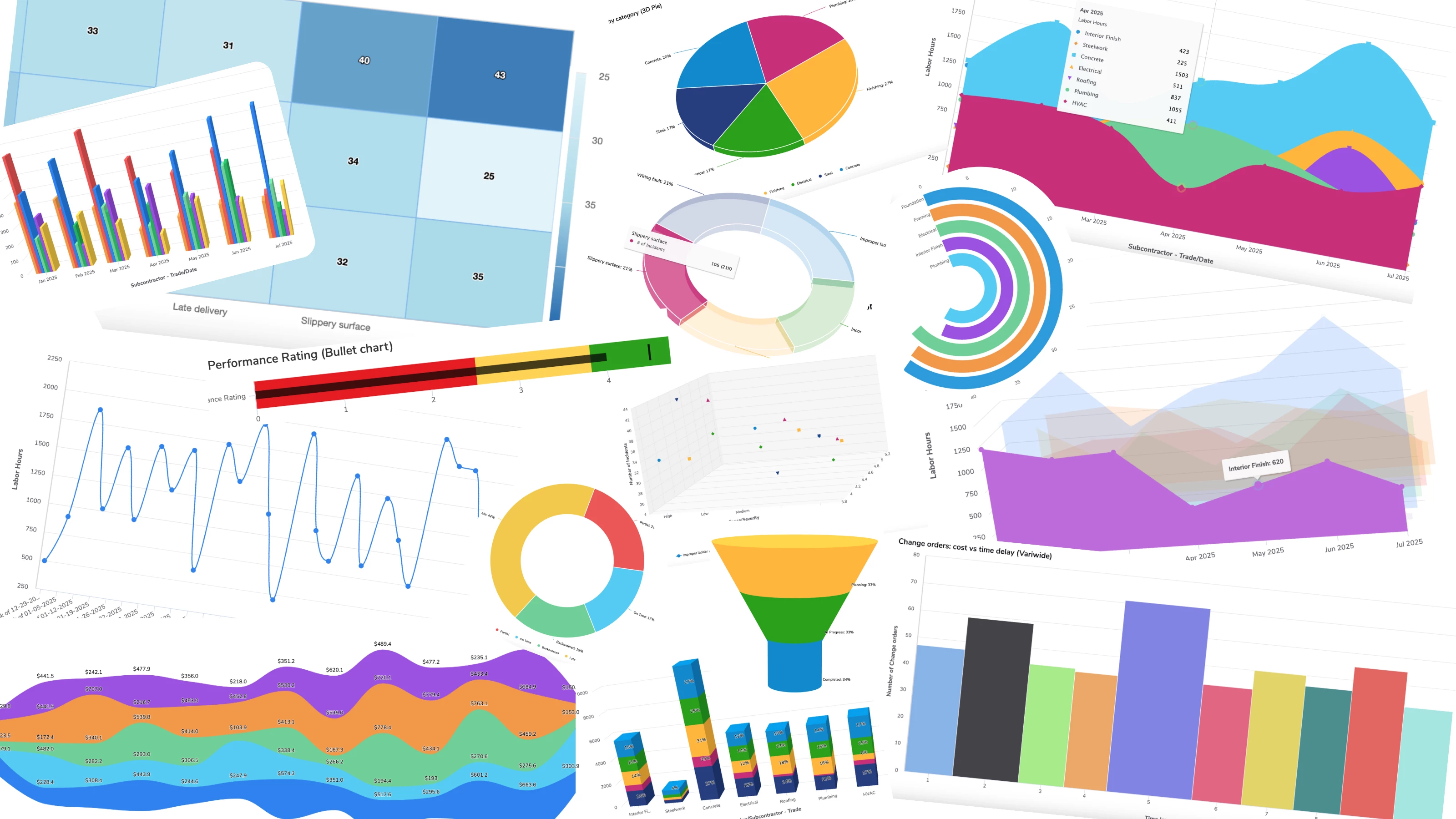
Quickbase helps you unite scattered information into one place, giving you complete visibility across your workflows. That means faster, more informed decisions. Visualizing your data with charts supports that decision-making, telling the story of where you’re winning and where you need to focus your attention to stay on track. Historically, Quickbase has offered thirteen chart types, including bar, pie, and gauge. Generally available to all customers now, we’re adding 15 new types of charts to help you tell even better stories with your data, and show off the great work your team is doing. Heatmap A heatmap is an effective way to visualize patterns and trends across large data sets. It uses color intensity to represent value, making it easy to identify spikes, clusters, or outliers at a glance. For example, when tracking safety incidents across multiple sites, darker shades can quickly highlight areas that require attention, enabling faster and more informed decisions. Radial bar
Join us for some good company with your local Quickbase Qrew! ✨ Product Roadmap discussion and deep dive!✨ Share use-cases and pro-tips with other Quickbase pros✨ Expand your Philly/Quickbase professional Network Attendees will have an exclusive chance to win a FREE all-access pass to Empower 2026! ⏰ Thursday, Sept 18th @ 3:30 - 5:00PM ET 📍 One Penn Center 1617 JFK Blvd, 20th floor, Market Room 🎟️ Free, refreshments provided
Hi Qrew! No virtual events this week, but we do have some exciting in-person meetups and activities you can look forward to this week: Boston Qrew Meetup Wednesday, September 17, 4:00–6:00pm EDT @ MIT — Feature overview with Alice Rich, Sr. Manager – Product Management. Join the Boston area Qrew, share your workflows, and connect with local app builders. Philadelphia Qrew MeetupThursday, September 18, 3:00–5:00pm EDT @ One Penn Center — Join launch of the Philly Qrew! We’ll be hosting a product roadmap deep dive with Quickbase experts, networking, and sharing pro tips. Registration for EmpowerPro 2025Oct 7–8 (virtual)is open! Save your spot to attend this fall event. In-person Qrew Golden Ticket Raffle: Attend an in-person Qrew meetup (Boston, Philadelphia, Atlanta, or Portland) for a chance to win free Empower 2026 registration! Check out the events page for more current event details. What's ahead for rest of September: Portland in-person Qrew Meetup (9/2
Please help write a formula to take estimated hours time different frequencies (daily, weekly, monthly) and calculate monthly hours.I currently have box for estimated hours, and radio buttons for different frequencies (daily, weekly, monthly, quarterly, yearly).
Has anyone ever been able to auto fill and submit a form assembly form from a QuickBase pipeline? Mine would be from an on update or on add event from QuickBase.If so, do you have some good instructions. I've been looking around and tried some things but get a error a 405 error.Thanks.
I have 3 tables in my Quickbase App,Assignments (PhoneNum is key),Member (PhoneNum_MbrID is key but has PhoneNum field),Calls (Record Id is key but has PhoneNum)Assignments is connected to Member (one to many)Assignments is connected to Calls (one to many)I have to create a table report from Calls table and pull all member table data. How can I achieve this? Please help.
I just tried adding an iCalendar field to a form and after saving the form the field itself shows like an empty field and when I hover over it a message pops up that says "Fields with shortKey=IC are not supported yet". I haven't used one of these fields in a long time, am I doing something wrong or are those still a work in process on the new forms?
Hi Everyone, I'm new to Quickbase and could use some help.I'm building an application with two related tables:Price Request (Header Table)Attachments Table (Each Price Request can have multiple attachments)I've created a form in the Price Request table with an "Add Attachment" button that routes users to the Attachment form, allowing them to upload documents. Here's the formula I'm using for that:URLRoot() & "db/" & [_DBID_ATTACHEMENTTABLE] & "?a=API_GenAddRecordForm&_fid_7=" & URLEncode([Record ID#]) & "&z=" & Rurl()Now, I want to add a "Cancel and Go Back" button on the Attachment form that:Deletes the current attachment record.Redirects the user back to the related Price Request record.Here's the formula I tried:URLRoot() & "db/" & Dbid() & "?a=API_DeleteRecord"& "&rid=" & URLEncode([Record ID#])& "&apptoken=APP_TOKEN"& "&rdr=" & URLEncode(
I think this is a simple thing, but I've been struggling with it for a while, so I thought I'd ask the community. I have a direct quickbase file attachment on a form. I want to only show that in edit mode (easy), then I want a button that will download that file when in view mode. I've tried formula URL and Formula Rich Text, but I can't get the syntax right I guess, because I continually get a 400 error. Can someone tell me how to accomplish this please?
I have a billing application that tracks Assets, their monthly rates, and the Rental Charges. I'm finding instances when the same field doesn't display the same value. Example: Sub-Total field when viewing that field on an embedded report shows one number, but if I view the record directly, it shows another. The difference is nearly always a $0.01 difference. But this isn't the only field that this happens to.So I'm seeking any tips or general good practices I should consider when creating calculation fields to ensure the data is consistent across the application. I currently have nearly 15 different calculations that a record may need to compute, store and display.I've played around with using ROUND in some places, but that seems to cause additional problems.
I am using Exact Forms Plus to generate invoice pdf and saving to a file attachment field in my record. When I click on the clock icon (to view the history) I get the following message.I have versions enabled and set to collect the 3 most recent versions, but am unable to actually view the history. The item I am trying to view should have at least 1 version in the history, but I'm getting the error message. Am I missing some setting somewhere to enable version history collection?
I have a summary report consisting of all checkbox fields. Is there a way to display something other than the "0" or "1" in each field? Maybe a checkmark?ThanksBrian
I have a parent table - Customers - there is a field for Sales tax rate. This rate can change periodically, so in my Charges table (that looks up the Customer) I am looking up the sales tax rate from the related Customer and then placing that value in a snapshot field. Charge calculations then use the snapshot field for the tax rate that way, if the Customer rate changes, historical charges will still be correct.From time-to-time, new Charges are created before the Customer tax rate was modified, so now the new Charges are out-of-sync with the correct value. The only way I know to correct this is to edit the charge, remove the customer link, save and keep working, then reselect the customer.Is there a way to build that logic into a button that would accomplish the same thing? Essentially turning 5 clicks into 1?
Hello Qrew! This month, we will be hosting four in-person Qrew meetups and two virtual Qrew meetups. Here’s what the Qrew has coming up for the week of September 8th, 2025: App Builder QrewTuesday 9/9/25 @ 12pm EDTSam Lange [aka SamLange1] Director of Innovations at ISTA Solutions, will be sharing dashboard design tips and examples that will make you want to update the dashboard experience for yourself and end-users. All week: daily @ 1pm EDT Quickbase Office Hours with SamSign up here M/W/F @ 2pm EDTFastField Office HoursDrop in anytime with questions. Visit the events page to register. Looking ahead!Boston Qrew and Philadelphia Qrew Meetups are both happening the following week—catch up with local peers, and don’t miss your shot at the golden ticket raffle to attend Empower 2026 for free! Find the sign up here EmpowerPro 2025 October 7th and 8th registration is live! Sign up and save the date on your calendar! Hope
We have our windows ad users synced to quickbase via Azure AD/Entra ID and it is working fine but have run into our first snag which I haven't found anything directly addressing.We had a user change her name and we have updated it in on prem AD which synced to Azure AD. Everything appears to be working normally for a week except for quickbase. She went through the sign in process in quickbase which pushed her to the identity provider sign in, the Azure sign in window comes up and she signs in successfully with her new email address and password. But then in quickbase she has no access to anything. Looking into user management it appears that Quickbase has generated a new user with her new email address, it still says "External authentication ID: <her new email>" so I assume that it's imported through provider management as usual however it did not transfer her paid quickbase seat or any of her app access or groups.My read on this is that quickbase is using the primary e
Not sure where to submit this, but I noticed an error in the Quickbase docs for the Gantt plugin. At the bottom of this page it says:"Note: If you don't create the tables, the plugin creates them for you."Which is wrong and contradicts another page on the same topic:"Note: The Gantt plugin does not create tables."
Hello Qrew! September 2025 is jam packed with many Qrew events and opportunities to win a golden ticket! Here’s what we have scheduled for this month: September In-Person Qrew Meetups Boston QrewSeptember 17, 2025, 4:00–6:00 pm EDT @ Mintz Headquarters Join Alice Rich, Sr. Manager – Product Management, for a Grid Edit feature overview and share what you’re working with the Boston Qrew. Philadelphia QrewSeptember 18, 2025, 3:00–5:00 pm EDT @ One Penn Center for a product roadmap discussion and deep dive with a Quickbase expert, and share use cases and pro tips to help expand your Philadelphia Quickbase network.Portland QrewSeptember 24, 2025, 3:00–4:00 pm PDT @ Harder Mechanical ContractorsVisit the Portland Qrew group page for more details and link to sign up. Atlanta Qrew @ Topgolf MidtownSeptember 25, 2025, 4:00–8:00 pm EDTKickoff the Atlanta Qrew with a round of golf and discuss what topics you’d like the local Qrew group to cover in future meetups. Sep
Already have an account? Login
Enter your E-mail address. We'll send you an e-mail with instructions to reset your password.