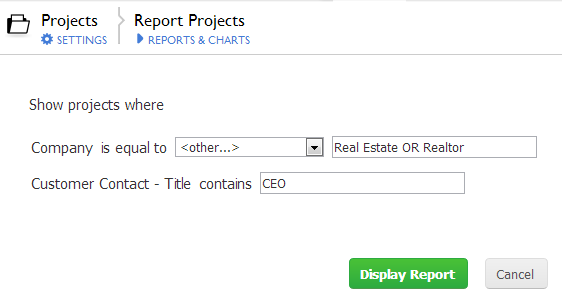
New to Quickbase...I am trying to create a simple report that prompts the user for a entry name. I have set that field to be the filter and set it to <ask the user>. When I run the report all I get is a text box for that field. What I'd like it to be is a selection list of all available options as shown in the following help entry.
Create a Report that Prompts Users for Selection Criteria
| Quickbase |
remove preview |
 |
| Create a Report that Prompts Users for Selection Criteria |
| You may not always know what records your users want to see. You can create a report that prompts users to enter selection criteria for one or more fields. After a user selects the report, Quickbase presents a dialog box like the one shown below. |
| View this on Quickbase > |
|
|
In the example, Company appears as a pulldown menu. I have a similar field that I would like displayed this way. Any help on what I'm missing would be appreciated.
Thanks
------------------------------
Ember Krumwied
------------------------------

