


This August, we're moving to a new feedback experience in Quickbase.
You'll still be able to share suggestions and feature requests with our Product team, and everything you've shared so far will move with you.
Here's what's changing, why we're making the move, and what you can expect.
Why we're making this change
The technology behind our current feedback tool is being retired, so we're moving to a new experience that lets you keep sharing.
The new experience also organizes feedback differently. Instead of a long list of individual requests, you’ll see Ideas that our Product Managers have grouped together based on related feedback. You can vote on the Ideas that matter most to you, follow their progress, and help our Product Managers better understand where customers see the biggest opportunities.
Feedback and Ideas
The new experience, is built around two concepts: Feedback and Ideas.
- Feedback is what you submit: a request, a pain point, or a suggestion. Your feedback goes straight to our Product team and stays private to your account or organization.
- Ideas are what our Product Managers publish. They bring together related feedback into a shared opportunity that customers can vote on and follow. An Idea might represent a specific feature many customers have requested, a broader problem we've identified across similar feedback, or an area we're actively exploring.
Not every piece of feedback becomes a published Idea. But every feedback is reviewed, helps us understand what matters most to you, and informs the decisions we make about what to build next.
How the new experience looks
When you select the help icon and choose Give feedback,
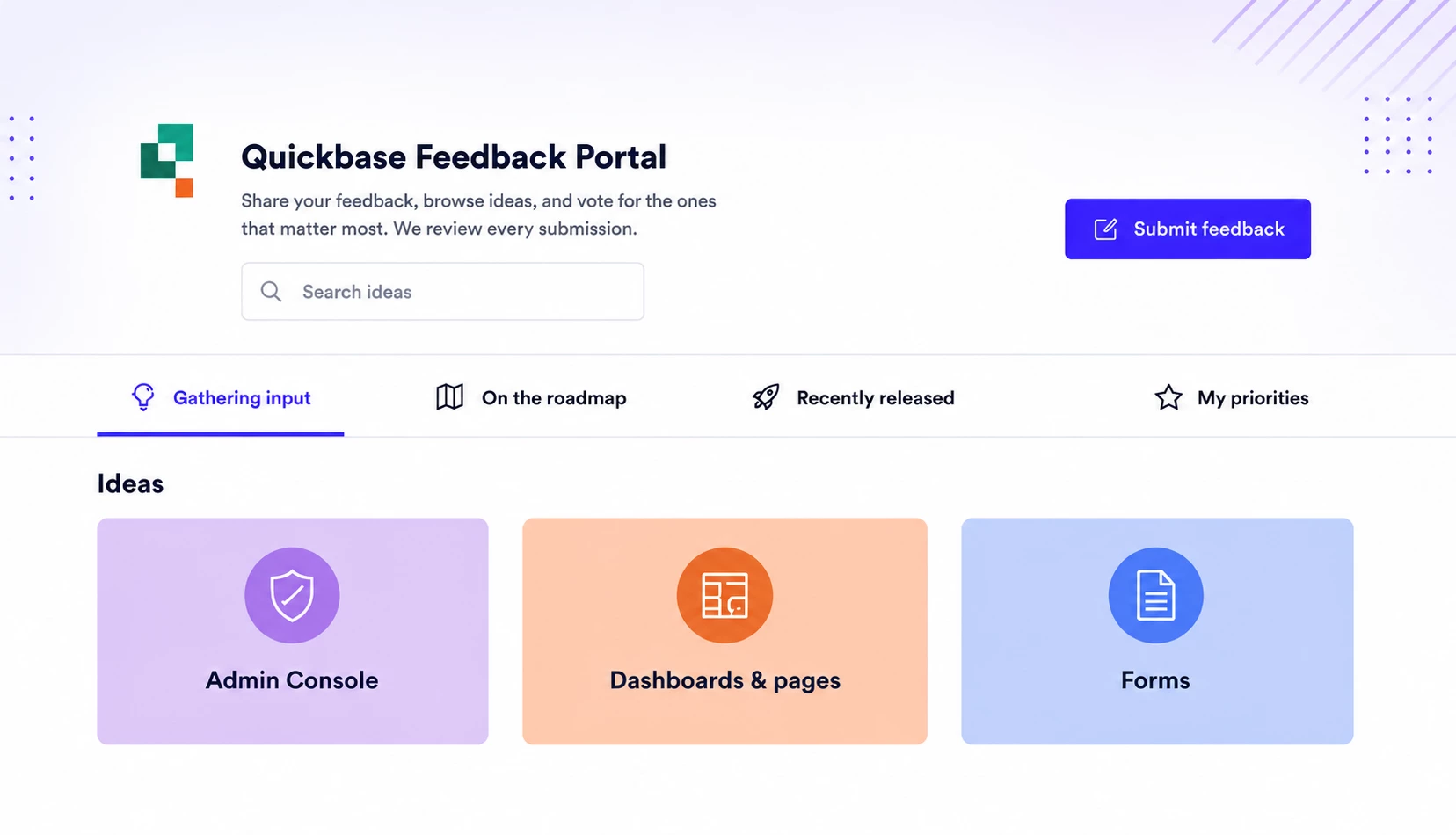
the new Feedback experience opens as a portal in the center of your screen, without taking you away from the page you're on.
The portal is where you share Feedback, explore Ideas, vote on the ones that matter most to you. If you're coming with a specific request, start with a quick search or browse the tabs - you may find an Idea that's already collecting votes.
Explore Ideas by status
Published Ideas are organized into tabs based on where they are in their journey:
- Gathering input: Vote on Ideas we're actively evaluating. This is where you can see what we're currently considering and tell us what matters to you.
- On the Roadmap: Follow Ideas we're planning or actively building.
- Recently released: See Ideas that have shipped and are now available in Quickbase.
- My priorities:
Track the Ideas you've voted on and the Feedback you have submitted. You can also switch between your own view and your organization's view, so you have visibility into what your teammates have submitted and voted on as well.
Vote on What Matters Most
When you find an Idea you'd like to see, cast your vote by choosing how important it is to you and adding a short note with your business context or use case.
If the Idea matches what you came to request, voting is the quickest way to add your support and help us understand why it matters.
Submit new Feedback
Can’t find what you are looking for in the Ideas tab? Select Submit feedback in the portal to open the submission form.
As you type, we'll surface any similar published Ideas, if one covers your request, you can vote on it instead. If not, submit your feedback and it goes directly to our Product team for review.
The more context you provide, the better we can understand your request. We recommend including:
- What you're asking for.
- Why it matters to your team or organization.
- A real-world use case.
- How you're solving the problem today.
- Screenshots or images that help explain your idea.
A few things that work differently
Along with the new experience, you’ll notice a few changes.
- Your feedback is now private to your account. The feedback you submit is visible only within your organization. Other customers won't see your individual requests. Our Product team still reviews every submission and groups related feedback into shared Ideas that everyone can discover, vote on, and follow. That makes it easier to see where customer interest is building while keeping individual requests private.
- Comments are simpler. Instead of open discussion threads, you can add a single note when you vote on an Idea to provide context or explain your use case. There isn't a back-and-forth conversation. If you are looking for a back-and-forth discussion, start a thread on our community, Qrew Discussions.
- Everything happens inside Quickbase. There's no separate feedback website. You'll access the new experience through the Help menu whenever you want to submit feedback, explore Ideas, or check on updates.
What happens to your existing feedback
All of your existing feedback and votes carry over and continue to inform our work.
At launch, you'll see some of that feedback represented as published Ideas, starting with the requests we've heard most often and continuing as we review additional feedback over time.
Even if your feedback doesn't become a published Idea, it's still preserved, reviewed, and considered as we plan future improvements.
If feedback you've submitted or voted on is connected to a published Idea, your support carries over automatically. You'll find that Idea in My priorities so you can continue following its progress.
When it's happening
The transition takes place in two steps during August.
First week of August
We'll temporarily replace the current feedback experience with a simple submission form while we migrate existing feedback and prepare the new portal.
You can continue submitting feedback during this period, and everything you send will carry over automatically.
Later in August
The new feedback portal becomes available inside Quickbase. You'll be able to browse Ideas, vote on the ones that matter to you, and submit new feedback - all in one place.
You don't need to do anything to prepare.
Questions you might have (FAQ)
What's the difference between Feedback and an Idea?
- Feedback is what you submit – a feature request, suggestion, or pain point. It stays private to your account and goes directly to our Product team.
- Ideas are shared topics our Product Managers publish based on related customer feedback. You can vote on them, follow their progress, and see where customers are asking for similar improvements. Not every piece of feedback becomes a published Idea, but every submission is reviewed and helps inform what we build next.
Can I see feedback from other customers?
No. Feedback submitted by other organizations isn't visible. Instead, you'll explore published Ideas that represent themes we're hearing across customers. Each Idea shows how much support it's received, making it easy to see what's resonating and add your own vote.
Will my team have a shared view of our feedback?
Yes. In My priorities, everyone in your account can see the feedback your team has submitted and the Ideas your team has voted on. That gives your organization one shared view of what's most important, while keeping it private from other customers.
Can I comment on or discuss an Idea?
When you vote on an Idea, you can include a short note describing your use case or business context. There aren't open discussion threads or back-and-forth comments. You can start a discussion on the community site, Qrew Discussions.
Will I know if my feedback has been reviewed?
Yes. You'll receive email updates when the status of your feedback changes or when there's an update on an Idea you've voted on.
Should I vote on Ideas that are already on the roadmap?
Yes. Voting on an Idea that's already planned is still worthwhile. It lets us understand how important the work is across customers, and you'll receive updates when it's released.
Do I need to do anything related to this change?
No. There's nothing to migrate or set up. Your existing feedback and votes will move automatically.
Thank you
Your feedback has a real influence on where Quickbase goes, and that doesn't change with this move. Keep telling us what's working, what getting in your way, and what you'd like to see next.

