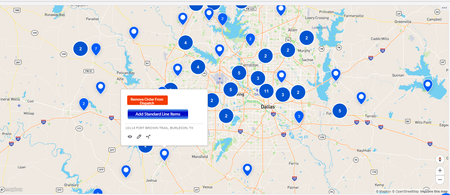
ContributionsMost RecentMost LikesSolutionsRe: Who picked this new ugly font? This comment right here speaks to my soul - I absolutely cannot stand the volume of wasted space everywhere now. I need QB to stop treating desktop UI development and design the same as mobile. It's not the same, and it never should be the same. The entire point of desktop UI/UX is precision via mouse and keyboard. There's no fat fingers involved in the hunting and pecking for elements, so there's no reason to design with such thicccccc padding around the padding of the padding around the border of the padding for the elements the way it's being done now. This design motif is the whole reason why I refuse to entertain the idea of using new forms for any of my workflows. Optimize desktop UI for desktop users again please. Re: Dashboard Maps are actually awesomeThat's exactly what I did. I took an old map report that I made years ago and just slapped it up on a dashboard and it displayed what you see in the screenshot. Pretty darn seamless. Only downside for me specifically is when multiple records are bunched together in a spot and you have to go to a drilldown report: Currently can't specify a particular report to drill-down to, and it also kinda kills the ability to use rich-text buttons to rapid-fire some actions off. ------------------------------ Brad Lemke ------------------------------ Re: Dashboard Maps are actually awesome Holy crap, the new maps support Rich-Text buttons! They cannot come to forms fast enough (for me and my workflows)! ------------------------------ Brad Lemke ------------------------------ Re: Pipeline to create a new Project in QuickbooksIn Pipelines, the JSON Handler channel is your key to leveraging any other parties' API that isn't part of a channels' standard workflows. It looks like the project/job creation isn't a standard workflow in the Quickbooks Online pipelines channel, but their QB API Guide does show that it's possible to create one via an API. Admittedly, I haven't worked with Quickbooks Online (only enterprise desktop on our servers) so my advice on exact actions/code is pretty limited, but I have leveraged the JSON Handler to do some non-standard actions thru Dropbox and it produced pretty darn awesome results. ------------------------------ Brad Lemke ------------------------------ Re: Show a form in a formI tested it out as well and it functions incredibly well as a direct replacement to my workaround solution that I built a while back. The only issue I run into is if I navigate in any way (such as using a save button), I get that infamous error code: Sorry, you can't use redirects to Quickbase URLs I wonder if that's a bug? ------------------------------ Brad Lemke ------------------------------ Re: Show a form in a formI did manage to get a 'child record form embedded into parent form' solution working a few years ago for my apps, though nearly every aspect of that solution has been deprecated. This solution involved using the Iframe html tag in a formula rich-text field, which is unfortunately no longer allowed to be used. ------------------------------ Brad Lemke ------------------------------ Re: A Pop-up message appears when clicking the formula-URL button in Edit modeI'm betting the extra ampersand just before the href is breaking the functionality of your button: If( (not IsNull([Project record ID#])and [Sign Off Status]="1. Draft"), "<a class='Vibrant Success SaveBeforeNavigating' & href='" & [Endorsement Bypass] & "' target='_blank'>Endorsement Bypass</a>") ------------------------------ Brad Lemke ------------------------------ Re: Using "hidden" fields in dynamic form rulesThat's exactly how I've gotten this to work as well. ------------------------------ Brad Lemke ------------------------------ Re: PIPELINE...Am I doing this right?It looks like your automation fires on either Add or Modify, but your Pipeline is set up for Modify only. Other than that, this looks perfect. ------------------------------ Brad Lemke ------------------------------ Re: New functionaility %%rid%%That is odd. The only other thing I do different in my app/formulas is I actually set up a global variable that I named [NewRID], containing just the pure text with no quotes: %%rid%% ------------------------------ Brad Lemke ------------------------------