




























Qrew EXCLUSIVE: 50% Off Camp Quickbase 🏕️
Articles, updates and stories from Quickbase and the Qrew
Recently active
TLDR: There are a few changes to how Virtual Qrew Meetups will be scheduled and communicated. Scroll down to the green table to see what's changing. Qrew Meetups App Builders Qrew - Virtual MeetupTue, Dec 9 @ 12PM EDTJoin us for a discussion on change-management best practices with LeeGilmore, followed by a secure links user adoption case study by MarkShnier__You. This meetup is focused on practical App adoption tips and simple UX wins that help with scaling Quickbase Apps at any organization. Atlanta Qrew - Virtual MeetupThu, Dec11 @ 4–5PM EDTConnect with Atlanta-area builders online to share use cases and tips. Webinars 2025: Year in ReviewThursday, Dec 11 @ 1:00 PM EDT2025 is coming to an end, and it’s the perfect time to walk through some of the most impactful features and enhancements from this past year. Whether you’re looking to end your year with some last-minute app building, or start your 2026 off solving a new, you’re sure to meet your next favorite featu
Intro Hi! I'm Miguel Francis, CEO from Pulsar Consulting Services but I wear many hats. I have been using Quickbase since 2013, when we realized we needed something more robust than the spreadsheet we'd always worked from. I have been transforming ideas into apps ever since.. Quickbase Beginnings How did you first discover Quickbase?It was recommended by someone… What was the first thing you ever built in Quickbase?A system to keep track of projects progress as well as tracking many KPIs When did you realize you were hooked on Quickbase?When I created the first App… 12 years ago 🙂 Building and Impact What’s a build or project you’re most proud of?A system that tracks project progress and waste management If you were a QB superhero, what would your special power be?Ability to structure architectures on systems in a fast manner. How has Quickbase changed the way your team/customers/employees work?Totally!!! Super well documented processes, lots of accountability, savings in all aspec
If there’s a constant in Jim’s world, it’s motion—whether he’s on a motorcycle carving through sharp turns or wiring together systems so data can flow freely. As a Data Analyst and Senior Developer at Harder Mechanical Contractors, Jim brings structure, efficiency, and a touch of precision to everything he builds. Since discovering Quickbase in 2017, he’s become a go-to problem solver—part developer, part architect, and always in sync with the data. Finding Quickbase Jim first encountered Quickbase in 2017 while helping Harder transition from spreadsheets and flat files to a cloud-based workflow system. “I first encountered Quickbase as part of solving workflow and data management challenges,” he recalls. “Harder had just begun the process of transitioning from spreadsheets and flat files over to a cloud initiative.” That shift opened the door for Jim to do what he does best—create systems that work smarter. When asked about his background, Jim laughs: “I’m a Jim of all trades.” He sta
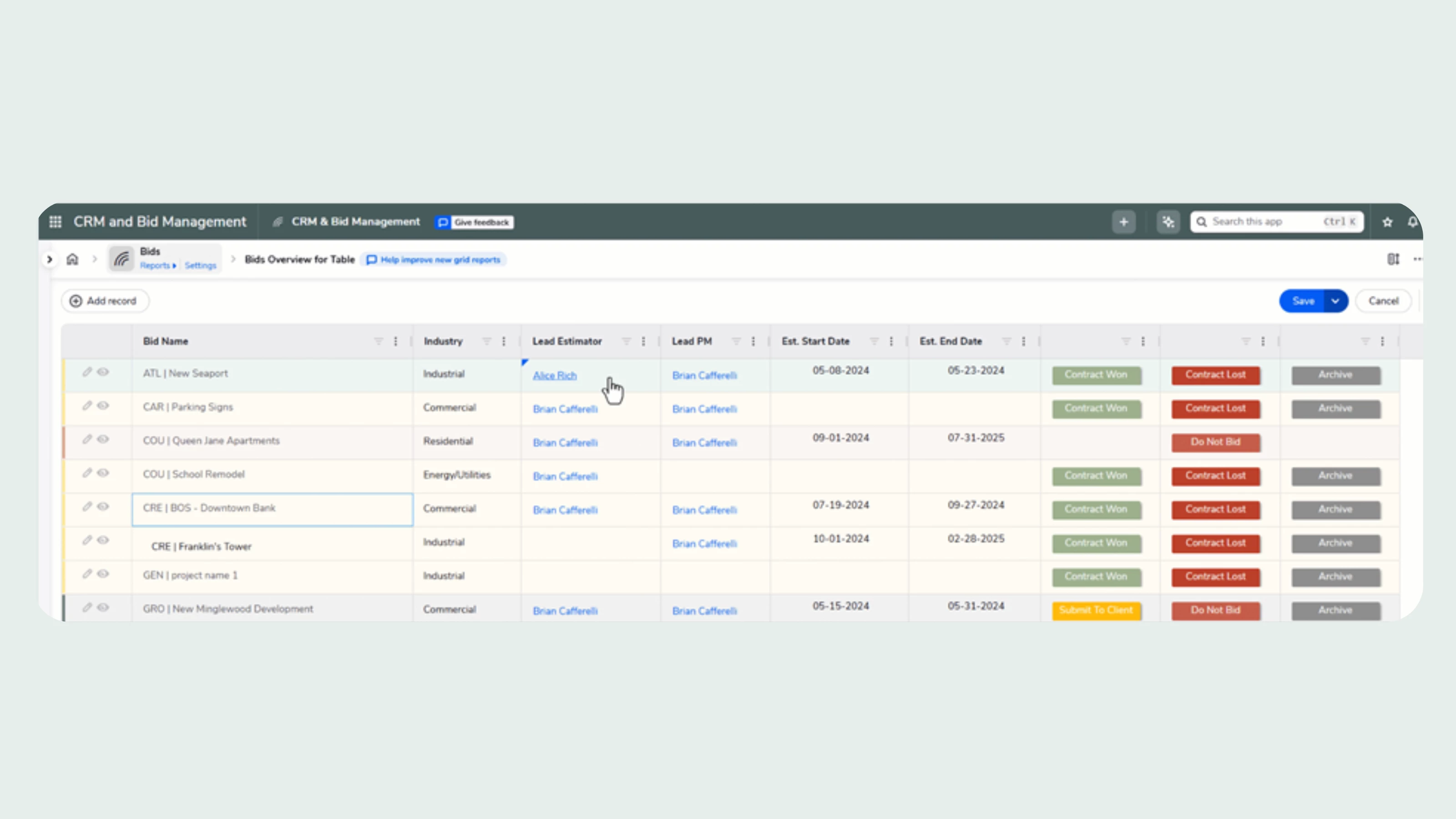
We are happy to announce that our new grid reports are now available in open beta for all customers starting today, October 7. Read on to learn about how they can boost your team’s impact, and how you can try out the new experience now. Background At Quickbase, we never stop thinking about how we can better support your users. Because your team is the engine that helps your business grow and out-innovate your competition. And this has never been more urgent than it is today, when so many companies are being asked to do more with less. At the center of your everyday Quickbase experience is table reports. We understand that the need to quickly look up or review operational data is constant. And we have heard from many of you about the limitations of table reports, and the grid edit view that comes along with it. We heard about workers being slowed down, and the frustration many are feeling as they toggle back and forth between pages just to edit data. We heard that using grid edit in 20
Intro Hi! I'm Sharon Faust, Quickbase Expert and Founder of Quick Base Junkie. I've been using Quickbase since 2011, when I first discovered it could transform projects from plodding, months-long nightmares into dreamy, ready-for-action solutions in days (or even hours!). Since 2018 I've been helping Quickbase builders learn fast and deliver more through my consulting, training, resources, and YouTube channel. And in 2025 I was presented with the Quickbase Qrew Legend award having been nominated by the Quickbase community for my contributions. Quickbase Beginnings How did you first discover Quickbase?I was introduced to Quickbase while working in process improvement at Intuit. At that time Intuit owned Quickbase and they were BIG Quickbase users. At Intuit it was not officially my job to build or maintain apps, but I had the opportunity to use apps that others built and in doing so I found many ways to leverage Quickbase support the work I was doing… which led me to building my own ap
Intro Hi! I’m Mike Tamoush, the Quickbase Architect for SpecPro Environmental Services, part of the Bristol Bay Construction Holdings LLC Family of Companies. I have been using Quickbase since 2019 when we were awarded a large contract that had a requirement for a CMMS system. We stumbled across Quickbase, and I quickly volunteered to get it up and running. It quickly grew well past our original intentions, and I’ve been furiously growing the system ever since. Quickbase Beginnings How did you first discover Quickbase?We accidentally discovered Quickbase. After researching several possible database systems, my manager was at a meeting with our Teaming Partner, looked over their shoulders and said, ‘Hey what is that system you are using?’. “This? Oh, this is called Quickbase.” What was the first thing you ever built in Quickbase?The first thing I built was a table to track Service Orders. We simply wanted to keep our data organized with a secondary goal of creating a workflow. Wh
So far in this series, we’ve explored how AI Actions can extract key details from emails and analyze complex documents like 10-K filings.Today, we’ll make it even more practical — automating weekly reporting. Many teams rely on weekly Quickbase reports to track key metrics, project updates, or customer issues.With AI Actions, you can now generate a concise AI-written summary of those reports every week — automatically. No manual copy-pasting, no rewriting dashboards, no time wasted on reading reports — just clear insights, delivered on schedule. Why Automate Weekly Summaries? Quickbase reports are great at presenting data — but stakeholders often want a digestible narrative: What changed this week? What trends are emerging? What should we focus on next? By scheduling a Pipeline, it can automatically: Pull a Quickbase report each week. Feed it to AI Actions along with some instructions. Store or email the AI’s analysis to your team. The Pipeline Flow Here’s how this works step by st
Hello Qrew! I need you help. I have a goal to sign up 12 customers to share their use case to the Qrew in 2026. So far I've gotten six people to confirm, but I need to get six more people add to the bench of speakers. Got a Qrew tip, use case, or a story about your experience with Quickbase that would be valuable to share with others? We are not booking dates/times at this moment so if you have any free time in 2026 and are interested in this opportunity, please reach out to me! I would greatly appreciate it so I can meet my December deadline. Incentives: $100 gift card and Qrew Presenter Badge on Community forum. Contact Esther LaVielle to learn more and help get me to my goal: mailto:elavielle@quickbase.com or message me here. Thank you!
Click the thumbnail below to better read the text
Intro My name is Wes. I rebuilt my career on and previously worked at Quickbase but now work at Versar in IT. My scope of work is broader than Quickbase, but Quickbase work is still a highlight after nearly a decade. I particularly enjoy backend work for automation and extension of the platform beyond native capabilities. Quickbase Beginnings How did you first discover Quickbase?A VP saw a potential fit and set me loose to build and administer. What was the first thing you ever built in Quickbase?Probably an Engineering Change or Marketing Collateral request form. When did you realize you were hooked on Quickbase?Empower 2019 in Miami! Building and Impact What’s your favorite app aspect to build out in Quickbase?Relationships; I love the work of optimizing app structure for a use case including drawing. What's a build or project you're most proud of?Systematizing newly formalized company-wide requirements of an ISO certified QMS: forms, reports, workflows, automations, dashboards, a
Watch Wes's update below to a Qrew Tip he made 2 years agoAdding custom bulk updates to records from reports have never looked easier! In his example he uses the delete action to show child records being removed from a parent record while all tiers are visible on a report. Cool stuff!Wes has graciously provided his secret sauce. You'll find the code he used at the bottom of this post. Wes's Code provided below: The below code allows the adding of a custom delete option to appear on V3 reports (aka grid reports). <!DOCTYPE html><html><head> <meta charset="utf-8" /> <title>Bulk Delete</title> <script> async function deleteRecords() { try { // Parse query string const params = new URLSearchParams(window.location.search); const dbid = params.get("dbid"); const apptoken = params.get(
Looking for answers to questions we could not get to during the EmpowerPro Product Talks: New Grid Reports session on October 29th? You’re in the right place! This post contains answers from the product team to the remaining questions we couldn’t get to during our highly active session. Jump to section: 1. Set Up & Configuration3. Display & Customizations 5. Dashboards & Reporting2. Permissions Roles & Access4. Functionality & Behavior6. OtherResources Prefer to watch? Here you go: Want to browse clips instead?Check out this playlist. Setup & Configuration: Is there a hard limit (or best‑practice limit) on reportable fields in a table? There’s no technical limit on the number of reportable fields. That said, less is more: keep only essential fields reportable to help performance, usability, and clarity. Best practice: Mark only fields that actually need to appear in reports as reportable. Learn more: Specify whi
🎓 Hello Qrew! We’re back with our November edition of Certification Wins, where we proudly spotlight the amazing individuals in our community who’ve earned Quickbase Certifications in October! 🌟 Each certification is a reflection of your effort, curiosity, and commitment to building smarter. Whether you’re just starting or mastering advanced skills, this space celebrates YOU. 🙌 🏅Certified In October🏅 bfultz BrayanSanchez_B CraigGlaser FredericSamier GZRService_Acco HannahEngelson karthiga MatthewEspie MickeyPotito RajeshGangji shivanijain1 SujathaJavvaji Ramya Monica__DBH_HamAylinMora bfultz DanielleOrioles Divya__OSSE-Con EmmaSnowden1 HannahEngelson karthiga MatthewEspie Mike_Shippy SujathaJavvaji BrayanSanchez_B DanielleOriolesDivya__OSSE-Con FredericSamier kpelowitz MatthewEspie MeganWillis M
We’ve got a lot Qrew-ing this week. Here’s what’s going on: Qrew Meetups Pipelines Qrew: Virtual MeetupWednesday, Nov 19 @ 12PM EDTDwightMunson1 from Sigma Technologies, LTD will walk us through two Pipeline examples for audit logs and post-backs. Join the Pipelines Qrew here. Portland Qrew: In-Person & VirtualWednesday, Nov 19 @ 3PM PDTConnect with JimHarrison via the Portland Qrew group community page to join. Boston Qrew: In-PersonWednesday, Nov 19 @ 3PM EDTJoin us, in-person, at Mintz HQ. BrianCafferelli will be joining us from Quickbase, he has a plethora of knowledge and ALWAYS shares a thing or two that makes me wonder, “Why didn’t I think of that?” Connect with TammieKing to learn more. Register here. Philly Qrew: VirtualThursday, Nov 20 @ 4PM EDTConnect with LauraNatal to get your invite! This week we will be discussing Application Life Cycle Management and Governance tips. Check out the Philly Qrew group community page here. Univers
About a week ago, I showed how AI Actions can extract key details from emails and structure them for use in Pipelines.Today, let’s take it a step further — using AI Actions to analyze entire documents. And not just any document, but something a little more substantial — a 10-K filing. Why a 10-K? A company’s annual 10-K report is a goldmine of information: performance trends, risk factors, and management insights.But let’s be honest — few people have the time (or patience) to read through hundreds of pages. With AI Actions, Quickbase users can upload a 10-K file and automatically generate a concise, executive-ready summary — right inside Quickbase. No APIs, no custom models. Just a pipeline. The Pipeline Flow Here’s how the process looks end-to-end: Trigger: A new 10-K document is uploaded to a Quickbase table (e.g., Filings). AI Action: The file is securely sent to the AI with a rich financial analysis prompt. Result: The AI returns a summary recorded in a rich text field - ready to
Product Talk Excerpts This is a compilation of clips from the session led by GeorgiGeorgiev.(Full session linked at the bottom) AI Spreadsheet Import: Quick Demo AI Spreadsheet Import: Why this feature? AI Spreadsheet Import: What's it doing? AI Spreadsheet Import: Best Practices AI Spreadsheet Import: Is our data Secure? AI Spreadsheet Import: Beyond Best Practices AI Spreadsheet Import: Looking to the Future AI Spreadsheet Import: Survey Feedback View the full talk (58:27) here. Recorded Webinar: Nov 13, 2025Strategies to See & Act on Insights Data gets trapped in static cells, leaving you with outdated information and constant guesswork. But with tools that give you real-time insights and a more complete picture, you can get more out of your data and replace that guesswork with confident decisions. In this deep dive webinar, you’ll discover tangible ways to implement Grid Reports, new charts, and Quickbase AI into the work you're already d
This week we have a healthy menu of Qrew events to choose from! Here’s what’s happening: Qrew Meetups App Builders Qrew - Virtual MeetupTue, Nov 11 @ 12PM EDTInstead of the normal use case presentation, AdamTowns1 (Rocky Mountain Care) will share a real-world challenge and needs your help with scaling permissions, roles, and more. Please join to share ideas and solutions with Adam and the Qrew. Atlanta Qrew - Virtual MeetupThu, Nov 13 @ 4–5PM EDTConnect with Atlanta-area builders online to share use cases and tips. Webinars Strategies to See and Act on Insights Thursday, Nov 13 @ 1PM EDTLearn how to apply Grid Reports, new charts, and Quickbase AI across a full project lifecycle. Trainings Public Foundations Day 3: Import DataMonday, November 10 @ 11am - 12pm ESTReady to bring your data into Quickbase? In this session, we’ll teach you how to import data with ease and confidence. Whether you're moving from spreadsheets or other systems, we’ll help you make it smooth and
If there’s a process at Mintz that runs smoothly, chances are TammieKing had a hand in it. As a Systems Analyst and longtime Quickbase builder, Tammie has quietly transformed the way her firm works, one workflow at a time. What started as an attorney’s side project has grown into an ecosystem of more than fifty apps that power everything from ticketing and scheduling to expense tracking and workload management. But behind all that technology is Tammie’s trademark blend of curiosity, creativity, and care. Her favorite kind of challenge? The one that starts with someone saying, "That can’t be done." How It All Began Quickbase first arrived at Mintz thanks to one forward thinking attorney who had already been using it in his own practice. "It took a little while to catch on," Tammie recalls, "but once people saw how quickly we could turn ideas into working apps, it became our go to for building workflows fast." It was a perfect match for someone like Tammie: part analyst, part problem so
Product Talk Excerpts Full session linked at the bottom. This is a compilation of clips yoinked(my daughter assures me that this is a real word)from the session led by AliceRich. Enjoy! Intro to Grid Reports: Columns Panel & Reportable Property: Form Rules & Required Fields: Column Widths: Row Heights: Report Settings: Form Permission Override: Backwards Compatible: The Quickbase Mobile App: Record Pickers: Dashboards: Editing Records: User Permissions / Access: Updating and Testing: Coming Soon: Features Survey Results: View the full talk (58:27) here Recorded Webinar: Nov 13, 2025Strategies to See & Act on Insights Data gets trapped in static cells, leaving you with outdated information and constant guesswork. But with tools that give you real-time insights and a more complete picture, you can get more out of your data and replace that gues
Hi Qrew, While there are no Qrew Meetups this week, this is an important week for the Qrew, as we'll be opening up registration for Empower26! Be on the look out for more details for Call for Speakers and registration information. Office Hours Quickbase Office Hours Sam Trachy is back!Monday–Friday @ 1 PM EDT FastField Office HoursMonday, Wednesday, Friday @ 2 PM EDT Our next Qrew meetups: App Builders Qrew MeetupNov 11 @ 12pm EDT Pipelines Qrew MeetupNov 19 @ 12pm EDT. Upcoming Fundamentals Trainings: Explore an AppNov 3 @ 11:00am EST Begin to BuildNov 4 @ 11:00am EST Import DataNov 10 @ 11:00am EST Resources from the Qrew... This Month's Qrew CalendarSam Trachy’s Office Hour: M-F @ 1pm ET*He's back!! FastField Office Hours: M,W,F @ 2pm ET Quickbase UniversityThe Qrew Discussions PageCustomer-led Quickbase Discord Thanks for being part of the Qrew and we hope to see you at office hours!
When you talk to Mark, you can sense two things immediately: he’s been using Quickbase for a very long time and he’s still having a blast. As the founder and Principal Engineer of Your Quickbase Coach—an official Quickbase Partner—Mark has been building, tinkering, and mentoring for more than two decades. What started as a way to bring order to chaos in a family-run business has grown into a lifelong mission: helping others get “unstuck” and discover the magic of building with Quickbase. How It Began The year was 2002. Mark was Director of Operations & IT in his family’s floor-covering distribution company. With over 100 staff and a tidal wave of marketing forms and product sheets flooding inboxes, chaos reigned. “No one could find anything,” he recalls. “We had these massive black binders, and every branch was begging for the latest version of something.” Mark's cousin found Quickbase and introduced the product to Mark. The result? Mark’s first “killer app”—a searchable do
A few months back, I wrote about the OpenAI channel in Pipelines and the benefit it could have to expand on the use cases that can be solved with Quickbase. Now, I'm writing again, but for something even more exciting - AI Actions. With this new channel, you will be able to safely and securely connect with an AI provided by Quickbase and send any information (yes, including files) along with instructions for the AI to perform. No API keys and no AI model training. AI Actions allows Quickbase builders to automate complex text and data tasks — from summarizing emails to analyzing uploaded files — without leaving Pipelines. What is AI Actions? To put it simply, a new pipelines channel, but able to solve countless problems. The channel has a single step called "Custom Action" and it allows the builder to pass any information and instructions to the AI and request from the AI to return its answer in a structed manner, so it can easily be referenced in following steps. Step parameters: Resp
We’re closing out October with two final EmpowerPro Product Talks this week. These Qrew Meetup sessions are your chance to connect directly with the Product team, hear what’s new, and share your feedback to help shape future updates. EmpowerPro Product Talks Tuesday, Oct 28 at 11 AM EDT – AI Spreadsheet Import: Feedback SessionGeorgiGeorgiev, Product Manager, will do a live deep dive of the AI Spreadsheet Import tool, share best practices to help streamline your workflow, and gather feedback from the audience. Wednesday, Oct 29 at 11 AM EDT – Grid Reports: Update & Feedback Forum AliceRich, Sr. Manager of Product Management, will cover EmpowerPro Q & A questions on Grid reports, share latest development updates, and gather audience feedback for future iterations. Register once to attend either session here Office Hours Quickbase Office Hours: Tuesdays & Thursdays at 1 PM EDT. Customers have been enjoying the rotation of solution consult
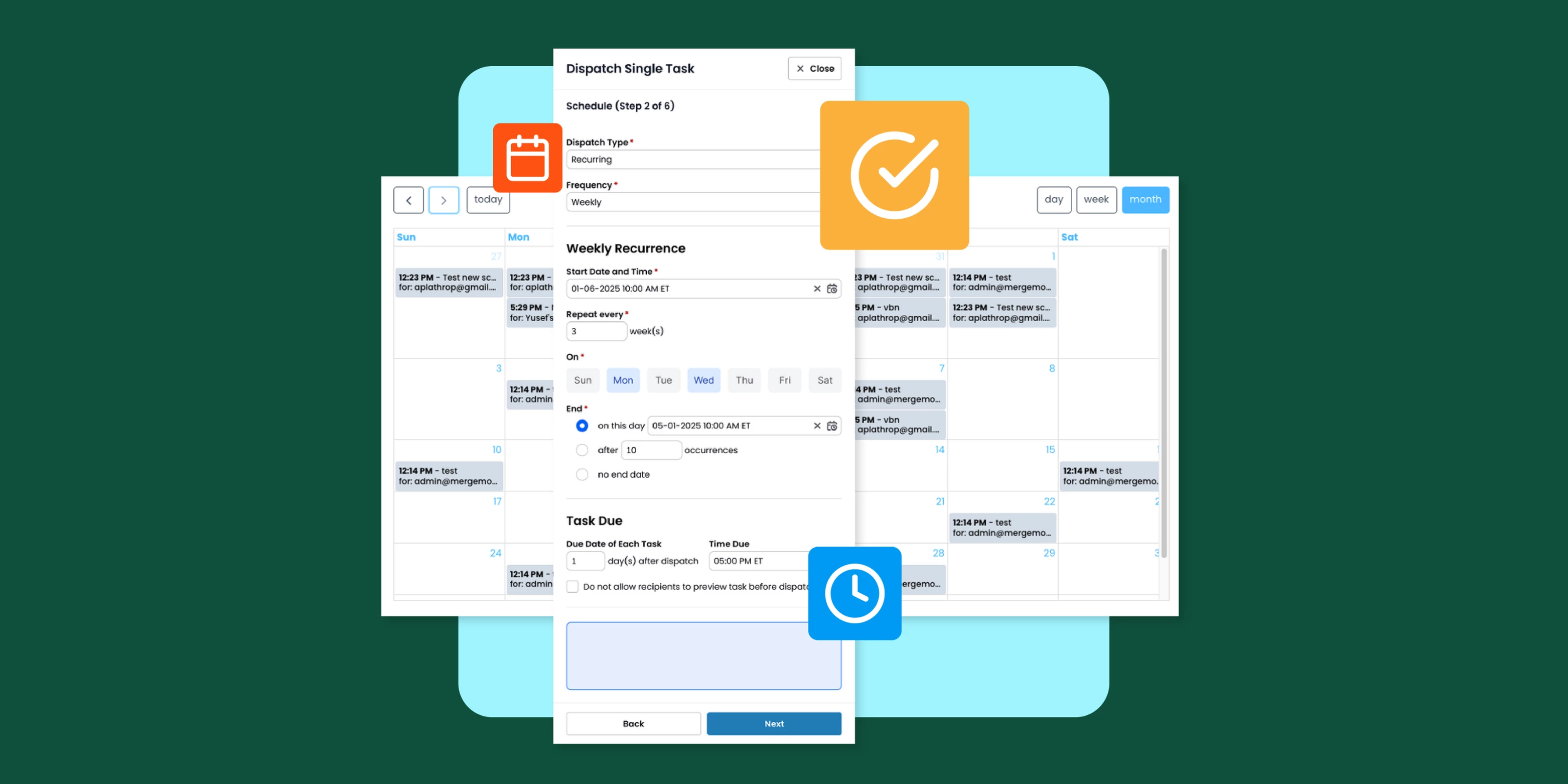
Hey Qrew! What an incredible couple of days we had at Empower Pro! Thanks to everyone who joined us! (And if you missed it, you can still tune in on demand here!) During the event, we announced that FastField is launching the Pro Plan with three exciting new features and as of yesterday, they’re officially live! If you’re new to learning about FastField, it’s our mobile data collection platform within the Quickbase family, and it just got a major upgrade. On October 13, 2025, FastField rolled out three powerful new features: Task Scheduler, AI Workflow, and Label Scanner OCR. Each one is designed to help field teams work smarter, faster, and with fewer errors. These tools are part of the brand-new Pro Plan, giving operations leaders next-level ways to automate tasks, cut down on mistakes, and keep every project running smoothly. What is FastField?FastField is a mobile-first platform that lets teams replace paper and spreadsheets with dynamic digital forms. W
At this year’s Empower Pro, we explored a topic that’s core to every Quickbase customer — how to scale with control and confidence. As organizations embrace no-code and AI-driven app development, governance is no longer optional; it’s the foundation that keeps innovation safe, compliant, and sustainable. Our session, Scaling with Control & Confidence, was led by Lyla Rozelle, Rayna Stoycheva, and Ventsislav Tasev. They unpacked the newest tools and upcoming features designed to help admins and builders collaborate, move faster, and stay in control. Why Governance Matters in the Age of AI No-code platforms have unlocked creativity across business lines, but they’ve also blurred the line between IT and operations. Builders crave freedom to experiment; admins need assurance that what’s built can scale securely. Governance is the bridge between those worlds — ensuring builders can innovate with confidence while admins can trust that the environment is safe. Three industry tr
Already have an account? Login
Enter your E-mail address. We'll send you an e-mail with instructions to reset your password.