Forum Discussion

Re: Looping through field values in Pipeline

Hey Brittany-
Looking at your screenshot, the jinja looks correct.  So I want to double check:
  • that you grabbed the correct list-user field?
  • there is more than 1 user listed in that field for the record you found
  • do you have the for each loop after this step?


------------------------------
Kristoffer Keene
------------------------------

2 Replies

  • BrittanyScheid's avatar
    BrittanyScheid
    Qrew Cadet
    Hi Kristoffer,
    Thanks for your response. See my answers to your questions below:
    • that you grabbed the correct list-user field? Yes
    • there is more than 1 user listed in that field for the record you found. Yes, I've tried multiple various selections and triggered the pipeline several times.
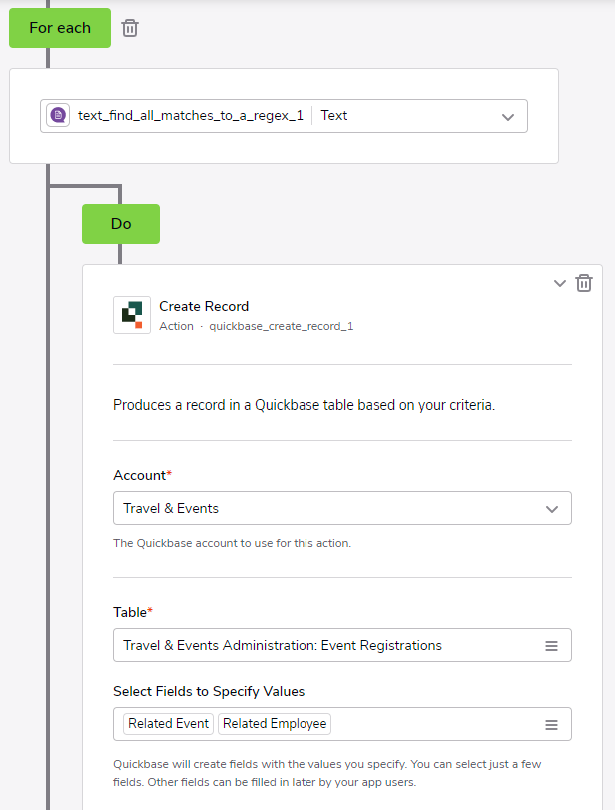
    • do you have the for each loop after this step? Yes. See the attached screenshots.


    ------------------------------
    Brittany Scheid
    ------------------------------
    • KristofferKeen1's avatar
      KristofferKeen1
      Quickbase Staff
      Hey Brittany-

      Figured it out!  Even though you could convert the UserList field into a formula text field and use the regex to split that text field.  Here's a way to not need that helper field and use the UserList field directly in pipelines.

      UserList is an array of objects so you need to extract the email attribute from all the objects and then parse that list.


      This Jinja will extract them to create a single string that you can use in regex:
      {{ a.user_list | map(attribute="email") | join(";") }}


      ------------------------------
      Kristoffer Keene
      ------------------------------