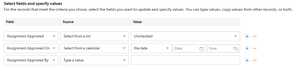
Sorry, let me clarify:
I tested your suggestion. It worked flawlessly for both the date/time field and the text field. Both were empty after the automation ran. No issues there.
----------------------------
QB Customer Care suggested that I have the source be "Type a Value" and the value be: <blank>, for both the date/time field and the text field.
Their exact words were:
"When you leave the fields blank Quick Base thinks it does not have to write anything but when you put <blank> Quick Base will know that it has to write in a blank space. It is a little confusing but it should work ..... "
So I tested it and it worked for the date/time field. Once the automation ran, the date/time field was empty.
But it did not give the expected results for the text field. The text field was not empty after the automation ran. It contained the text: <blank>.
Hopefully that makes sense.
----------------------
I am trying to see if I can have things run via the automation the way that it really should work instead of using helper fields. But if they can not do it, then at least I know that using the helper fields (your suggestion) works.
------------------------------
Andrew
[email protected]------------------------------