CODE DUMP: Email Help Button for Top Right Corner (that grabs page url)
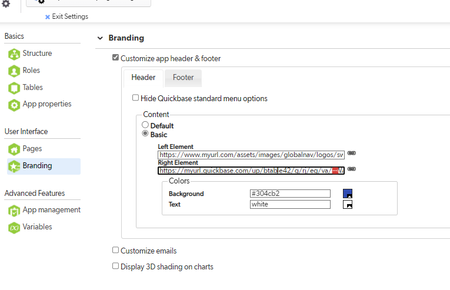


I LOVE all the community upgrades to this code, and I hope this helps you all!
I took all of your input, consumed a bunch of caffeine, fixed a few things, made some things a bit prettier, and spat out this code for the code page part of this button:
<!DOCTYPE html>
<html>
<head>
    <script>
        let oldUrl = encodeURIComponent(document.referrer);
        var oldTable = oldUrl.substring(oldUrl.lastIndexOf('/') + 1);
        var newBody = oldTable + 'testin';
        function handleonload() {
            window.open("mailto:[email protected]?subject=New%20Quick%20Base%20Ticket%20Request%3A%20App%20Name&body=------------------------------------------------------------------------------------------------%0D%0APlease describe your problem below %26 attach screenshots to this email.%0D%0A------------------------------------------------------------------------------------------------%0D%0ADESCRIPTION OF THE PROBLEM%3A%20%0D%0A%0D%0A%0D%0A%0D%0A%0D%0A%0D%0A%0D%0A%0D%0A------------------------------------------------------------------------------------------------%0D%0APlease make sure that the Ticket Fields below are filled out correctly%3A%0D%0A------------------------------------------------------------------------------------------------%0D%0AQUICK BASE APP%3A%20App%20Name%0D%0ALINK TO PROBLEM%3A%20" + oldUrl + "%0D%0A", "_blank");
        }
        function ticket() {
            history.back();
            handleonload();
        }
    </script>
</head>
<body onload="ticket()">
</body>
Be sure to replace the 'mailto' with your own email, and the 'App%20Name' (2 places) with the name of your app.
Thank you @Simon H and @Tim D for your help!

Hi from a person you used to know!
I am so glad I found this and am able to use it here in my new life!!