
























Qrew EXCLUSIVE: 50% Off Camp Quickbase 🏕️
Community categories
Recently active
Intro Hello, Everyone. This is Tony Gonzalez, the Director of Information Technology here in the City of New Braunfels. Shortly after we stepped into the Quickbase realm, I told our City Manager I would gladly trade him a Director for a dedicated Developer position. Quickbase quickly became that much work, but it has truly made a difference here in the City and I am thankful for what it has done and will continue to do. We have built a lot of momentum in this first year and there is still a lot out there for us to improve upon. In terms of the Realm, we are still in the Shire and there is an entire world out there waiting to realize the benefits of Quickbase. The Qrew has been the equivalent of a Fellowship for me. We aren’t marching towards Mordor, but rather towards the mythic Forest of Great Efficiency that even the eternal Elvers would envy. (How is that for nerdy?) Quickbase Beginnings How did you first discover Quickbase? I attende
We are trying to test out a new version of a form. Our testing group contains people from roles that all use different dashboards. Say we have 20 people in group 1 using dash 1, 20 in group 2 using dash 2, and 20 in group 3 using dash 3. We want 5 people from each of those groups to test out a new form.If we create a role that uses that new form, and move it up the hierarchy they'll get the new form, but they'll all have to share a dashboard. This is not something we can have them do. They need to continue to use their existing dashboards? When will we have the ability to set Dashboards on a per-user level instead of only on a per-role? And what is the reason behind not allowing that?I understand that in this current scenario our only option is likely to create 3 new roles, but that's silly, and starts to become impossible to maintain once we start needing to have others testing different forms and mix-and-match them from different groups. The most simple solution would be to allow per
Hello! I am attempting to import fields into Quickbase, and encountering the following error:The 'Value'='~flSortEnabled=true~flColShow=cb,label,richType,whichRel,id,actions,end~flLastColSort=richType~flLastColSortOrder=asc~' part of the cookie is invalid.I have tried multiple times. Using a CSV upload, plain text in the file, all Project IDs match. I even tried only 1 row upload and still got the error. I'm curious if it's because I am trying to upload dates in the MM-DD-YYYY format.Any help would be appreciated, thank you!
Introducing "Q Tips", a blog series designed for Qrew members to share tips with the rest of The Qrew. Q Tips are short and sweet. The idea behind a Q Tip is there's something you do in Quickbase that makes your life easier, and you want to give access to this gold nugget to the rest of The Qrew. Do you want to submit your own Q Tip? Join the Champions Program and take the Q Tip challenge! I'll review all submissions and publish entries everyone in The Qrew can benefit from. What do you get? Points, badges, and the priceless feeling of knowing you made The Qrew a little bit smarter today. The Qrew, meet @Wes McAda. Wes, meet The Qrew. Now that you're formally introduced, if you're reading this and you want to know some cool ways to expand your Quickbase apps, you probably want to get to know Wes. For the intermediate to advanced Quickbase builders who are either dabbling or experienced working with webhooks, check this below Q Tip out... It allows you to take
TLDR: There are a few changes to how Virtual Qrew Meetups will be scheduled and communicated. Scroll down to the green table to see what's changing. Qrew Meetups App Builders Qrew - Virtual MeetupTue, Dec 9 @ 12PM EDTJoin us for a discussion on change-management best practices with LeeGilmore, followed by a secure links user adoption case study by MarkShnier__You. This meetup is focused on practical App adoption tips and simple UX wins that help with scaling Quickbase Apps at any organization. Atlanta Qrew - Virtual MeetupThu, Dec11 @ 4–5PM EDTConnect with Atlanta-area builders online to share use cases and tips. Webinars 2025: Year in ReviewThursday, Dec 11 @ 1:00 PM EDT2025 is coming to an end, and it’s the perfect time to walk through some of the most impactful features and enhancements from this past year. Whether you’re looking to end your year with some last-minute app building, or start your 2026 off solving a new, you’re sure to meet your next favorite featu
Where does the 'ifv=1' parameter go in a report query formula URL, such as the one below?URLRoot() & "db/" & "XXXXXX" & "?a=q&qt=tab&dvqid=X&query=({'10'.EX.[Request ID]})&clist=48.41.15.26.4.30"
Hello!I want to pull employee data (name, email, work location, etc) from a connected table that gets fed from our HR system. My connected table uses the Employee ID as the key, but I could change it.An employee goes into the app to submit a new report, they have to put in their ID number to find their info. I want the connected table to automatically populate the employee's data based on the current user, without them having to do anything. We have 1700 employees who will be using this submission process so we're a little concerned about mistakes being made and not putting in the correct ID number, therefore submitting a report for someone else.I've tried to do this in a couple of ways, and I just can't get it to work. Ideas are very much appreciated!
Intro Hi! I'm Miguel Francis, CEO from Pulsar Consulting Services but I wear many hats. I have been using Quickbase since 2013, when we realized we needed something more robust than the spreadsheet we'd always worked from. I have been transforming ideas into apps ever since.. Quickbase Beginnings How did you first discover Quickbase?It was recommended by someone… What was the first thing you ever built in Quickbase?A system to keep track of projects progress as well as tracking many KPIs When did you realize you were hooked on Quickbase?When I created the first App… 12 years ago 🙂 Building and Impact What’s a build or project you’re most proud of?A system that tracks project progress and waste management If you were a QB superhero, what would your special power be?Ability to structure architectures on systems in a fast manner. How has Quickbase changed the way your team/customers/employees work?Totally!!! Super well documented processes, lots of accountability, savings in all aspec
If there’s a constant in Jim’s world, it’s motion—whether he’s on a motorcycle carving through sharp turns or wiring together systems so data can flow freely. As a Data Analyst and Senior Developer at Harder Mechanical Contractors, Jim brings structure, efficiency, and a touch of precision to everything he builds. Since discovering Quickbase in 2017, he’s become a go-to problem solver—part developer, part architect, and always in sync with the data. Finding Quickbase Jim first encountered Quickbase in 2017 while helping Harder transition from spreadsheets and flat files to a cloud-based workflow system. “I first encountered Quickbase as part of solving workflow and data management challenges,” he recalls. “Harder had just begun the process of transitioning from spreadsheets and flat files over to a cloud initiative.” That shift opened the door for Jim to do what he does best—create systems that work smarter. When asked about his background, Jim laughs: “I’m a Jim of all trades.” He sta
How would you go about removing one Username from all the records in a table where the User-list contains that Username and still leave any other username selection untouched?Manually, one record at a time?Grid Edit and unselect the one Username, oh and any of the deactivated users or you can't save the record?Export, find and replace, upsert?
In the old form builder, I can create rules that allow to use data from any other fields, just like how you build email notifications. I used this to update a logging field. ie.. User [userfield] changed the status to [statusfield]Attached is an exampleIs this still not possible in the NEW form rules?
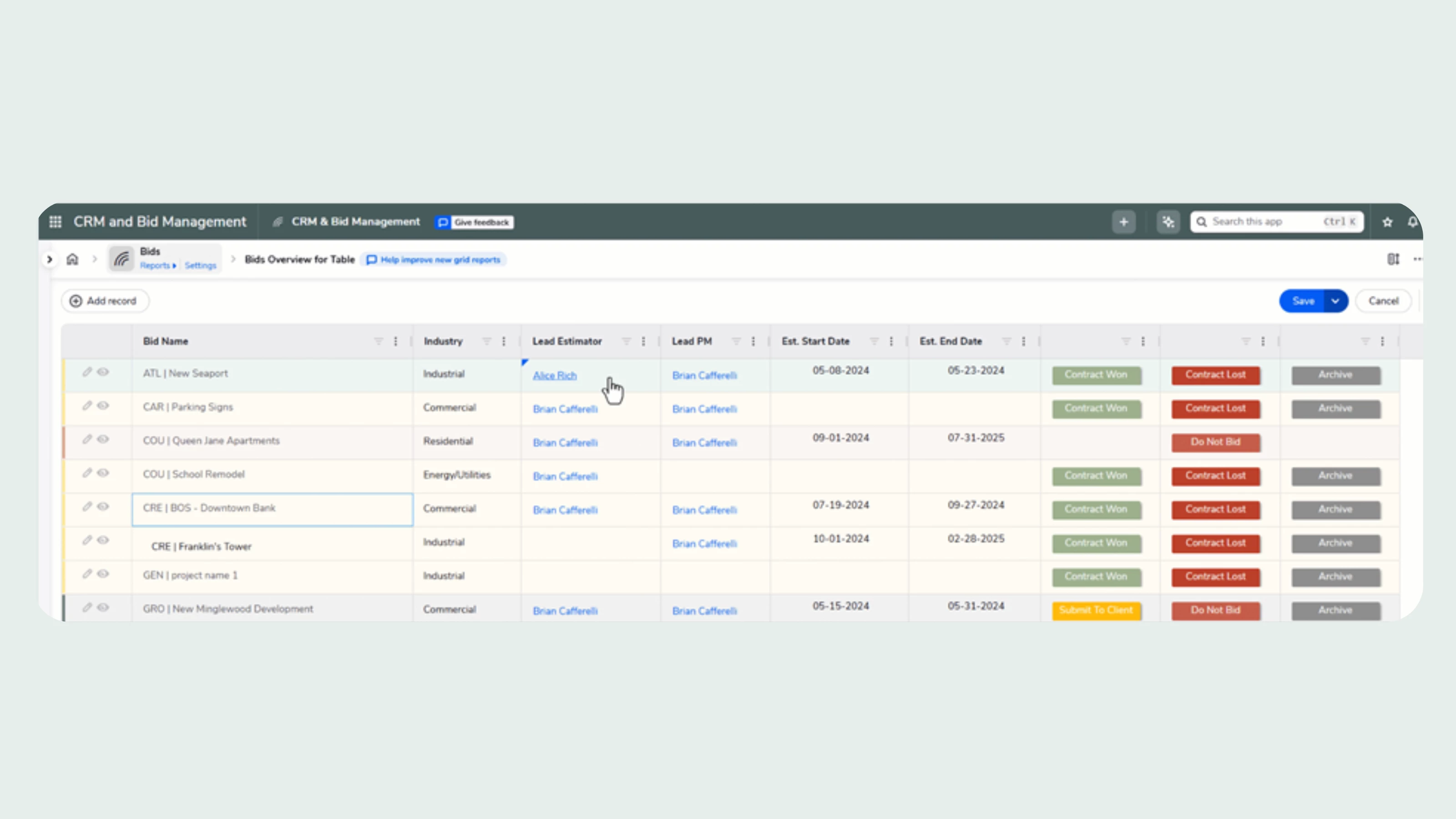
We are happy to announce that our new grid reports are now available in open beta for all customers starting today, October 7. Read on to learn about how they can boost your team’s impact, and how you can try out the new experience now. Background At Quickbase, we never stop thinking about how we can better support your users. Because your team is the engine that helps your business grow and out-innovate your competition. And this has never been more urgent than it is today, when so many companies are being asked to do more with less. At the center of your everyday Quickbase experience is table reports. We understand that the need to quickly look up or review operational data is constant. And we have heard from many of you about the limitations of table reports, and the grid edit view that comes along with it. We heard about workers being slowed down, and the frustration many are feeling as they toggle back and forth between pages just to edit data. We heard that using grid edit in 20
Intro Hi! I'm Sharon Faust, Quickbase Expert and Founder of Quick Base Junkie. I've been using Quickbase since 2011, when I first discovered it could transform projects from plodding, months-long nightmares into dreamy, ready-for-action solutions in days (or even hours!). Since 2018 I've been helping Quickbase builders learn fast and deliver more through my consulting, training, resources, and YouTube channel. And in 2025 I was presented with the Quickbase Qrew Legend award having been nominated by the Quickbase community for my contributions. Quickbase Beginnings How did you first discover Quickbase?I was introduced to Quickbase while working in process improvement at Intuit. At that time Intuit owned Quickbase and they were BIG Quickbase users. At Intuit it was not officially my job to build or maintain apps, but I had the opportunity to use apps that others built and in doing so I found many ways to leverage Quickbase support the work I was doing… which led me to building my own ap
Intro Hi! I’m Mike Tamoush, the Quickbase Architect for SpecPro Environmental Services, part of the Bristol Bay Construction Holdings LLC Family of Companies. I have been using Quickbase since 2019 when we were awarded a large contract that had a requirement for a CMMS system. We stumbled across Quickbase, and I quickly volunteered to get it up and running. It quickly grew well past our original intentions, and I’ve been furiously growing the system ever since. Quickbase Beginnings How did you first discover Quickbase?We accidentally discovered Quickbase. After researching several possible database systems, my manager was at a meeting with our Teaming Partner, looked over their shoulders and said, ‘Hey what is that system you are using?’. “This? Oh, this is called Quickbase.” What was the first thing you ever built in Quickbase?The first thing I built was a table to track Service Orders. We simply wanted to keep our data organized with a secondary goal of creating a workflow. Wh
So far in this series, we’ve explored how AI Actions can extract key details from emails and analyze complex documents like 10-K filings.Today, we’ll make it even more practical — automating weekly reporting. Many teams rely on weekly Quickbase reports to track key metrics, project updates, or customer issues.With AI Actions, you can now generate a concise AI-written summary of those reports every week — automatically. No manual copy-pasting, no rewriting dashboards, no time wasted on reading reports — just clear insights, delivered on schedule. Why Automate Weekly Summaries? Quickbase reports are great at presenting data — but stakeholders often want a digestible narrative: What changed this week? What trends are emerging? What should we focus on next? By scheduling a Pipeline, it can automatically: Pull a Quickbase report each week. Feed it to AI Actions along with some instructions. Store or email the AI’s analysis to your team. The Pipeline Flow Here’s how this works step by st
In our main app we have around 4,000 placeholder users in addition to our regular and denied users. ~8 of them have actual names of real users. Most of them are simply a random number like this: ""-527502726"". I had contacted support and they were unable to tell me much about placeholders other than they are possibly imports that have gone bad in some way. They told me it is impossible to know where they are coming from or what created them as they do not have any kind of tracking in the system for this. That was a little surprising to hear.Their suggestion was to just remove the placeholders. We eventually did this. Thursday of last week I removed them with the big "Remove Placeholders" button on the manage users tab next to Home and everything was good. I came in today and all 4k placeholder users are back in the user list. I have reached out to support again but because of the fact that they could tell me nothing about them previously I am hoping someone in the community
I have 2 step sign-in enabled on my builder account but for the past 24+ hours have not been receiving the sign in code. Have tried the "I didn't get an email" button, but nothing ever arrives. Checked Inbox, Spam, and Trash. My email is working and receiving other emails.Anyone have a similar experience? I can't submit a support ticket, since builder accounts don't have that option and I can't log in anyway. I also can't disable 2-step sign-in. I'm basically locked out of my builder account because the email with the sign-in code never arrives.
Hello Qrew! I need you help. I have a goal to sign up 12 customers to share their use case to the Qrew in 2026. So far I've gotten six people to confirm, but I need to get six more people add to the bench of speakers. Got a Qrew tip, use case, or a story about your experience with Quickbase that would be valuable to share with others? We are not booking dates/times at this moment so if you have any free time in 2026 and are interested in this opportunity, please reach out to me! I would greatly appreciate it so I can meet my December deadline. Incentives: $100 gift card and Qrew Presenter Badge on Community forum. Contact Esther LaVielle to learn more and help get me to my goal: mailto:elavielle@quickbase.com or message me here. Thank you!
Hello! I am having some difficulties import/exporting from a QB report. This functionality only seems to be available in the Table Homepage, however that does not work for my use case. I need to be able to work offline in an Excel CSV file on specific fields, and then be able to import those fields (associated to a project ID) into my Table. I have over 700 fields in my Table, but the Excel CSV will only have around 40 fields/columns that require updating.When I try to import/export from my Report, that functionality is not available. When I try to import/export from the Table Homepage, I end up exporting all 700 fields/columns, making it really difficult to work on the records offline.What is the best way to solve this problem statement? Thank you in advance!
I have a master price table containing part numbers and customer prices and a child table that adds parts to a customer work order table. I set up a snapshot field to in the child table to capture the current price of a part being added from the master price table. When the part number is selected from the master price table, and before save is clicked, I want to do some calculations on the current price such calculating Qty. x current price and the sales tax for the part. The problem is the snapshot field isn’t valued until after the record is saved so my calculations for the extended price (Qty x Price) and sales tax don’t display any data until after the record is saved. Is there a way to do calculations on the snapshot field before saving?I don’t want to base calculations on the lookup field in the master table because I only want the calculations to be based upon the part price when it was first saved
Hello,It seems like there isn't any way to add a "Section Heading" element on QuickBase's new forms. On the legacy forms, I can add a section heading element as way to divide fields with a blue line (see the "Legacy Form" screenshot I've attached). On the new forms, I can't find any way to add a section heading. See the "New Form" and "New Form (Editor)" images I've attahced for reference on how the new forms I created look. Are section headings not available on QuickBase new forms? Please let me know. Thanks in advance!
Click the thumbnail below to better read the text
I have a report that uses parameters to select the information on the report. I want to show on the report what values were entered for each parameter. Is there a way to show this in a title or on the report somewhere?
Hello!I've recently setup a button for my users to be able to send their customers a receipt of delivery. I've used a Secure Link for the customer to be able to open the receipt and setup the URL so it opens in edit, so they can scroll down and click a checkbox to confirm delivery.However, when testing I'm noticing that even after I save and close as an outside user, the checkbox doesn't actually update on the record. Is there something I'm missing in either my Secure Link or the EOTI permissions that would cause this behavior?Attached are screenshots of the record from my admin view, and a screenshot of the field from the customer's view.Thank you in advance!
Looking to see if anyone has knowledge of the engine Quickbase is using in the Document Template (Doc Gen) feature? Reason: We are hand editing the source to gain control over the layout. Each time we paste our edited and functional HTML into the Source window and save, the Document Template engine modifies the HTML. When we print the Template the layout does not meet end User requirements.If we know what Quickbase is using, we can read the documentation and learn what HTML is allowed. It is obvious the HTML engine is not compliant with HTML5 and we are struggling.We are chasing our tails. Any ideas ... aside from using a third party solution.
Already have an account? Login
Enter your E-mail address. We'll send you an e-mail with instructions to reset your password.