How to Sort Specific Options in Drop Down List
Hey everyone, is it possible to sort 7 or 8 specific records to the top of a drop down list? For context, there are 120 records in this drop down list, so they don't all show due to drop down list length limitations. They have to be searched for. However, I'd like to have the most commonly selected options put at the top of the list for quick selection without searching, but I can't change the naming scheme of the items for reporting purposes to do it the easy way. The drop down list is pulled from a relationship, not manual entry of all 120 items for the list. To summarize, this is for utility poles. They all have their own class, species, and size. All of the pole info is in its own table. I used the concatenate formula to combine all 3 details (size/class/species) into one field for the delivery table, so the employees can pick the pole the delivered that day. I just want the commonly delivered poles shown at the top of this list. Is this possible? The built-in AI says no, so I thought I'd give this a shot. Thank you!92Views1like3Comments
Automatically Update Date Field
I use QB to keep track of thousands of articles that I schedule for the e-newsletters my company sends out. Each article is a project. I am constantly updating these projects, like from "Assigned" to "Accepted" or from "Bob" is editing to "Mary" is editing. I have an "Updated" column but I have to change it myself. What I would like is an "update" column that changed the date automatically every time I make a change. That is, no matter which field I change for a project (the title, the author, the assignment date) the update column automatically updates. Is this possible? If so, how? Thanks in advance to any help.Solved260Views0likes3Comments"Can not update built-in fields values."
I am leaving Notion for QB. I created an exact copy of my Notion database (it was pretty simple) in QB and exported the Notion data into CSV. I started the import and in the preview screen it looked perfect. But every time I hit "import" I get "Can not update built-in fields values." I can't find any simple solutions to this, just very complex instructions about API, which is a little beyond my skills! Does anyone know of a simple workaround? Thank you!237Views0likes4Comments
Form Error: More than 20 Multi select
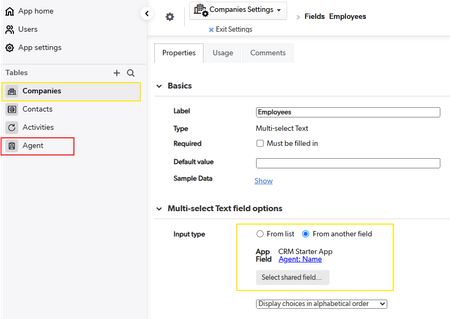
I created a multi-select text field which should use values from another table's text field. On the record page, when I select value and save, it displays below error message. I removed values but still the same - switched input type "From list" (cleared values) back to "From another field". Please help. The field with ID '45' would have more than 100 choices:30Views0likes0Comments
[Video] How to identify deleted parent records using relationship magic
Hellos, In this simple video we learn how to identify orphaned children records where parent have been deleted OR identify deleted parent records from orphaned children (very mouthful indeed) Generally we create a pipeline which automagically deletes children records whenever a parent is deleted, in this case due to token expiry , we had tonnes of records where this was not happening . LOOM VIDEO82Views1like0CommentsGetting together in Pittsburgh!
Hi all! I am my company's only remote employee! They are in Detroit, I am in Pittsburgh. I would love to connect with other QB users/admins in southwest PA who love all things QB! Qrew leadership supports my effort--thanks @BenSimon So, if you are interested in connecting, just reply to this post or direct email me!58Views0likes0Comments
Need help deciding between two db setups
I am pretty new to qb and am currently trying to create an app to help my department track a student's requested thesis committee. The (hopeful) process: student will submit form with their identifying info, proposed thesis title, then choose their requested thesis supervisor, and selected reader, both fields pull from the same list of faculty (though if someone is chosen in one field they will not appear in list in 2nd field - that's for another time to figure out). So in trying to build something I came up with two different setups and am wondering which people think would be best. Which do you think will be better longterm. Attached are screenshots of both relationship diagrams. Hopefully they are decipherable.Solved441Views0likes8Comments
block admin console access without denying
I do not want users assigned a "viewer" role or "participant" role to be able to have access to the Admin Console. *My Apps - Account Admin Manage my account - Admin Console I would like "admin" role to be able to share app with users but also not be able to access the Admin Console. I do not want to "Deny" users because I want them to have access to log in to the app and use it, I just do not want everyone seeing the Admin Console information. Is this possible?Solved154Views0likes1Comment[Snippet]Weekly Updates Excel Sheets to QuickBase
Before we implemented QuickBase , we used to have tonnes of excel sheets were salesman will give weekly update regarding the status of their orders in excel / google sheets. This require creating Creating comments table Creating parent child relationship Limiting two updates in report Speedrun of above is on this , watch at 1.5x LOOM VIDEO with no sound OR You can copy paste below in browser https://www.loom.com/share/1139f233e1a548f4b6c19655c54ddb9e?sid=e477defa-231e-4446-ac35-b9248bdbd6e4105Views3likes2Comments