Rich Text Field Markdown Cheatsheet
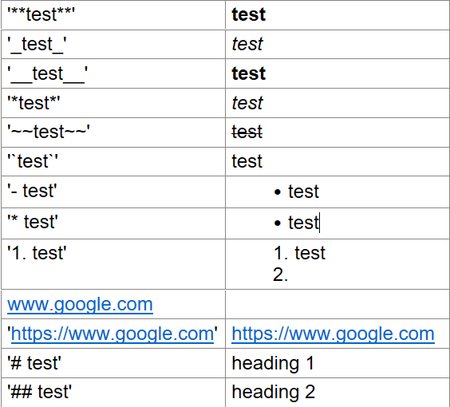
tldr; Rich Text Fields use Markdown I was writing a solution to a User Request problem into our homebuilt ticketing system. It has to do with applying '_curuser_' to a custom Role permission. I noticed that as soon as I hit space after the last underscore, the text changed. This is unexpected behavior and in this case undesireable, I want to maintain the syntax of the custom rule. Today I learned something new and want to share it in case like me you had no idea this would happen. If you type certain characters in a specific order into a Rich Text field, the text changes formatting. Below is a table of all the examples I could find. The left column is preceded and ended by a single quote which causes the text to stay unchanged. The right column is the same syntaxt without the single quotes, note how the formatting is changed. ~ since this Website won't allow some of the characters I inserted an image, sorry to those who like to copy and paste for thier own notes.Solved200Views0likes3Comments
Snapshot calculations
I have a master price table containing part numbers and customer prices and a child table that adds parts to a customer work order table. I set up a snapshot field to in the child table to capture the current price of a part being added from the master price table. When the part number is selected from the master price table, and before save is clicked, I want to do some calculations on the current price such calculating Qty. x current price and the sales tax for the part. The problem is the snapshot field isn’t valued until after the record is saved so my calculations for the extended price (Qty x Price) and sales tax don’t display any data until after the record is saved. Is there a way to do calculations on the snapshot field before saving? I don’t want to base calculations on the lookup field in the master table because I only want the calculations to be based upon the part price when it was first savedSolved146Views0likes2Comments
Rearrange Fields/Columns in table
I can't seem to find a way to change the order of my fields/columns in my tables. I added a new field, but would like to move it to a different location other than the end of the table. I've looked for answers here but can't find any. I had found a couple posts that were several years old regarding this, but since QuickBase has changed/updated since then those solutions were no longer an option. I'm sure there is a way, I just can't figure it out.Solved241Views0likes2Comments
Multiple lookup fields out of same table
I have a table "Customers" and I have a table "Cruise Certificates". Currently I have a lookup in "Customers" to link the certificate that is issued to the customer. There are times when a customer is issued 2 or maybe 3 certificates. I do not know if I am overthinking it or if I just do not know how, but I need to be able to have 2 or 3 lookups but that will pull different certificates. Is this possible? ------------------------------ Kim Cameron ------------------------------258Views0likes9Comments
Embedded Tables
So I have information from two synced tables that I need to put in an embedded table, I believe it is possible but not sure how to go about it. I have the form (the request table) that I need to put an embedded table that has information from the projects table and the milestones table. hopeful you can help. thank you in advance! ------------------------------ Michelle Craig ------------------------------115Views0likes7CommentsHow do I create a button within a Quickbase form that allows users to add fields when needed?
How can I add a button within my Quickbase form that enables users to add additional dropdown fields with associated comment text fields as needed? ------------------------------ manohar vankireddy ------------------------------227Views0likes1Commentchange multiple fields with one button
so I need to make my cancel button change one field to "Cancelled" (which it is doing) but now I need to get another field (fid 65) to change to "Closed" and I have tried to simply add on the field ID 65 but that hasn't worked out so well as I get an error. here is my full code w/o my app ID tho var text RID = If([Record ID#] > 0, ToText([Record ID#]), "%%rid%%"); var text Edit = URLRoot() & "db/" & Dbid() & "?a=API_EditRecord&rid=" & $RID & "&apptoken=missed one &_fid_79=" & URLEncode("Cancelled") & URLRoot() & "db/" & Dbid() & "?a=API_EditRecord&rid=" & $RID & "&apptoken=missed one &_fid_65=" & URLEncode("Closed"); var text DisplayURLMissingRID = URLRoot() & "db/" & Dbid() & "?a=dr&rid="; var text URL = $Edit & "&rdr=" & URLEncode($DisplayURLMissingRID) & $RID; "<a class='SaveBeforeNavigating' data-replaceRid=true style=\"text-decoration:none; background: #000000; border-radius: 10px; color: #ffffff; display: inline-block; padding: 5px 5px 5px 5px; width:200px; text-align: center; text-shadow: none; border: 2px solid #000000; font-size: 12px \"href='" & $URL & "'>Cancel</a>" this is the error that I get: <qdbapi> <action>API_EditRecord</action> <errcode>0</errcode> <errtext>No error</errtext> <rid>220</rid> <num_fields_changed>0</num_fields_changed> <update_id>1680093311158</update_id> </qdbapi> so while I would guess that this change is wrong (obviously), but the ask is possible, just went down the wrong road. thank you for your help! ------------------------------ Michelle Craig ------------------------------151Views0likes3Comments
Counting log edits in a text field
I have a multi-line text field named [Client's referrals] that logs the edits to the field with Date, time and user. We keep track of the people a client has referred to us. I would like to know how many people a client referred to us each month. Is there a way I can count each edit and catch the date? Thanks! Consuelo ------------------------------ Consuelo Viramonte ------------------------------118Views0likes1Comment
How to change summary report column header?
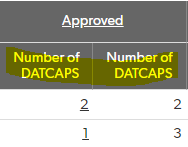
Hi Everyone, Is there a way to change summary report column name/header? I don't see any option when I customize the report. I'm using the same field to show the number of records in 1st column and running total in the 2nd column. This report shows the field name which is apparently same for both columns. ------------------------------ Mrunali Kadam ------------------------------166Views0likes3CommentsMy User field does not change to a new user.
Hello, I am trying to change my User field to another name. Event though I have selected a new person for the field as a default, the name has does not change on the table field. thank you. ------------------------------ Reza Khosrowabadi ------------------------------44Views0likes4Comments