Forum Discussion

811locate's avatar
811locate
Qrew Member
3 months ago

Daily Auto Email By Job Number

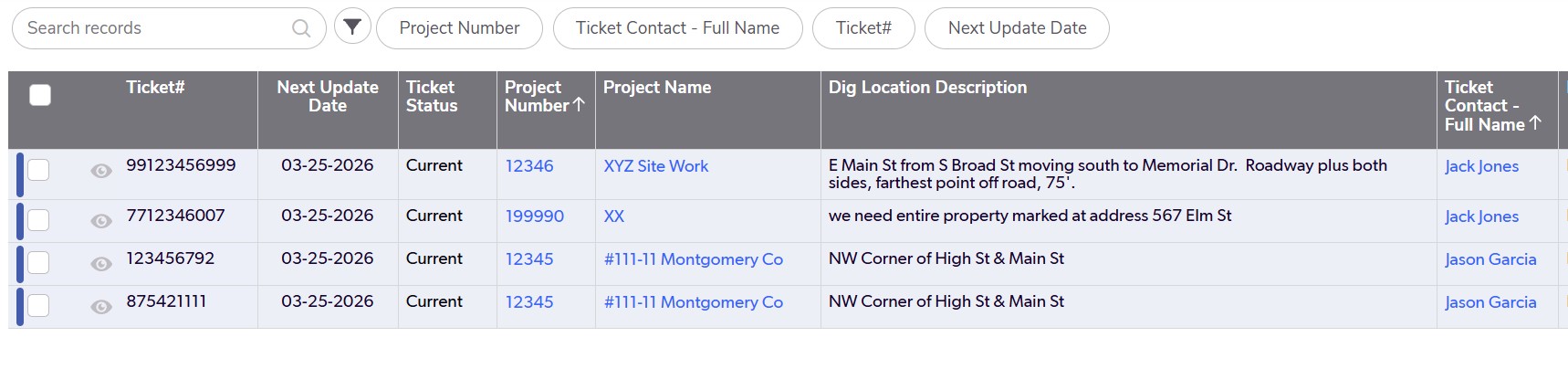
I have this daily report (see attached) that changes every day.  I would like to email this automatically each evening at 4:00 PM to myself, but, want each project number to have its own separate email with the job number in the title of the email.  Any suggestions on how to go about this?  (Ex.  using the attached document, for this particular day, I would have 3 emails total:  project 12346 with 1 ticket listed, 199990 with 1 ticket listed and 12345 with 2 tickets listed.)

4 Replies

  • I'm not sure if you want to trigger an email for every project so I will assume for example, that only projects with tickets meeting some criteria are deserving of causing the project to be emailed. So my suggestion is to create a summary checkbox field on the relationship between projects and tickets to indicate whether the project has tickets which are deserving of being emailed. 

    Then you could set up a special form for the project which only has an embedded report of tickets which are deserving of peoples attention.

    Set up an email notification  on Projects to Fire when a field called [date time to trigger email] is changed.

    Then you can set up a Pipeline to run at 4:00 every day, which would search for projects which have tickets deserving of being emailed and populate a [date time to trigger email] field with the current date time. You can put this Jinja  {{time.now}} into the field to set the current date / time .

    Now, when you say every day, you probably don't actually mean the weekend so one way to control that is to make a helper field on the Projects table notification to indicate whether today is a weekend 

    DayOfWeek(Today())=6 or DayOfWeek(Today())=0

    and put in a notification filter not trigger the email on the weekend.


    • 811locate's avatar
      811locate
      Qrew Member

      "Then you could set up a special form for the project... "     

      Would I need to set up a special form for each individual project?  And then continue to set it up for future new projects as well?

      • MarkShnier__You's avatar
        MarkShnier__You
        Icon for Qrew Legend rankQrew Legend

        No, you did not set up a separate form for every project. I'm assuming that you have a project table and each project has many activities. So what I'm suggesting is that you email the project record and when the user views the project record, they will see an embedded report of the activities. I was just suggesting that if the project record is complicated or long, you might want to dedicated smaller form for this email, but that's up to you.