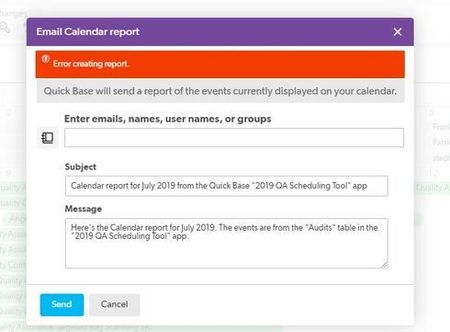
Error - Invalid record data provided when executing form rules
Hello, I was getting this error when selecting a name from a lookup field on my form. I am now getting this error when i check a checkbox. I don't have any conflicts with my rules and I have not been able to find any information on this error. Is there anyone that can help me?451Views0likes6CommentsYAY!! Formula Error Pop Up No Longer Covers the Field
I am sooooo happy. After what feels like two years of silently creeping up on a formula error in a formula field, because the error help text pop-up would cover the text that needed to be fixed. Someone at Quickbase has finally moved the pop-up to below the error!!! Thank you kind Quickbase Developer!! ------------------------------ Jim Harrison transparency = knowledge + understanding : The Scrum Dudes ------------------------------34Views0likes1Comment
I am receiving an error when attempting to use a formula without saving the record in the 'In Progress' table (B). However, once I save the record in the 'In Progress' table (B), the same formula works fine.
I have two tables. I added a new record to the 'New Request' table (A) using the Quickbase auto-generate API button, and then attempted to add the same record to the 'In Progress' table (B) by clicking on the API button. However, I received an error message stating that the 'rid' parameter was missing. 'In Progress' table (B) formula= "If(IsNull([Start Date]), URLRoot() & "db/" & [_DBID_INPROGRESS] & "?act=API_EditRecord&apptoken=dpvtvtrbuvtrjjd5ydp38bccn9np&rid=" & [Record ID#] & "&_fid_45=" & URLEncode("Task Started") & "&_fid_6=" & Now() & "&rdr=" & URLEncode(URLRoot() & "db/" & [_DBID_INPROGRESS] & "?act=dr&rid=" & [Record ID#]) )" Note: I am receiving an error when attempting to use a formula without saving the record in the 'In Progress' table (B). However, once I save the record in the 'In Progress' table (B), the same formula works fine ------------------------------ manohar vankireddy ------------------------------265Views0likes16Comments
Does a pipeline still update records when it errors out for unique fields.
Received this error which I expected when running this pipeline. Remote service reported an error: 51 : Trying to add a non-unique value to a field marked unique : Your import data has duplicate values for the following unique fields Field name: Invoice Number Duplicate values: 60401 57304 58901 59070 55231 55391 57280 60925 61027 57510 58583 60812 59400 55234 60086 60168 54736 58932 58940 58427 60088 -- Processed: 0 - Added: 0 - Updated: 0 - Unchanged: 0 I am wanting anything with duplicate values to not create a new record. These items it flagged. But does this mean that the other records that were not duplicates still were updated properly? Or did the error cancel any other updates? ------------------------------ Davis Ward ------------------------------67Views0likes2CommentsWebhook Error
{"error":{"code":"WorkflowTriggerIsNotEnabled","message":"Could not execute workflow '4543529d-74ae-40de-8426-164a6370acb5' trigger 'manual' with state 'Suspended': trigger is not enabled."}} Does anyone know what this webhook error means? ------------------------------ Mackenzie Phillips ------------------------------81Views0likes1Comment
Create 12 records in another table
Hi all, I need to create a process that when a new record is added in a table will add 12 new records in another table. I was able to create a process using automations that works by incrementing a counter on the initial record, which creates a new record in the second table which in turn increments the number in the first table until the counter reaches 12. The problem is that at times, I have multiple records that have to be processed, and at that point, I get a 429 error: Webhooks are exceeding the rate threshold. Any thoughts on how I can overcome this?66Views1like5CommentsBug? Icon centered in report, but not when report is on dashboard page
I have a formula filed that compiles fields and icons into a table and one of the icons is centered in the report view and was previously centered on my dashboard pages, but now is no longer centered on my dashboard pages. Any ideas? A bug? Report view: Dashboard view: Today is the first day I have noticed this.55Views1like1CommentQB Variable Save and Keep Working Button - Unsupported and Deprecated
Based on the community feedback in this Quick Base Community post: https://bit.ly/2ZtUg4A I have been using a technique that involves using a QB variable defined as... <a class='Vibrant' style='font-size:12px; color:black; background:#33ff33; white-space:nowrap;' onclick='$("#saveAndKeepWorkingMenuOption").click();'>Next</a> ...and referencing it in a formula rich text field to create a save and keep working button that i can place on a form. It works great on desktop, but not at all on mobile. I was advised to open a user support ticket. This is an easy way to create the record Here is the feedback from the support ticket: The function being called cannot be used in a formula field. Furthermore, the features that are being taken advantage of are not intended for public use and will eventually be deprecated. All said, this is a browser/mobile discrepancy that we do not plan on addressing as the functionality being invoked is generally unsupported. I just wanted to give a heads up for anyone using this technique so you can find a different solution before the functionality ceases.50Views2likes1Comment
Users Reappearing in the App After they have been Removed
Got nowhere with support, so I'm putting this out to the community. Does anyone else have issues with Users that have been removed from an App showing back up in the App at random intervals? This has been happening repeatedly for the last few months, and it's really getting annoying. I have a lot of List User fields, and utilize the Default User List, because I don't want to have to edit each of those fields every time someone comes or goes. It's not a matter of access, because when they leave they are put on the Denied list, but it does mean that when things are being assigned, those old users expand the selection list from 50 people to 200. I know it will happen whenever I have to edit old records, and so if the removed user is on the record they will reappear in the App, but it also happens completely at random, and whenever there is a big Quick Base release. I have been unable to track down a specific cause for the completely random occurrences, though. I do know that instead of getting better, it's getting worse. I've already had to remove users twice this week alone.156Views1like14Comments