Enter the App Builders Qrew Raffle!
Ready for a chance to win and boost your Quickbase skills? The App Builder Qrew is hosting a raffle giveaway—simply download Mark Shnier’s app from the Quickbase Exchange and show proof (a screenshot or confirmation in the thread or email [email protected]) to be entered for a chance to win prizes. Link to the app in the exchange: https://www.quickbase.com/db/main?a=UniversalLink&entityId=qbredir&asset=user-focus-examples Mark’s app is a powerful tool that’s helped many builders streamline their workflows and solve real-world challenges. The raffle contest will be open until Tuesday April 22nd. Don’t miss out—download the app, share your proof in this thread, and enter the raffle today!699Views1like15CommentsQrew Meetups all Cancelled
EstherLaVielle bsimon_personal Second day in a row, I opened the calendar event in Outlook and logged on to the Zoom meeting. There were about 10 people in the room waiting for the meeting to start. Since it just happened yesterday I asked, "is Esther on this meeting?" LauraT said "no" and so I did what Esther said and went to the Events page and looked for Pipelines. I did not notice the date had changed, it took me back to the same event. Oh I guess the event date changed. I have now deleted all my Outlook calendar events. I guess this means I have to come to the Events page on a regular basis and check to see if anything has changed. IMO this new Meeting method adds Grey work and reduces value for the customer. My advice, if there is interest, is to make a plan and stick to it.Solved204Views0likes2CommentsQuickbase Qrew: May 2025 Community Events
May is blooming with Quickbase events to help you grow your skills and connections! Our meetups, webinars, and community gatherings offer fresh opportunities to build and grow your knowledge of using Quickbase. Watch the video below to view the Qrew events happening this month. The four Qrew events we highlight in the video above include: May 13th at 12pm EST - App Builders Qrew Meet Up Prashant Maheshwari, Director at Krishna Beads Industries, will show how he uses formulas and AI in Quickbase for validation rules, multi-status reporting, and intuitive reports and forms. We'll also have our product team share an update on Audit logs. May 14th at 1pm EST - Pipelines Qrew Meet Up PLEASE NOTE THE AGENDA AND TIME CHANGE: At 1pm EST MichaelFrishman , owner of MJF Technology Solutions LLC, will lead a session on using APIs with Quickbase Pipelines and Postman, focusing on foundational tips for beginners and intermediate users of Pipelines. May 15th at 1pm EST - Governance Webinar: Expanding the Power of Governance Core Apps May 22nd at 1pm EST - Feature Focus Webinar: Unite Your Data and Put it Work with AI Click the links above or check out the events page to learn more or register for May’s events. We look forward to seeing you there!155Views1like0CommentsJanuary 2025 Meetup Notes
Attendees: Kennedy Maxey, Esther LaVielle, Nico Cantillo, Jen Clark, Daniel Jeon a Denver Quickbase builder 12-14 years, Elena Larabee & Jim Harrison We held the January Monthly Qrew meetup a week early as planned last month. Next month we go back to the regular fourth Wednesday schedule. The meeting started with Introductions. A new attendee Daniel Jeon joined us remotely from Denver, CO. Daniel has several years of experience with Quickbase. We are excited to hear what insights he has to share. Everyone had a chance to say hello to Daniel and give a brief introduction as well. Once the introductions were complete we moved on to asking if there were collaboration questions from the group. Collaboration: Jen asked about anyone's experience with setting up Single Sign On using Microsoft Active Directory. The example showed her login process takes three clicks and doesn't keep the login active once the browser is closed. Several commented there are some settings in the Admin console and Quickbase Support may have to make some changes on their end as well. She is planning to contact Quickbase Support. Nico Showed an App he built this past month around the management of stringing tennis rackets. The design is to keep track of materials, cost and time spent on each racket. During the presentation Kennedy asked about the Document Template. Nico explained how he is using Document Template to print forms. Kennedy looked and doesn't have access to the Document Template since her Realm is not on the plan that offers the Document Template feature. We suggested either a Builder Account, make a test, show it off and see if there is budget or Nico is going to see if Quickbase can turn it on so she can test it out. Daniel asked about Webhooks. He wanted to know if they are "really" going away. Nico responded that yes Webhooks are going away as Quickbase wants traffic going through Pipelines and not Webhooks. I pointed out that Webhooks are going away from the UI and moving forward will be managed via API. There is still a lot of work to be done before Pipelines is ready to replace Webhooks. We then talked about Zapier, Workato and Pipelines. Daniel has experience using Zapier and I asked about the experience since we use mainly Workato. He said the UI/UX is more feature dense than Pipelines, there is a Dev and Production environment for example. Next Jen asked about ideas for building a tool management system. The idea in essence is Users fill a shopping cart with Tools and then check them out. As the checkout process happens quantities are updated in an inventory table. Elena has the most experience with inventory management and building tools in Quickbase. She mentioned using a Code page. We talked about using code pages and Quickbase API to get records from a Query and then add the template new records to another table as well as update the quantity values. This is all possible with a firm understanding of JavaScript. Pipelines is also an option but doesn't provide a live real time experience for the Users. We talked more about Code pages, service accounts and performance tools. The last question came from Jen regarding a new Pipeline process. The idea is getting the most recent files from a SharePoint folder. We looked at several examples of the file structure and the recommendation came up to use Bucket. I have an example I can share but it has been a while so we decided to hold off and look at it again at the next meeting Jen is available. We arrived at the end of our meeting and said our fair wells until next time.147Views1like1CommentAvoid Login Mix-Ups: Check the Qrew Meet Up Times
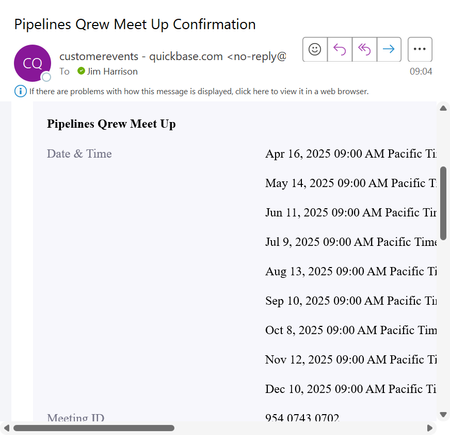
Hi Qrew! We’ve noticed some confusion recently with members logging in at the wrong times for Qrew Meet Ups. This is likely due to shifting schedules for Empower happening the first week of April. To avoid any scheduling mix-ups, we want to remind everyone to visit the Quickbase Events Page for the most up-to-date information on upcoming sessions. As of Jan 2025, we are no longer sending out calendar invites and making the events page the source of truth for all Qrew events and registration information. Remaining April Qrew Meet Up Schedule: App Builder Qrew Meetup: Tuesday April 15th, 12pm EST Pipelines Qrew Meet Up: April 16th, 12pm EST May Qrew Meet Up Schedule: App Builder Qrew Meetup: May 13th, 12pm EST Pipelines Qrew Meet Up: May 14th at 12pm EST (FYI: Final agenda for Pipelines Qrew will be finalized by next Friday, May 18th) * Realm Admin, Solutions Spotlight, and Mobile Qrew Meet Ups will be cancelled for May 2025. With plans to incorporate more webinars into Qrew events, we will be prioritizing webinars and scheduling our Qrew meet ups around it. Please be sure to review the schedule on the events page and mark or change your personal work calendar so you don’t miss these valuable opportunities to connect and learn. Let the community know if you have any questions or feedback by reaching out directly to ben_simon or me. Thank you for your attention, and we look forward to seeing you at this month’s meet ups!131Views0likes0CommentsUpdate to Code Page Example Folder: All Videos Included
Hi everyone! I wanted to give you an update from the Code Pages Qrew Meetup: All 4 videos of code page examples from our speakers are now included in the Code pages folder. Here's a quick recap of what they covered in the meeting and here's the folder to watch the videos: Code Page Example Showcase by Elvis Agyemang: Elvis showed off a personalized homepage and a world clock, both built in minutes using ChatGPT—proof you can spin up cool tools fast. Tips: Use AI like ChatGPT to draft code page widgets or dashboards when you’re short on time. Process Messaging & Pipelines by Eric Mohlman: Eric demoed a code page that gives live progress updates for pipeline tasks—no more guessing if your process is done. Tips: Use webhooks to trigger progress bars and auto-redirects for a smoother user experience. Pass record IDs in the URL to keep your code pages flexible and reusable across different workflows. File Upload Controls & Multi-Table Assignments by Simon Herbst: Simon walked through file upload controls that check file type and size, with instant feedback using Bootstrap and Vue.js. Tips: Make your file upload page portable by passing table and field info in the URL—one page, many uses. Use real-time validation for file size and type to give users immediate, clear feedback (and avoid frustration). “Quicksheets” Code Page by Andrew Carbejal-Everts: Andrew recorded a short video on how to use code pages to export data to Excel to email different reports in a single file. Interested in reviewing their code page examples and using it for your use case? Here’s a link to a folder that has Code Page examples from Elvis, Eric, Andrew, and Simon. All videos included. Please let us know if you have any questions and we'll be sure to have experts review and respond. Thank you!114Views1like0CommentsGrid Reports: Post‑Session Q&A
Looking for answers to questions we could not get to during the EmpowerPro Product Talks: New Grid Reports session on October 29th? You’re in the right place! This post contains answers from the product team to the remaining questions we couldn’t get to during our highly active session. Jump to section: 1. Set Up & Configuration 3. Display & Customizations 5. Dashboards & Reporting 2. Permissions Roles & Access 4. Functionality & Behavior 6. Other Resources Prefer to watch? Here you go: Want to browse clips instead? Check out this playlist. Setup & Configuration: Is there a hard limit (or best‑practice limit) on reportable fields in a table? There’s no technical limit on the number of reportable fields. That said, less is more: keep only essential fields reportable to help performance, usability, and clarity. Best practice: Mark only fields that actually need to appear in reports as reportable. Learn more: Specify which fields are reportable Community discussion: How many fields is too many? Can I mass‑edit the “Field may be used in reports” property? Yes. You can bulk‑update Reportable from the Fields list: 1. Open your table → Settings → Fields 2. Click Advanced options (upper right) 3. Check Reportable and click Save (Page bar) 4. Use the new Reportable column to update fields in bulk Reference: Make several fields reportable Can I turn on Grid Reports for a single table (not the whole app)? Not today. Grid Reports is enabled at the app level. How to: Turn Grid Reports on/off Why not offer Grid Reports as a per‑report type instead of a global app feature? To deliver a consistent, intuitive experience for everyone. Multiple table report types can be confusing—especially for newer or less technical users—so we’re standardizing Grid Reports to reduce learning curves and keep behavior cohesive across the platform. Will embedded grid‑edit reports in legacy forms keep working, or be deprecated? They’ll continue to work. We have no plans to deprecate access to existing legacy forms. Permissions, Roles, and Access: How does the role setting Hide Multi‑Record Operations interact with Grid Reports? Grid Reports respect existing permissions. If a role has Hide Multi‑Record Operations enabled, users in that role cannot inline edit in Grid Reports (similar to legacy grid edit). Where to set it: Role → User Interface tab Docs: Customize the UI by roles · Grid Reports (beta) If I save changes in a report, does everyone see the same thing? Two types of settings: - App/report defaults (builder‑controlled): Starting column widths (set per field) and default row height (in default report settings; can be overridden per report) - Personal preferences (per‑user): Dragged column widths and chosen row height are saved per‑user, per‑report, per‑widget Net effect: App defaults set the baseline; each user can override for their own view. Does the URL parameter trick shown in the session work for anyone, or just admins? It works for any user, but it’s intended only for troubleshooting/transition during rollout. Don’t build long‑term workflows around it. Clip: URL parameter demo Display & Customization: We want column width changes that everyone sees. How? Set default column widths in each field’s properties (builder‑controlled). If a user has already saved a personal width preference, their personal setting wins for that user. Can we set header colors or additional visual styling? Not currently on the roadmap. If this matters to you, please submit feedback to help us gauge demand. Is there an option for an editable colored field? Yes. Color‑coding works in Grid Reports, and colors display in edit mode as well. Without dynamic row sizing, how do we handle rich text that exceeds the “Max” option? We’re evaluating a custom row‑height option to better accommodate rich content. That’s not available yet; for now, use field formatting and report layout choices to balance readability and density. Can we show an ellipsis when text is horizontally truncated? Grid Reports are designed to show ellipses for horizontal overflow. If you’re not seeing this, please report it so we can take a look. How do spacing (Relaxed/Normal/Condensed) and row height (Short/Medium/Tall) interact? Row height controls how many lines of text are visible. Spacing controls the padding around cell content. Defaults come from each user’s preferences; users can override via the More menu on each Grid Report. Try combinations—e.g., Short + Condensed maximizes on‑screen density. Guide: Grid Reports (beta) Functionality & Behavior: Will formula URL buttons work in Grid Reports? We have work planned to allow link interaction in edit mode. Until then, buttons may appear clickable but won’t trigger actions while editing. When I paste a value into multiple rows of a single column, I sometimes get an “incompatible type” error. Why? It happens when data types don’t match (e.g., pasting a user value into a date field). Ensure pasted values match the target field’s type. Will there be safeguards to prevent losing edits when links become clickable in edit mode? Yes—when we enable link interaction in edit mode, we’ll include appropriate safeguards to avoid accidental loss of changes. Will every legacy report option be supported (e.g., Copy Records to another table)? Not necessarily. We focus on the best next version, not a 1:1 port. For “Copy Records to another table,” use a table‑to‑table import workflow. Can I inline‑edit embedded forms without putting the form in edit mode? No. The form must be in edit mode to edit embedded reports. Dashboards & Reporting Integration: Do Grid Reports work on dashboards? Any limitations? Yes. They’re great for quick updates. On dashboards, these actions are not available: deleting records, adding records, and column filtering (dashboard filters take precedence). Will dashboards support more than four filters? Nothing is currently prioritized. If this would help your team, please submit feedback so we can assess demand. Other Resources: learn more about New Grid Reports and dig into Qrew Tips – a Knowledge Base for the Qrew by the Qrew: Grid Reports (Beta) Guide Turn Grid Reports on/off Specify which fields are reportable Make several fields reportable Customize the UI by roles Community thread: field count & performance URL parameter demo (clip) Qrew Tips: The Qrew Knowledge Base Have feedback or another question on new Grid Reports? Drop it in the comments or send it our way—we’ll keep this Q&A updated as the grid report evolves.100Views0likes0CommentsMonday Update Week of April 13th
Happy Monday, Qrew! Here’s what’s happening the week of April 13 th : 📅 Tuesday, April 14 at 12PM EST Webinar: Quickbase Customer Experience Catalog: Services to Help You Build and Scale Agenda: Join Quickbase Customer Experience leaders for a live overview of the new Customer Experience Catalog and discover services designed to help you build faster, scale confidently, and get more value from Quickbase. Register here 💬 Tuesday April 14 th 12PM EST App Builder Qrew Meetup Agenda: Jenna Kotyk from Michael’s will be sharing how she uses Quickbase Documents to create summary reports, invoices, and more. Register Here 🧠 Quickbase Office Hours with Sam Trachy Weekdays at 1 PM ET ⚡ FastField Office Hours Mon / Wed / Fri at 2 PM ET Thank you and hope to see you all this week!84Views0likes0CommentsSeptember 2025 Qrew Meetup Recap
Thank you to everyone who joined yesterday’s Pipelines Qrew meetup. Here’s what we discussed: Rob Mersereau, Sr. Implementation Consultant, shared an encore of his Empower 2025 talk using a Mardi Gras example to show how to integrate Quickbase with Google Calendar through Pipelines. He noted that this use case can be applied to Outlook and SharePoint. Key highlights and tips: Link to app for following along Connect & Import: Rob demonstrated linking multiple Google accounts to Pipelines to pull Mardi Gras parade events into Quickbase—one record per event. Qrew Tip: Name Quickbase fields clearly with “gcal_” prefixes so AI auto-mapping works smoothly. Push to Calendar: He showed sending Quickbase parade plans to Google Calendar, writing back event IDs and clickable links for seamless updates. Qrew Tip: Always double-check your pipeline is turned on—this is the top cause of sync issues. Keep Data Fresh: Rob recommends using Bulk Record Upsert in Quickbase to quickly update or add records and track changes. Qrew Tip: Use Google event IDs as merge fields to prevent duplicates and enable reliable two-way sync. Build Gradually: Start with simple one-way flows, then add Teams alerts, Maps API calls, or multi-way sync as your workflow grows. Missed the meetup? Here’s the recording Attached is the participant guide to follow Rob’s examples. October is EmpowerPro month! Be sure to register for EmpowerPro October 7-8. Afterward, the Qrew will host a 3-part series, EmpowerPro Product Talks, on October 22, 23, and 28. More details coming soon!83Views0likes0Comments