Cross-Table Report Formulas
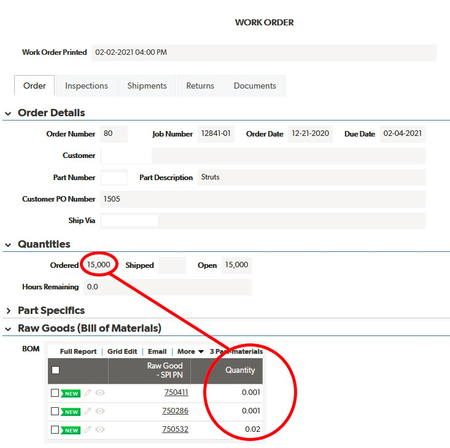
I am using QB in our manufacturing facility and am trying to get an order-by-order bill of materials. Specifically, I have a table for "Raw Goods" (the raw materials we make into parts), "Parts" (the things we sell), "Assigned Goods" (an intermediate table creating a many-to-many relationship between Raw Goods and Parts), and an "Orders" table (where individual orders for parts are entered). Each part record has a bill of materials that specifics how many pounds of of each raw good is needed to make one part. When I enter an order in the Orders table and enter the quantity of parts ordered, I need the Order record to multiply the quantity of each raw good by the number of parts ordered. I can figure out how to the get the original bill of materials to show up on the Order record (by looking up the embedded bill of materials report from the related Part record), but how do I then multiply the quantity of parts ordered in the Order record by the individual raw good quantities? In the example below, I would need a column multiplying each value by 15,000. Any suggestions are much appreciated! ------------------------------ Kiel Berry ------------------------------1.4KViews0likes2Comments
Looking for simplest example to access quickbase using python
Can someone point me to examples that show how a quickbase/db can be accessed from the command line/using python -? We would like to access, add, delete, change records and create reports - and in addition to the GUI provided, do such using CLI tools and python (saw pybase on github, am having some difficulty with it - unless someone can provide a complete example -?)1.3KViews2likes22CommentsCalculate total working days between dates (including Bank holidays)
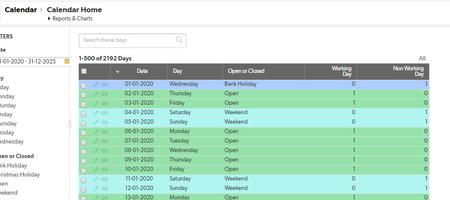
Hi I am aiming to calculate the total amount of working days between two dates whilst also considering Weekends, Bank holidays and Christmas Holiday etc. I have created a calendar for the next 5 years which puts a 1 next to the days that are actual working days. Within this table the desired result is achieved by simply filtering the start and end date and it totals up the working days, however I need this result to appear as a result of a start and end date on another table. Any help appreciated. After I have achieved this I will also need to calculate the end date based on a start date and adding a number of working days, which again needs to consider Weekends, Bank holidays and Christmas Holiday etc. Thank you in anticiption. ------------------------------ Stu ------------------------------700Views0likes9Comments
Formula text button to create Quick Base Action (Add Record) and redirect to that record
I have a formula text button in a table to check a box in one table, fire an Action to create a new record in another table. Right now the formula takes me back to the original table. I need to go to the record in the new table.538Views1like10Comments
Creating a URL based on a record ID
I have an automation that creates a new record on Table B when the existing record on Table A is modified. Due to the specific report I need, I could not create a traditional relationship between these two tables so I created the automation instead. When the new record is created on Table B, it will have a field that references the Record ID of the triggering record from Table A. I would like to make a formula URL field on Table B that creates a link to the triggering record on Table A. My assumption is that I need to do this using the record ID, but I'm not sure how.445Views1like11CommentsCHECKBOX OPTION
I'm using the checkbox feature to trigger an action (i.e., such as issuing an automatic Notification email). Question - once that trigger is executed (i.e., issued the automatic Notification email), can the checkbox be configured to automatically be unchecked, so that it's available for the next time a trigger action is needed? Thank you, ------------------------------ Bruce Kasen ------------------------------408Views0likes7Comments
add background color for checkbox field
I want to add the background color for the checkbox field. I have 3 checkboxes under section "Customer instruction" and want all of them have the yellow background as the text above. Please see below for what I mean. Please help and show me how to format the background of the checkbox. It would be nice if someone knows how to format the background color for the entire section. Thank you.399Views1like56Comments
Setup "Tomorrow" in automation as next work day
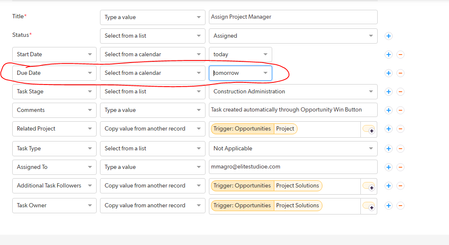
Hi an automation which creates a bunch of new tasks that are X days in the future.... It is assigning them on weekends. How do I set the automation to only create tasks with a due date X work days in the future? ------------------------------ Ivan Weiss ------------------------------342Views0likes12Comments
Ground rules for triggering an email notification or automation
I have a parent table with a formula checkbox field that does multiple logic calculations and returns "true" when all required conditions have been met. I need to trigger a notification email on each child record in a child table if this formula checkbox field returns "True". In addition, the email notification's trigger will be filtered based on the value of a numerical priority field in the child table record. I'm having trouble making this work because I'm not clear how to trigger the email notifications. I know that an email notification will not trigger on a lookup of the formula checkbox field from the parent table, so that won't work. This use case does not involve adding or deleting records, so the child record somehow has to be modified to trigger the email notification which is in the child table. I've seen various postings that appear to address this problem, but I'm not clear on exactly what "modified" means in terms of triggering an email notification or automation. For example, should I use a formula-URL field to update a trigger field in the parent record say with the current date/time? If so, will a ?a=dr API command be the equivalent of a manual "save" and so the change to the parent record will be accepted as a trigger for an automation that would in turn change a similar trigger field in each related child record? If an automation changes a field value in a child record, will the email notification recognize the change and trigger? In other words, when an automation changes a field value in a record, does it save the record automatically and will the email notification trigger on that? I wrote code for the formula-URL field (the name of the formula checkbox field is "Logic Checks Complete" and the field ID of the text trigger field in the parent record is 210). I'm assuming that the display record command is the equivalent of a manual record save and therefore suitable to trigger the automation that will set the trigger field in the child records that will trigger the email notification. Is this right? IF([Logic Checks Complete]=1, URLRoot() & "db/" & Dbid() & "?act=API_EditRecord&rid=" & [Record ID#] & "&_fld_210=" & ToText(Now()) & "&rdr=" & URLEncode(URLRoot() & "db/" & Dbid() & "?a=dr&rid=" & [Record ID#]) ) Thank you, Paul Streit ------------------------------ Paul Streit ------------------------------332Views0likes20Comments