Convert currencies to USD using today's exchange rate
Is it possible in QuickBase to convert different currencies to USD using today's exchange rate? I have a field where users enter costs in different currencies, but want these costs to be converted to USD so i can compare costs. I know i can do that by create another numeric field and set us a formula with another text field contains all the currencies and then identify all the foreign currencies values against USD, but this needs to be updated regularly as the exchange rates change. Any function in QB to resolve this and convert currencies to USD based on today's rate.135Views3likes3Comments
number of rows displayed per page in table report
For some reason I can't find any details for how to change number of rows displayed per page for particular table report (and if it even possible). What makes me more wondering - different reports for the same table may display different numbers of rows: 50, or 100, or 200.428Views1like5CommentsRich Text Field Markdown Cheatsheet
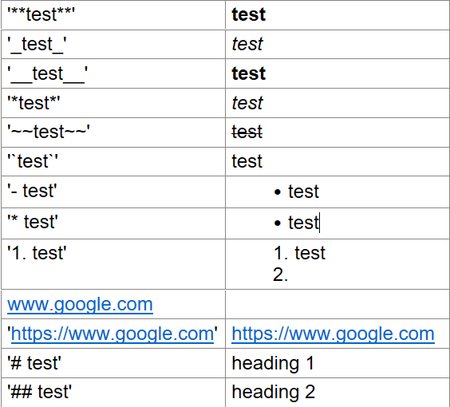
tldr; Rich Text Fields use Markdown I was writing a solution to a User Request problem into our homebuilt ticketing system. It has to do with applying '_curuser_' to a custom Role permission. I noticed that as soon as I hit space after the last underscore, the text changed. This is unexpected behavior and in this case undesireable, I want to maintain the syntax of the custom rule. Today I learned something new and want to share it in case like me you had no idea this would happen. If you type certain characters in a specific order into a Rich Text field, the text changes formatting. Below is a table of all the examples I could find. The left column is preceded and ended by a single quote which causes the text to stay unchanged. The right column is the same syntaxt without the single quotes, note how the formatting is changed. ~ since this Website won't allow some of the characters I inserted an image, sorry to those who like to copy and paste for thier own notes.Solved204Views0likes3Comments
Multiselect list some options grayed out and italicized
I'm sure I'm missing something obvious, but I'm stuck. I have a "Cases" table. Many other tables/forms pull from/reference this table using either one-to-many or many-to-many relationships. I recently added three new cases. But in some tables these cases appear grayed out and italicized, but in others they are selectable. It seems that in single-select fields they appear as normal and are selectable but in multiselect fields they are gray, italicized, and not selectable. Any thoughts on how to troubleshoot this? ------------------------------ Paul Easton ------------------------------163Views0likes4Comments
Snapshot calculations
I have a master price table containing part numbers and customer prices and a child table that adds parts to a customer work order table. I set up a snapshot field to in the child table to capture the current price of a part being added from the master price table. When the part number is selected from the master price table, and before save is clicked, I want to do some calculations on the current price such calculating Qty. x current price and the sales tax for the part. The problem is the snapshot field isn’t valued until after the record is saved so my calculations for the extended price (Qty x Price) and sales tax don’t display any data until after the record is saved. Is there a way to do calculations on the snapshot field before saving? I don’t want to base calculations on the lookup field in the master table because I only want the calculations to be based upon the part price when it was first savedSolved151Views0likes2CommentsSearch And Replace to Remove "enters"
I have field where users can enter data and divide them by using Enter: XXXXXX YYYYYY For another field summary I would like to convert this way of entering into: {XXXXXX; YYYYYY} I was thinking to use formula "SearchAndReplace" but I am not sure what to enter in Search for?: SearchAndReplace([1-Step feeder(s) - after AltBOM],"?????","; ") In excel I would search for Char(10) but how to find "Enter" in QuickBase? I tried to Trim, but does not work. I tried to use in formula enter but after save it is converted to "/n " Any ideas how to search and replace "ENTER" between numbers? There might be more then 1 enter. ------------------------------ Adam Krzyzanek ------------------------------431Views0likes8Comments
Getting parent records to be related to multiple child record
There is a Master Copy and the Master Copy has a multi select with the master SOP names. I have a document storage app which has a table named Manuals and a table named Supporting Documents. Each has a File Attachment field of the same name. Each Manual has multiple Supporting Documents. This is handled by a standard one to many relationship. I found out today that each Supporting Document could potentially ?support? multiple Manuals. This could be handled by simply uploading the Supporting Document file multiple times, each record being related to a different Manual. Due to storage space and modifications of files I do not want multiple Supporting Document records that contain the same file attachment. I tried to use a multi-select field in the Supporting Documents table that would check off the multiple Manuals, and through a report link field link the Supporting Document to the Manual records. This won?t work because there are over 250 Manual records, and the Multi-select can only handle 100 values and 20 selections. Otherwise it would have worked. I could create a regular text field and manually type in the names of the Manuals that the Supporting Document supports, but I don?t want to do that either. What?s the cleanest way to get one Supporting Document to be able to be related to multiple Manuals?184Views1like5Comments