Bulk Record Creation (User Defined # of Records)
Can anyone suggest how I can create an unknown number of child records? Sometimes the user might need 10, 50, 200 or any number in that range. I would like the user to have the option to enter this # in a field and click a button to trigger the process. I thought I could use a pipeline loop but I don't see a way to run the loop a number of times based on a field value. My goal is to populate the table shown below, with no data, allowing the user to quickly input the data right on this form without adding/opening/editing each individual record. I'm happy to provide more details or take a different approach. Thanks33Views0likes5Comments
Pipeline Iterate over JSON nested data
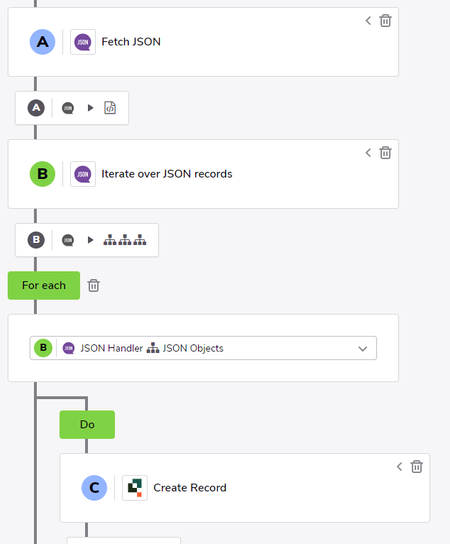
I was pulling in JSON data from Ground Control and was having some trouble pulling in some nested data while creating a record. Here is how I solved it. I hope I can save some people time. Used the method posted here to get this started: JSON Handler details Data initially pulled was not an issue at the top level. Nested inside my data is "customFieldValues". Sample: "customFieldValues": [ { "name": "SomeFieldA", "value": "Abcdefg" }, { "name": "SomeFieldB", "value": "1234567" }, { "name": "SomeFieldC", "value": "CwhatIDidThere?" } ] To pull in this value I needed to use a raw_record Jinja expression and state the location in the array. {{b.raw_record['customFieldValues'][0]['value']}} 0 is used since this is the first location in the Array. (This assumes that b. is the reference used for the other fields such as {{b.status}} ) This is placed in the field reference in Create Record step for SomeFieldA. ------------------------------ James Carlos ------------------------------910Views0likes5Comments
New Pipeline Run Preview Feature (July 2026)
Hey there Boston Qrew! Great meeting on Wednesday...and yes, before I say anything else, I'll say...can't wait for Tammie King's scavenger hunt in September! :) One of my takeaways from our run through this month's release notes thanks to Tyler Brezler was the curiousity & contemplation around the new pipeline run preview feature released on 7/14/26. I conferred with the Product Manager overseeing this and he shared: The feature does not incur any Reads, it just combines the activities of an entire pipeline run into a single view The idea is that the current Activity Log does not provide a user-friendly view of the run, just a table, so that's the gap we tried to cover. It also shows the path of the pipeline execution in a pipeline run. And that's the value prop really - having a user-friendly preview of a specific run on top of the activity log. We are aware of an issue with browser cookies preventing the preview from loading, so clearing those should fix the issue if you're running into any errors. Since it's release, there hasn't been any further informational assets prepared from a product enablement perspective, so simply dive in and try it out if you're curious! Hoping this additional insight helps anchor your expectations around it.53Views1like1CommentUsing one field to collect data multiple times.
In quickbase, I have a field for user and datetime. There are several project status like pending, submitted, review,approved and denied. Everytime in the status field change I want to record who did the change and date time. I want to use the two buttons. submitted by and submitted datetime field to track the audit history or logs. I did try with a pipeline but there is no data being recorded. Anyone done this before?Solved110Views1like9CommentsUsing one field to collect data multiple times.
In quickbase, I have a field for user and datetime. There are several project status like pending, submitted, review,approved and denied. Everytime in the status field change I want to record who did the change and date time. I want to use the two buttons. submitted by and submitted datetime field to track the audit history or logs. I did try with a pipeline but there is no data being recorded. Anyone done this before?12Views0likes0CommentsPipeline Filters using AND and OR
I have a pipeline which has a search step from a list of students. In the filter I want to include the names I want and not the entire list. SchoolName is xxx AND Student Name contains John OR Student name contains Michael OR Student Name contains Joan OR .......they are 24 how can I approach this using using advance filters64Views0likes2CommentsAccessing previous field values after an import mapping failure
I have a bulk event-triggered pipeline firing whenever records are modified, leading to an Import to Quickbase step. The import stores current and previous field values on another table. Working on error handling for this import, I would like to log the attributes of the intended "change record" it was attempting to create, i.e. current and previous field values of the source record. If the error was an "import error" this is easy: I can access any of the target field values inside the `import_error.record` container. But if the error was a "mapping error" then it seems only the source's current fields are accessible through the `mapping_error.item` container, with apparently no metadata like previous field values. I don't think I can reference the original record in this context because it's a completely different object with a different index (since the import failures are obviously a subset of the original record set). So this leaves me without a way to store previous field values if there is a mapping error that I can see, unless I restructure the pipeline to process the records serially, which I'd prefer not to do if I can avoid it as the trigger event can potentially be quite large (thousands of changes at a time). Am I missing something? Or should I just not concern myself with auto-handling mapping errors in production, because the data types should never be allowed to change in the first place? Should I just make sure to throw a bright red alert if it does ever happen?28Views0likes1CommentCompile a custom raw bulk api string based off a bulk event trigger
I am attempting to store changes from a table to a dedicated "change records" table. There are a handful of specific fields I want to store changes for and I need to store both the new and previous values in these fields. So I have some complex filtering logic that can't be captured in the initial filter. At the same time, the source table can have hundreds or even thousands of records changed simultaneously or near-simultaneously, so I can't be making separate API calls for each change record to be created. And I need to be able to conditionally store a payload if the bulk creation step fails, so that I can rerun it manually/by another scheduled process. The native Bulk Upsert step does not allow for this if I'm not mistaken. For these reasons, I would like to trigger my pipeline off a bulk event, skip the default For pipeline step, and put all my filtering logic within a loop in my jinja expression for my (QB channel) Make Request step. I feel like this should be possible but I'm getting responses saying my record payload is empty. Is there a problem with the way I'm trying to access the bulk event data, or is this just not possible? { "to": "bqxxxxxx", "data": [ {% ns namespace(record_count=0) %} {% for row in a.records %} {% if complex_filter_logic_here(r) %} {% if ns.record_count > 0 %},{% endif %} { "6": { "value": "{{ r['value_1'] }}" }, "7": { "value": "{{ r['value_2'] }}" }, "10": { "value": "{{ r['value_3'] }}" } } {% set ns.record_count = ns.record_count + 1 %} {% endif %} {% endfor %} ], "mergeFieldId": 10 }Solved69Views0likes3Comments
Jinja for User List field
Hi, I am building a pipeline to update a record that includes a User LIst field. I will be updating this field with single user and wanted to use Jinja: The "Help Text" below this field in the pipeline explains: "Comma-separated list of QuickBase User IDs. You can either assign same type list field or manually construct the comma-separated list using Jinja expression." I am not finding an example of how to construct this list in Jinja. Would appreciate help with the syntax. Thanks so much ------------------------------ Christine White ------------------------------288Views1like4CommentsCreating Pipelines with Multiple admin best practice
It seems that if I create a pipeline, as it is my user token, only I can see the pipelines I have created. What is the best practice when you have multiple QB developers, all wanting to create pipelines? One person creates all...? I want other admin to be able to troubleshoot or update all pipelines. I guess this is not possible. How do other people handle this? ------------------------------ Michael Tamoush ------------------------------84Views1like5Comments