Include/add pdf flyer on the form
Hi, I've created a pdf which has instructions for user so they can successfully submit the form. Now looking for solution/ideas to include this pdf flyer on the form. Please advise. ------------------------------ Mrunali Kadam ------------------------------227Views0likes12Comments
Post Webhook External
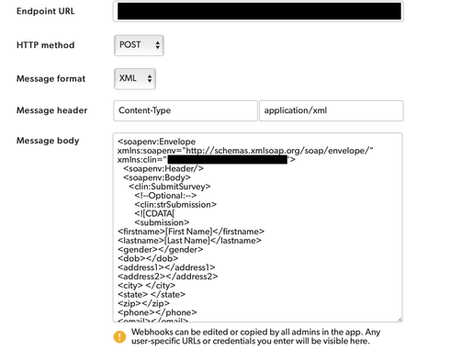
I'm trying to post a Webhook into a CTMS and it's out of scope for QuickBase to help with. The documentation doesn't provide any info on posting Webhooks externally. This is the instructions that our CTMS vendor provided: <soapenv:Envelope xmlns:soapenv="http://schemas.xmlsoap.org/soap/envelope/"; xmlns:clin="URL"><soapenv:Header/> <soapenv:Body> <clin:SubmitSurvey> <!--Optional:--> <clin:strSubmission> <![CDATA[ <submission> <firstname> </firstname> <lastname> </lastname> <gender></gender> <dob></dob> <address1></address1> <address2></address2> <city> </city> <state> </state> <zip></zip> <phone></phone> <email></email> <besttimetocall></besttimetocall> <howdidyouhearaboutus></howdidyouhearaboutus> <comments></comments> </submission> ]]> </clin:strSubmission> <clin:strSecret>PASSWORD</clin:strSecret> </clin:SubmitSurvey> </soapenv:Body> </soapenv:Envelope> The validator on our (CTMS Vendors) end does not like capitals, spaces or special characters. I plugged their info in like this and many other variations of this, but am failing: Can QuickBase send XML formatted submissions in a SOAP message externally?160Views2likes5CommentsWeekly Report Summaries with AI Actions in Pipelines
So far in this series, we’ve explored how AI Actions can extract key details from emails and analyze complex documents like 10-K filings. Today, we’ll make it even more practical — automating weekly reporting. Many teams rely on weekly Quickbase reports to track key metrics, project updates, or customer issues. With AI Actions, you can now generate a concise AI-written summary of those reports every week — automatically. No manual copy-pasting, no rewriting dashboards, no time wasted on reading reports — just clear insights, delivered on schedule. Why Automate Weekly Summaries? Quickbase reports are great at presenting data — but stakeholders often want a digestible narrative: What changed this week? What trends are emerging? What should we focus on next? By scheduling a Pipeline, it can automatically: Pull a Quickbase report each week. Feed it to AI Actions along with some instructions. Store or email the AI’s analysis to your team. The Pipeline Flow Here’s how this works step by step: Schedule: A scheduled pipeline runs every Monday morning. Quickbase Actions: The pipeline fetches the latest report data (e.g., project updates, tickets, or KPIs). It stores it as a CSV in Quickbase. AI Action: The data is analyzed and summarized by AI in plain English. Quickbase or Email Output: The summary is emailed to key stakeholders. You can also watch the quick demo here: Pipeline YAML: # Report Summary (CSV) # # Account slugs: # - quickbase[REDACTED]: Realm Default Account <none> # - microsoft-outlook[REDACTED]: Georgi Peev (...) # <none> --- - META: name: Report Summary (CSV) crontab: 0 8 * * 1 crontab_timezone: America/New_York enabled: false - ACTION bucket pipeline_row define -> a: inputs-meta: date_format: '%Y-%m-%d' datetime_format: '%Y-%m-%dT%H:%M:%SZ' header_row: Project ID, Project Name, Status, Priority, Owner, Department, Region, Start Date, End Date, Budget, Description, Customer Name, Project Manager, Team Size, Completion, Risk Level, Last Updated, Client Satisfaction, Is Billable, Project Type, Revenue ($), Expense ($), Profit Margin (%) header_separator: ',' type_of_budget: number type_of_client_satisfaction: number type_of_completion: number type_of_customer_name: string type_of_department: string type_of_description: string type_of_end_date: date type_of_expense: number type_of_is_billable: boolean type_of_last_updated: date type_of_owner: string type_of_priority: string type_of_profit_margin: number type_of_project_id: string type_of_project_manager: string type_of_project_name: string type_of_project_type: string type_of_region: string type_of_revenue: number type_of_risk_level: string type_of_start_date: date type_of_status: string type_of_team_size: number name: Define table for report - QUERY quickbase[REDACTED] record search -> b: FILTERS: - AND: - status is "In Progress" <in progress=""> inputs-meta: export_fields: '"Budget ($), Client Satisfaction, Completion %, Customer Name, Department, Description, End Date, Expense ($), Is Billable, Last Updated, Owner, Priority, Profit Margin (%), Project ID, Project Manager, Project Name, Project Type, Region, Revenue ($), Risk Level, Start Date, Status, Team Size" <15, 23, 20, 17, 11, 16, 14, 27, 24, 22, 10, 9, 28, 6, 18, 7, 25, 12, 26, 21, 13, 8, 19>' table: '"AI Actions - Georgi Peev: Report Summary - Projects" <bvjypq5b3>' name: Fetch report records - b<>LOOP: - DO: - a<>ACTION bucket pipeline_row create -> c: inputs: budget: '{{b.budget}}' client_satisfaction: '{{b.client_satisfaction}}' completion: '{{b.completion}}' customer_name: '{{b.customer_name}}' department: '{{b.department}}' description: '{{b.description}}' end_date: '{{b.end_date}}' expense: '{{b.expense}}' is_billable: '{{b.is_billable}}' last_updated: '{{b.last_updated}}' owner: '{{b.owner}}' priority: '{{b.priority}}' profit_margin: '{{b.profit_margin}}' project_id: '{{b.project_id}}' project_manager: '{{b.project_manager}}' project_name: '{{b.project_name}}' project_type: '{{b.project_type}}' region: '{{b.region}}' revenue: '{{b.revenue}}' risk_level: '{{b.risk_level}}' start_date: '{{b.start_date}}' status: '{{b.status}}' team_size: '{{b.team_size}}' name: Add record to table note: match the column names from the query step - a<>ACTION bucket pipeline_row download_csv -> d: {} - ACTION quickbase[REDACTED] record create -> e: inputs-meta: table: '"AI Actions - Georgi Peev: Report Summary - CSV files" <bvjy9kdu7>' name: Create record for file - e<>ACTION quickbase attachment upload -> f: inputs: field: '6' name: '{{d.file_name}}' url: '{{d.download_url}}' name: Upload report file - LOOKUP quickbase[REDACTED] record look_up -> g: inputs-meta: table: '"AI Actions - Georgi Peev: Report Summary - CSV files" <bvjy9kdu7>' export_fields: '"file" <6>' inputs: id: '{{e.id}}' name: Fetch uploaded file - ACTION qb-ai-actions custom_action create -> h: inputs: file_url: '{{g.file.file_transfer_handle}}' system_message: "You will receive a CSV file representing a Quickbase report.\ \ Your job is to analyze the report and produce an HTML-ready email containing\ \ the analysis. Output must be only valid HTML suitable for sending as the\ \ body of an email (no external CSS, no scripts, inline styles only). \nThe\ \ report contains currently active projects.\nBased on trends and dependencies:\n\ - Flag the top 10 projects that are at risk the most. Provide some details\ \ like project id, project name, PM and other info you find useful.\n- Provide\ \ an explanation on why you've flagged each one\n- Give a suggested action\ \ item for each one" user_message: file attached below name: Summarize - ACTION microsoft-outlook[REDACTED] email send_email -> i: inputs: body: '{{h.output_text}}' subject: Weekly report - at risk projects to_addresses: ... ...</bvjy9kdu7></bvjy9kdu7></bvjypq5b3></in></none></none> The AI Prompt You can tailor the AI persona to your audience. Here’s the one from the example that works well for leadership updates: You will receive a CSV file representing a Quickbase report. Your job is to analyze the report and produce an HTML-ready email containing the analysis. Output must be only valid HTML suitable for sending as the body of an email (no external CSS, no scripts, inline styles only). The report contains currently active projects. Based on trends and dependencies: - Flag the top 10 projects that are at risk the most. Provide some details like project id, project name, PM and other info you find useful. - Provide an explanation on why you've flagged each one - Give a suggested action item for each one Why This Matters This example demonstrates how AI Actions can automate recurring intelligence from Quickbase data — not just static documents or ad-hoc inputs. By scheduling weekly summaries, you’re turning your operational data into living insights your teams can actually use. You can take this further: Summarize multiple reports in one flow Compare current vs. previous week automatically Send or record summaries via other Pipelines channels Conclusion AI Actions continues to expand what’s possible inside Pipelines. From analyzing emails and PDFs to now scheduling recurring AI insights, Quickbase users can close the gap between raw data and decision-ready information. Start small: schedule your first AI-powered summary this week — and let your reports start writing themselves!292Views0likes0Comments
API Do Query No data Recieved
Hi, I have recently started facing this issue with my API call that I do from Alteryx to pull data from Quickbase table. I was working fine until last week Aug 1st, 2025 , but started to give no data then. I have provided the warning message that i get with Http 400 bad request error. Surprisingly there are other tables in my app that use the same headers and configurations (filters in query) which continue to work fine. I am unable to understand what to troubleshoot here. Do you have any guidance or setting that I could check? As a work around I tweaked the query a little bit removing filters adding number limits and then it works but that query cannot sustain for long. Please help. [Warning: Download (390): No data received from "https://******.quickbase.com/db/btdwv2ucy?a=API_DoQuery&query={'26'.XCT.'Complete'}AND{'26'.XCT.'Completed-Manual'}AND{'26'.XCT.'Closed Denied'}&clist=6.7.8.9.10.11.13.14.15.16.26.27.31.34.36.37.38.39.40.41.45.46.47&apptoken=**********66dxqt544&usertoken=************6av4c4wecdtcnjh4qbdf6gk5p"; Check the headers for details.]90Views0likes1CommentClient Portal With Userids
Are there any tips out there of how to let a user sign in without the Quickbase branding screen. I have a situation where customers will be logging into a supplier Quickbase app, with proper userids. But we want to suppress all the Quickbase branding on that page. ------------------------------ Mark Shnier (YQC) Quick Base Solution Provider Your Quick Base Coach http://QuickBaseCoach.com [email protected] ------------------------------190Views0likes4Comments
Script a button to print current record to DYMO
I'm finally moving a product pricing process from EXCEL into QB. The last step is giving a user(s) the ability to print product labels from QB to a local DYMO printer. What I had envisioned was a button on the record form that would take a half dozen or so values in the record and push them as values for the label. Has anyone here done this already? If so, are you willing to share any of your scripting? My JavaScript experience is extremely limited. This link is an example of printing to a DYMO via a JavaScript library, but I don't really understand how to set the values of QB fields as the values to send to the printer. http://developers.dymo.com/2010/06/02/dymo-label-framework-javascript-library-samples-print-a-label/ Any help would be greatly appreciated.160Views0likes6Comments
Formula Rich Text Button - File to Add Record
Hi, I'm using a formula rich text button to add record in a different table when click. The button includes the action of copying multiple field values into the newly added record. I have one field that is a file upload field and need to copy this file into the corresponding field on the newly added record as well. Can this be done in the rich text formula? If not, how might you do this? Example: Approval Record: Name Date Amount JPG (image of the agreed terms) When clicking 'Approve' button, a new Transaction Record is created with all of the approved info: Name Date Amount JPG (***Need to duplicate this file to the newly created record) Thank You! Chris ------------------------------ Chris ------------------------------197Views0likes12CommentsCreate a button that gets the UserID for the user in a user field and then write that information to a field in the same record
Hello Quick Base Community. I am wanting to get the UserID for a user with the click of a button. Using the API_GetUserInfo, I can pull the UserID, copy it and then paste it somewhere, but what I would like to do is click a button that will get the UserID and then write it to a field in the record that I am on. Really the question is, is it possible to call an api and then perform an action using data that is returned from the initial api call? I assume that this wouldn't be a problem using scripting but I would like to know if it is possible natively within Quick Base. Thanks!321Views1like7Comments
URL button to add new record and then go to that record
Hi everyone, I feel really silly asking this, but I can't figure out how to use a URL button to add a new record and then simply go to the newly added record. This is what I have currently. And, the only reason I'm using API_AddRecord instead of API_GenAddRecordForm is because I can't get it to set field 18 to what I want, but for whatever reason it does work with AddRecord. URLRoot() & "db/" & [_DBID_CREW_TIME_RECORDS] & "?a=API_AddRecord" & "&_fid_18=" & Now() & "&apptoken=cynqae3bygzqysbuufhnqczijtxn" & "&rdr="&URLEncode(URLRoot() & "db/" & Dbid() & "?a=doredirect&z=" & Rurl()) Thank you! ------------------------------ Elena Larrabee ------------------------------384Views0likes6Commentsdistance between two addresses
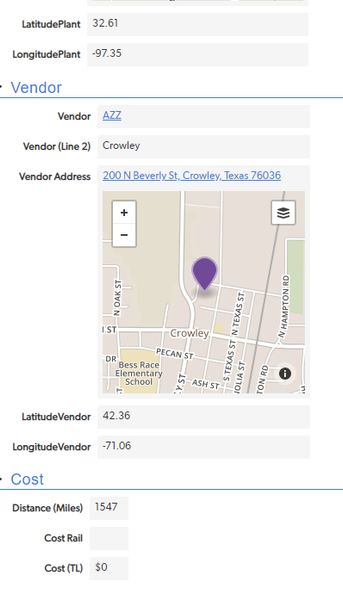
I am trying to calculate the distance between two addresses. I put the below formula in but came up with a distance of 5000 and it should be 3. var number OriginLat = [LatitudeVendor]; var number OriginLong = [LongitudeVendor]; var number DestLat = [LatitudePlant]; var number DestLong = [LongitudePlant]; var number Distance = Round(((69*($OriginLat - $DestLat))^2 + (53*($OriginLong - $DestLong))^2)^0.5); If($OriginLat =0 or $DestLat=0,0,$Distance) ------------------------------ Sarah Burres ------------------------------646Views0likes18Comments