Adding an icon next to the app name
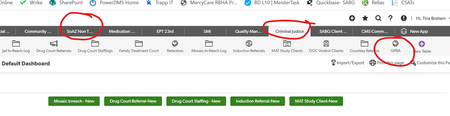
You can see the little icon in "My Apps", "Pipelines", and "New App". I would like to be able to add something next to "Employee File", "Employee Dashboard" and whatever other app I want to have going. Is there a way to do this? ------------------------------ Jennifer Meyer ------------------------------76Views0likes1Comment
[NON-HA] RE: Getting Started : Add Logo to Quickbase Header
Hi Kirk, Thank you so much for the help with this! I've been trying this several ways, but can't get it to work right. I've tried adding the links below to the left element, but it only shows the URL rather than the image. Can you see what I'm doing wrong? Image posted to Imgur: Imgur Image Link: https://imgur.com/Vh2YWRx Header when link used: Imgur Direct Link: https://i.imgur.com/Vh2YWRx.png?1 Header when link used: Header with fields populated: Thank you! Leah Langowski | Manager, IT User Automation Hawaiian Airlines PO Box 30008, Honolulu, HI 96820 • P: 808.838.6719 [email protected] • HawaiianAirlines.com30Views0likes0CommentsAdd Logo to Quickbase Header
I'd like to add our company logo to the header area of Quickbase, but am having trouble. If I use the 'Basic' option, the field to insert the logo is too short for the full URL. With the 'HTML' option, I don't know where to put the file so it can be referenced. Ideas? ------------------------------ Leah Langowski ------------------------------164Views0likes1CommentAdd Logo to Quickbase Header
I'd like to add our company logo to the header area of Quickbase, but am having trouble. If I use the 'Basic' option, the field to insert the logo is too short for the full URL. With the 'HTML' option, I don't know where to put the file so it can be referenced. Ideas? ------------------------------ Leah Langowski ------------------------------204Views0likes1Comment
Realm Branding: Footer with custom coding to open form and populate field in another app
I want a realm branding footer for users to submit a help ticket to our application management platform (AMP) app. Use case: while in an app, user can click "submit help ticket" and the link will open the ticket form in AMP and populate the App Name field with the name of the app the user was in when they clicked the link. App Name field is a multi-choice lookup field so I need the code to recognize the app id. I need a way to do this in the realm branding, because if I create a custom footer in an individual app, it removes the realm branded header. I've tried several variations on the dbid() function, but so far no luck. Any ideas? ------------------------------ Sherry Blackburn ------------------------------83Views0likes4CommentsCopying Tables
Hi All: I am an admin for 2 apps that for some strange reason I am not able to copy a table from one app to another. Why is that not happening? From the Home Table >> Copy - the other app I am needing to copy to is not in the dropdown From the table >> Copy Table (Coming Soon).....?? ------------------------------ CMS ITOperations ------------------------------131Views0likes6Comments
Purple forever?
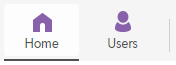
I see that after the rebranding, the homepage 'Home' and 'User' icons still purple. Will we ever be able to customize these icon colors? I see the purple is still on the quickbase homepage, so I guess I should assume it will stay? Thank you, John ------------------------------ John Freire ------------------------------79Views0likes2Comments
pixel dimensions for branding header and footer images?
I see specifications for supported file formats and locations of branding images for the app header and footer. Is there also guidance on pixel dimensions? Thanks! ------------------------------ Robin Wendler ------------------------------89Views0likes1Comment
Browser Differences for Reports and New Chrome Logo Error?
Has anyone else had issues with their branding on Chrome? The logo on top suddenly no longer appears and instead says "Custom Brand Image" and is missing any picture. However, still works perfect in Edge, IE, and Firefox. Anyone know what setting in Chrome that is.... Regarding printing reports, has anyone found a particular browser they like the best for customization? On Chrome I can repeat the title on each page, so that's nice - but it also puts the Report Title in 3 spots so it is a bit of overkill. Edge I can't get to print at all. Fire Fox I can't get the header (with the webpage etc) to hide, and IE is clean but the Report title doesn't repeat. I would love to simply print the report, with a title on each page. Has anyone figured out the right combination of QB Settings, Browser Settings, and Printer settings to achieve a clean report printout, with titles on each page? I've come up with one combination of settings in Chrome that works the best so far... ------------------------------ Mike Tamoush ------------------------------83Views0likes4Comments
Succeed in Your Trial
Succeed in your Trial Congratulations! You have decided to embark on your first trial experience with QuickBase. This post has been written with your success in mind, hoping to guide you to a successful completion of you trial and sign up as a customer. Trials are intended to give you the ability to put your tests to the software you hope to purchase, to see if what is advertised is truly as described, and to see if the general feel of using the software meets your expectations. In order to succeed at this, I've put together some 'best practices' to implement during your trial to help ensure you enjoy success! Set Aside Time to Work in the Product In order to learn about QuickBase, the platform, and how to build applications successfully, you will need to make sure you set aside time. This is usually the most important consideration when evaluating our platform. Identifying what your purchase timeline is, and lining it up with your teams' timeline to properly make your purchase decision takes some effort, as well as some honest reflection. You will want to be realistic about how much time this process will take, and it's one you won't want to rush. Write Down All of Your Questions You will not be able to know all of the questions that will arise during your trial up front, before you begin, but you should make an effort to identify all of your stakeholders' questions, as well as what they would like to see or learn during the trial. Once you begin to think of your desired solution, new questions may emerge that you never previously thought of. Identify Your Stakeholders Make sure to gain input from all of your key stakeholders. That is, each of the end users of the solution will need to give feedback, ask questions, and state what it is they are seeking in a new solution. Meeting with your team before you begin your trial will help get everyone 'on the same page' and steer your team towards success. Don't Just Wing It, Have a Plan The most successful QuickBase customers are those that know what it is they want to build on the platform, and as they set about on this journey, they continually reflect back to this plan to make sure they are aligned with it. By attempting to build in product with specificity and purpose lends itself to a more successful outcome. Ask Questions This may seem to be obvious, but the more questions you ask, the more detailed your vision of a solution becomes, and this will help you feel more prepared for the change that is coming. We find that the best evaluations are those which include open conversations between customer and QuickBase staff. We always try to ask "what else?" when engaging potential customers, in the hopes of uncovering other items on their wish list that we may be able to help with and provide a solution for. Software evaluations are meant to be a positive experience for all involved, and when you look to use your time effectively by following guidelines such as these, you will ensure a more positive outcome for you and your team. ------------------------------ Sean Padian ------------------------------25Views0likes0Comments