IF Statement based on a file being attached
Greeting - I want to do an IF Statement to tell me if a file has been attached to the record or not. it does not seem to be working when i say Attachment=True. how could should I format my text formula field to tell me an attachment is present? If([Attachment]="true","Yes","No")Solved515Views0likes3Comments
Need help deciding between two db setups
I am pretty new to qb and am currently trying to create an app to help my department track a student's requested thesis committee. The (hopeful) process: student will submit form with their identifying info, proposed thesis title, then choose their requested thesis supervisor, and selected reader, both fields pull from the same list of faculty (though if someone is chosen in one field they will not appear in list in 2nd field - that's for another time to figure out). So in trying to build something I came up with two different setups and am wondering which people think would be best. Which do you think will be better longterm. Attached are screenshots of both relationship diagrams. Hopefully they are decipherable.Solved421Views0likes8Comments
Master’s Thesis: Request for Quick Feedback on Low-Code Platform Requirements
Hello everyone, I am a master’s student, currently working on my thesis in the field of low-code development. I have compiled a list of requirements and would like to determine how well the platform meets them. It would be sufficient if you could simply respond to each requirement with “yes,” “no,” or “partially.” I hope it’s alright that I’m posting this here. I’ve tested the free trial versions extensively, but I’m still not entirely certain if this platform suits my needs. Thank you in advance for your feedback. (F1) Overview & Progress Status, capacities (F2) Notifications & Appointment Scheduling Automated e-mails, reminders (F3) Document Generation For example PDF, digital signatures (F4) Automatic Calculation of Deadlines For example: deadline = start date + X days (F5) Central Document Repository Structured storage, archiving (F6) Template Library Digital forms to be filled out online (F7) Different Role Profiles Permissions for students vs. supervisors (F8) Document Feedback Loop Iterative reviews, comments, and version control (F9) Interoperability Outlook, Moodle, SAP, etc. (N1) User-Friendliness Intuitive handling (N2) Data Protection GDPR, data security (N3) Reliability Maintenance, stability (N4) Pricing Model No subscription models <3Solved271Views0likes2CommentsClient portal/App setup help
I would like to create an app that is specific to a Client, I can use paid seats for the users logins. Specifically, there are 2 main functions I need. The ability for submission of request and then once reviewed, the ability to view/access the requested information from the Client specific App. I do not want to give any access to our main application, which is why I was thinking the client specific app would be best to build. I want to set the new app up similar to a “portal”, where this Client can log in and do/see several things such as: Submit an estimate request through a form Check the status of this request Provide updates for the request Add authorizations and scheduling updates Send message or make notes Upload attachments I am thinking I could create tables in the Client App that will mirror the tables/fields etc. that are in the main app, thus assisting in relating the data. Then have some type of notification set up when a new submission is made. Our teams would then review any new submissions etc. prior to using a pipeline to import the information into our main app. Once we have reviewed and approved the data in our main app, then I would like to have the client app updated to reflect the “same” details. I know this is possibly, I am just not sure the best way to set it up. Does QB have any prebuilt apps like this I could customize to our needs??? Any suggestions are appreciated!!257Views0likes3Comments
Dynamic scaling of X-Axis
Hello team, based on a "Report Link" field I have added chart to my record form that prefilters the information shown in the chart below based on the opened record. However, I would also like to limit the displayed x-axis values (calendar weeks) based on the start date that is mentioned in the particularly opened record on top. Does anyone of you know how this can be realized?241Views0likes7Comments
Automatically Update Date Field
I use QB to keep track of thousands of articles that I schedule for the e-newsletters my company sends out. Each article is a project. I am constantly updating these projects, like from "Assigned" to "Accepted" or from "Bob" is editing to "Mary" is editing. I have an "Updated" column but I have to change it myself. What I would like is an "update" column that changed the date automatically every time I make a change. That is, no matter which field I change for a project (the title, the author, the assignment date) the update column automatically updates. Is this possible? If so, how? Thanks in advance to any help.Solved233Views0likes3Comments
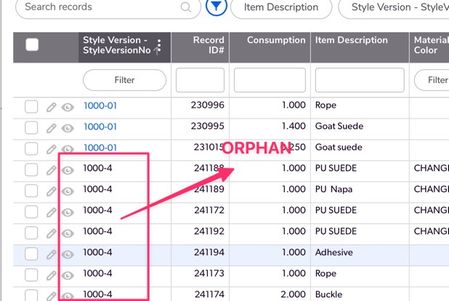
Deleting Orphaned Children (records)
Hellos, I have a scenario where I have a table where orphaned children exists , they can be recognised visually from hyperlink (See Screenshot). The question is how to filter for them so they can be deleted in QuickBase . I can do this easily outside of QuickBase but how to do this natively ?Solved226Views1like2Comments"Can not update built-in fields values."
I am leaving Notion for QB. I created an exact copy of my Notion database (it was pretty simple) in QB and exported the Notion data into CSV. I started the import and in the preview screen it looked perfect. But every time I hit "import" I get "Can not update built-in fields values." I can't find any simple solutions to this, just very complex instructions about API, which is a little beyond my skills! Does anyone know of a simple workaround? Thank you!204Views0likes4CommentsTrying to Create a Attendance Checklist
Hey Everyone, I'm working on an app for tracking attendance by class. Would it be possible to create a dynamic list of checkboxes that teachers can toggle for students who are present each day? For example, Class 1 Day 1 has 15 out of 20 students, and Class 2 Day 1 has 18 out of 25 students. I've already set up a parent-child relationship per class, but I'm now sure how to implement the dynamic checkboxes. Any Idea would help. ThanksSolved200Views0likes2Comments