Javascript
I have a field that utilizes Javascript to create pdf documents using an external server. This was setup back in 2019 before the ability to utlize Javascript was eliminated. It has been working fine for 5 years now but all of a sudden today it is no longer working. The page just spins and never creates the PDF document. Does anyone know if Qbase has implemented something where the old fields that utilized Javascript are no longer working?205Views0likes2Comments
How can I make a field editable every time a record is opened, even in view mode?
As the title says, I would like to make a text box (preferably multi line) that is editable in view mode. I can't seem to find any properties that specifically allow for this. I know it is possible because this person did it, but I'm not sure how to recreate it https://haversineconsulting.quickbase.com/db/bmkz323rr?a=dr&rid=1 Thanks! ------------------------------ Sehun Joo ------------------------------143Views0likes7Comments
JS code in the URL formula field
Hey, There are several URL formula fields in my application. They were created a couple of weeks ago and work great. Today I was surprised that QuickBase no longer allows me to edit them. How to solve this problem? ------------------------------ Andrew S ------------------------------132Views0likes6Comments
jGrowl configuration Options
What are the configuration options for jGrowl that are specific to QuickBase? I have found them for use outside QuickBase but I couldn't get some of them to work within QuickBase. I am most interested in changing the color and location of the jgrowl message.128Views0likes4Comments
Button to Save and go to Next TAB on a form
Hi all! I'm trying to insert a button at the bottom of each TAB of my form that will take the user to the top of the next TAB. I found some old posts from 2019 and tried the solution of setting up a js page, some variables and a formula rich text field: Discussions Here is what I have put together from looking at a few different posts: Formula Rich Text Field: Custom Save and Next Tab [customButtonScript1] & "saveAndNextTab.js" & [customButtonScript2] & [customButtonStyleSKW] & "Next tab" & [customButtonEnd] Variable: customButtonScript1 <a href='javascript:($.getScript("https://XXXXX.quickbase.com/db/YYYYYYY?a=dbpage&pagename= Variable: customButtonScript2 "));void(0); Variable: customButtonStyleSKW ' class='Vibrant Tall' style='font-size:14px; color:white; background:#6BBD57; white-space:nowrap;'> Variable: customButtonEnd </a> Code Page: SaveAndNextTab.js var nextTabLink=$("li.ui-tabs-selected").next("[style!='display:none']").children("a"); $("#saveAndKeepWorkingMenuOption").click(); var noErrorDialog=$('#qbDialog').length==0; if( noErrorDialog ){ $(nextTabLink).click(); location.assign('#navTop'); }; So, a couple of issues: 1. This button saves the record for me, but does not move to the top of the next TAB. (I don't get any errors when I click on it) 2. I'm getting a pop-up that my formula rich text field includes unsupported content. Is there an updated "legal" way to do this, that won't potentially break on me? Thanks in advance for your help! Kim ------------------------------ Kimberley ------------------------------125Views0likes1Comment
Alert popup should not save
I created a javascript help popup alert and when the user 'ok' the message the record saves when it should just acknowledge 'ok' and allow the user to continue editing the form. How can I fix this? #Forms #record#Button #save#javascript ------------------------------ Alexus Hill ------------------------------ 123Views0likes12CommentsRegarding changes to Javascript in Quickbase
Hi Everyone, I am facing issue in injecting my custom code page. By reading all the docs, I came across that in order to inject your custom code you have to make a field and insert your custom page as follows : ""&[iol] & "Formula_Save_Proposal.js" & [/iol]&"". Earlier it was working fine and was getting saved , but now when i am trying to save this field it is giving error as shown in image attached for your reference.Could you please help me to find a solution for same. ------------------------------ Adis Kljajic ------------------------------111Views0likes1Comment
Button help on formula text
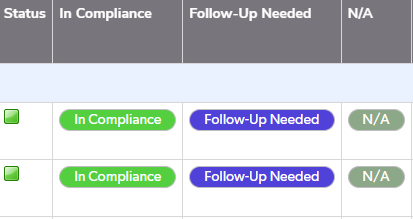
Last year we made and finished an app for our company. And while we knew our information might change or be added to we knew it would never be truly finished. So it wasn't until yesterday when I was asked to add a new table to the app that I noticed changes made to quickbase. we have 4 formula fields that are the same in all our tables in our app that do the same thing. when you click on In Compliance and N/A they do the same thing only change the status to that answer. but when you click Follow-up needed we have it so it pulls the information of that record and adds a new record on another table called 'actions'. We have 17 tables with this system and they still work fine and do what they are suppose to do. I would edit them but since they work still I don't wanna touch the text to ruin it. The problem comes with the new table as I want to do the same thing but it looks like quickbase no longer supports javascript? as we get this error for In Compliance/Follow-up Needed and N/A I've tried deleting just the javascript part but it doesn't make my new table button appear like the other 17 tables. I'm unsure if I have to just rewrite the entire thing its self? Note that my company didn't learn this we had our QB start up consultant make the formula text and we basically just copied and pasted each time. I'll be putting the formula text below to see if it will help. This is the Formula for the button In Compliance This is the formula text for Follow-Up Needed And this is for N/A. which is essentially the same as In Compliance This new table that I created is going to be using the same buttons with the only difference being Yes/No/ N/A instead of In Compliance/ Follow up/ N/A As stated above I copied the text above just removed the javascript part but as you can see it just doesn't show up as an actual button. despite having display as button checked on I would appreciate any help. Thank you in advance. ------------------------------ Maritza Acosta Gonzalez ------------------------------100Views0likes5CommentsAlternative to Image on Load : inline javascript Support ended
I have used inline javascript in many places in my Apps. Since now the support for inline javascript is ending. Can someone please help with the alternatives to the features used. I have used image on Load at most places, Along with Image on Load error. https://community.quickbase.com/blogs/graham-leto2/2021/02/03/upcoming-changes-to-javascript-in-quickbase ------------------------------ Abhishek Choudhary ------------------------------100Views0likes1Comment