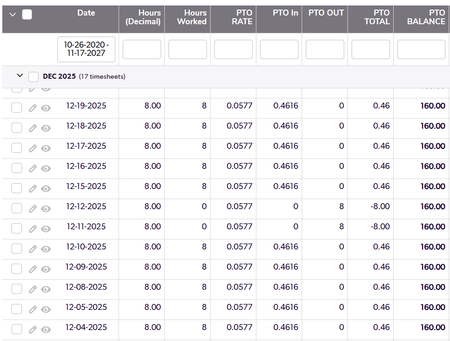
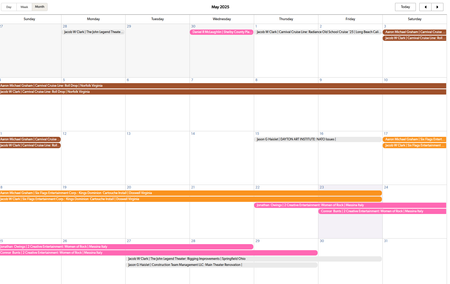
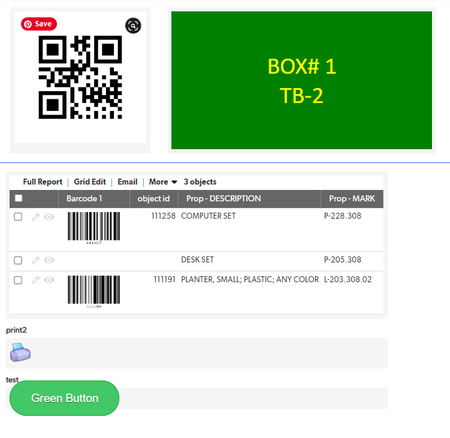
ContributionsMost RecentMost LikesSolutionsRe: Running Total with a Max The problem here is that when someone uses 8 hours of PTO is does not take it into account in the balance field. It still show a balance of 160 instead of 152. If there is a better way to do running totals without a query I'm all ears. Running Total with a Max Have a timesheets table and it helps with accruing Paid time off. I need to implement a policy that PTO will max out at 160 hours in a running total field. The running total field looks like this: var text QONE = "{23.BF.'" & [Date] & "'}AND {56.EX.'"& [Related Resource] &"'}"; var text QTWO = "{23.EX.'" &[Date] & "'}AND{3.LTE.'" & [Record ID#] & "'}AND {56.EX.'"& [Related Resource] &"'}"; Min(160,Nz(SumValues(GetRecords($QONE),193)+Nz(SumValues(GetRecords($QTWO),193),0))) THE PROBLEM: When I use the Min function it doesnt calculate against the 160 value in the formula. If the balance is 200 hours, any subsequent line entries build off the 200 value although the table above shows 160. Here is the table without the Min function: When I try to change the formula in the PTO in the something like If([PTO BALANCE]>=160,0,[Hours worked]*[PTO Rate] I get an error that I cannot write a formula for a field that is based on itself. --------------------------------------------------------------------------- I also tried the pipeline approach but since PTO in is a calculated field I hit a road block as well. Quickbase to google calendar pipeline issue I have a pipe line set that manages my calendar installs to a google calendar. It has 3 pipelines New install are added changes in installs are updated deleted install are deleted. The path flow work great but the dates are not correct. Here is the quickbase calendar Here is the Google Calendar: Start Date and End dates are date/time fields built with the following: Does anyone have any ideas why these dates are distorting by a day? QUICKBOOKS BILL PAYMENTS PARSING I have have app that my team can monitor Quickbooks activity without letting the entire user team into our accounting. I have a connected table to Bill payments. When I try to set up a report link In by Bills table I have to mine a record in the Quickbooks table that has the Bill ref # and applied amount. Once Record looks like this: [(null,null,null,'978.00',{('162021','Bill',null)},null)] 978 is the applied amount 162021 is the Quickbooks bill ID Multiple records look like this: [(null,null,null,'97199.28',{('163251','Bill',null)},null), (null,null,null,'37784.30',{('163351','Bill',null)},null), (null,null,null,'8100.00',{('163364','Bill',null)},null), (null,null,null,'12658.44',{('163352','Bill',null)},null), (null,null,null,'1092.00',{('163432','Bill',null)},null), (null,null,null,'1103.00',{('163433','Bill',null)},null), (null,null,null,'130.00',{('163439','Bill',null)},null)] How do I parse this into a Useable Form? I need [DATE],[Bill ID],[And Applied amount]. in a table that I can plug into my Bill View. Re: Auto-numbering in Quickbase This Works fine in this instance but if you use a copy record with children the line numbers corrupt and all end up being the same. a way to override existing number assignments in the subtable warrants a look. Re: Auto-numbering in Quickbase This needs to be updated using pipelines Re: Freeze column names / headers in summary reports I agree, The Kanban Header should always be visible when you scroll down at the very least. Can Quickbase put this on the wishlist? ------------------------------ Dan McLaughlin ------------------------------ Print Rich text fieldI having issues trying to get my rich text filed to print as they appear: This is what I want This is what I get: Code Below: var text Bcolor= Case( [Blg ##],1,"#FF00FF",2,"Green",3,"F87A17",4,"#0000FF");//#4E9258 var text tcolor= Case( [Blg ##],1,"#FFFF00",2,"#FFFF00",3,"FFFFFF",4,"#000000"); var text STYLE = List(";", "background:"& $Bcolor, //button color "color:"& $tcolor, //text color "text-align:center", //text alignment //"text-decoration:bold", //none, underline, line-through "font: 36px Calibri", //text size, font, style //"border: 2px solid #0000FF", //border width, style, & color //"border-radius: 80px", //roundness of button corners "width: 275px", //button width "padding: 60px 60px") //space between text & button ; "<div style='" & $style & "'>BOX# "&[BOX ID#]&" <br /> TB-"& [Blg ##]&"</div>" Any Ideas? ------------------------------ Dan McLaughlin ------------------------------ Barcoding and key fieldsI have 3 tables objects >pallets >and containers When the employee add a new object they need 2 populate 2 fields first field is a picture of the object second field is a barcode (number) selected randomly from a stack of preprinted labels This entry goes pretty well until... Palletizing Now I go to the pallet table and I have 2 problems I cannot lookup the barcode from the object as it is not a key field. In other systems I would set up a foreign key . I need the pallet record to stay open and allow me to point an click at all off the objects with the barcode scanner without additional screen commands. ( I need something akin to add new record and go to control on update) looking for ideas. Similarly I need to associate pallets that have assigned QR codes to respective containers for shipment. Any suggestions here are greatly appreciated ------------------------------ Dan McLaughlin ------------------------------ Re: Mobile button save and addNo Joy The mobile app even asks if i want to save the record and I reply "save" but it does not associate the parent. ------------------------------ Dan McLaughlin ------------------------------