Identifying differences in a copy app?
As a solo developer often tasked with taking over ongoing projects in various stages of completion with either poor documentation or none at all, I spend a lot of time comparing copy apps with their originals to find the differences in order to inform how to proceed with a project. Is there a way that I'm missing to not have to do this manually? For even a moderately sized app it is extremely time-consuming to have to check every single field, pipeline, etc in two places to see if they differ. I don't need to see how they differ (manual review for that is reasonable), just whether they do. Essentially just a list of elements modified/created/deleted since the copy app was created is what I'm looking for. Is there a way to obtain this info?Solved66Views0likes2Comments
Post Webhook External
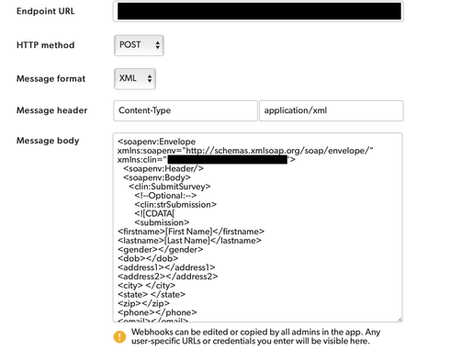
I'm trying to post a Webhook into a CTMS and it's out of scope for QuickBase to help with. The documentation doesn't provide any info on posting Webhooks externally. This is the instructions that our CTMS vendor provided: <soapenv:Envelope xmlns:soapenv="http://schemas.xmlsoap.org/soap/envelope/"; xmlns:clin="URL"><soapenv:Header/> <soapenv:Body> <clin:SubmitSurvey> <!--Optional:--> <clin:strSubmission> <![CDATA[ <submission> <firstname> </firstname> <lastname> </lastname> <gender></gender> <dob></dob> <address1></address1> <address2></address2> <city> </city> <state> </state> <zip></zip> <phone></phone> <email></email> <besttimetocall></besttimetocall> <howdidyouhearaboutus></howdidyouhearaboutus> <comments></comments> </submission> ]]> </clin:strSubmission> <clin:strSecret>PASSWORD</clin:strSecret> </clin:SubmitSurvey> </soapenv:Body> </soapenv:Envelope> The validator on our (CTMS Vendors) end does not like capitals, spaces or special characters. I plugged their info in like this and many other variations of this, but am failing: Can QuickBase send XML formatted submissions in a SOAP message externally?155Views2likes5CommentsMonday Qrew Update - Week of January 12th
Happy Monday, Qrew! Here’s what’s coming up—hope you can join us for one (or all) of these sessions this week: 📅 1) App Builder Qrew Meetup — Tuesday, Jan 13 @ 12pm EDT Agenda: Wes McAda shares how he built a real-time amusement ride capacity tracking app. Register: https://quickbase.zoom.us/meeting/register/DoqyWs61RGODggbk_xqs6g 📅 2) Atlanta Qrew Meetup — Thursday, Jan 15 @ 1pm EDT (please confirm time) Agenda: Join the Atlanta Qrew for a FastField spotlight, a fireside chat on what you’re working on, and a brainstorm for February’s agenda plus our next onsite. See you there! Register: https://quickbase.zoom.us/meeting/register/1AOIVeGDQh6ibWalvxNAlA 📅 3) How to Go from App Inheritance to App Ownership — Thursday, Jan 15 @ 1pm EDT Register: https://quickbase.registration.goldcast.io/webinar/f791e78d-5677-430f-90f9-2b21eab2042b?_gl=1*nmh986*_gcl_au*MjU1MDM5NTYyLjE3NjYxNjczMjY.*_ga*NzAzNzY0MzYyLjE3NjU5OTAzNDE.*_ga_YZ6780317K*czE3NjgyMzg1MjkkbzI0JGcxJHQxNzY4MjM4NjQ1JGo1OSRsMCRoMA.. ⚠️ Reminder: Office hours with Sam Trachy are cancelled until Tuesday, January 20th. FastField Office Hours is available M, W, F @ 2pm EDT. Thanks—and let’s have a great week!33Views0likes0CommentsIs there a limit to the number of pages you can use?
I have used HTML pages as instruction sheets to walk users through the steps of creating records. I am entertaining using them for detailed work instructions for jobs at the plant, but this would require hundreds of pages. Is there a limit to the number of pages you can use in Quick Base? I know there is a limit to the number of tables in an app, but can't find information on pages.140Views2likes7Comments🎓 Certification Wins
Hello Qrew! We’re back with this month’s edition of Certification Wins, where we proudly spotlight the amazing individuals in our community who’ve achieved Quickbase certifications this past April! 🌟 Each certification reflects your effort, curiosity, and commitment to building smarter. Whether you’ve just begun or are advancing through expert-level skills, this space is all about YOU. 🙌 🏅Certified This Month🏅 🟨 App Foundations DeShawnJones anagalingam 11013 HemaChennojwala KristaSibery laharms Mark MihirMulloth MolinaDavis RaviShankar1 RajeshGangji RBater SeanTori 🟧 App Builder JenniferPotter1 🟩 Expert Builder CassandraFrien1 RohitVuppuluri ShubhangiSingha Lakshmi_Hanisha 💡 Each name above represents hours of learning, practice, and persistence. Congratulations to all our achievers! 🌟 Featured Shoutout 🌟 🎉 This month’s spotlight goes to SeanTori, for their dedication and perseverance. A $25 gift card is heading your way — congrats! 📣 Join the Celebration Want to see your name here next month? Start your certification journey today via Quickbase University and showcase your expertise to the entire Qrew. Quickbase Certification Central Read about Certifications here! Until next time! Bhavani Ramana Certification Specialist, Quickbase189Views1like0CommentsNew Forms Are Now Live in Quickbase Mobile!
We’re excited to share that as of April 21, the new forms experience in Quickbase is now generally available on mobile! This launch marks a significant milestone in our mission to provide a seamless, consistent, and powerful experience to users—no matter where they work or what device they use. Why This Matters Historically, building for mobile in Quickbase presented a number of challenges. App Admins often had to create and manage separate legacy mobile forms to provide a usable experience on smaller screens. For end users, the experience was often inconsistent. Legacy mobile forms came with limited layout options, lacking the flexibility to organize content using columns, or tabs. Form rules and workflows sometimes behaved differently than expected, and key functionality—like viewing embedded reports directly on the form—wasn’t available on mobile at all. As a result, mobile usage often required workarounds, compromises, or shifting tasks to desktop, slowing down teams who needed to work when they were away from the desk— until now. One Form, Multiple Devices The new forms experience is now fully responsive. Builders can design a single form that automatically adapts to desktop, tablet, or mobile, with no extra configuration required. Whether users are approving invoices, pulling up customer contacts, submitting support cases, or updating project details, the experience is consistent and intuitive across the board. What’s New for Mobile Here are a few key enhancements you’ll notice right away: 🔹 Fully Responsive Form Canvas The layout automatically adjusts to the screen size and orientation, while maintaining the structure and design you built on desktop. Forms are organized with pages, sections, columns, tabs, and steps, and Quickbase automatically adapts the layout to fit the device's screen. For instance, on mobile devices, columns stack vertically to ensure optimal readability and usability. On tablets—especially in landscape mode—forms can display multiple columns side by side, taking full advantage of the larger screen and offering a more spacious, desktop-like layout. Additionally, tabs and steps help break down longer forms into manageable sections, making it easier for mobile users to navigate complex forms without feeling overwhelmed. Users can quickly swipe through form steps or tap between tabs, maintaining focus while completing tasks efficiently. 🔹 Optimized Field Interactions We’ve reimagined how field components work on mobile. From dropdowns to date pickers, every interaction is optimized to feel natural on a smaller screen, while retaining the power of the desktop version. For example, multiple-choice fields are presented in modals, allowing users to search and select options efficiently. 🔹 Dynamic Form Rules & Workflows Form rules and formulas now behave just as they do on desktop. We’ve been on a mission to eliminate the need for mobile-specific workarounds, and this update is a step forward. Dynamic form rules now apply across devices, so the logic you’ve built for desktop users works just as smoothly for those on the go. 🔹 Embedded Reports on Mobile For the first time, embedded reports are displayed directly on mobile forms, giving users real-time access to the related data they need to make decisions and take action on the go. While some functionalities like grid edit and exporting to CSV are not supported on mobile, users can view reports, search, add new records, edit or view individual records, and delete records, depending on their permissions. 🔹 Support for Custom Workflows New forms on mobile now support more advanced and flexible workflows. App admins can confidently use table-level settings like “Auto save when redirected away”, the custom CSS class SaveBeforeNavigating, and URL parameters such as ifv=1 and hs=1 to hide native Save and Cancel buttons. These tools enable customized navigation, smoother inline saves, and fully tailored form experiences—all while maintaining mobile compatibility. Assigning Forms for Mobile App admins can assign the latest, mobile-friendly version of forms to specific user roles using the "View/Edit/Add Form (Mobile)" column from Forms Settings, ensuring that users see the appropriate form on their mobile device. In some cases, assigning a simplified, mobile-specific form may be beneficial. It allows you to reduce friction, minimize cognitive load, and create a faster, more focused experience for users – especially for those who only need to complete a subset of fields or perform quick tasks on the go. Alternatively, if admins prefer to use the same forms across desktop and mobile, they can select “Use full site forms”. A Better Experience for Builders and End Users With this release, builders no longer need to build two versions of a form, and end users don’t have to adapt to a stripped-down mobile layout. The result? Faster time to value and more efficient teams. Ready to Get Started? If you’re already using new forms on desktop and you have selected the option “Use full site forms” for mobile, you don’t have to lift a finger—your mobile experience is ready to go. Just open your app in the Quickbase mobile app (version 1.68 and above) or browser and experience it for yourself. If you’re not using new forms on desktop yet, now is the perfect time to start. By switching to new forms, you’ll not only unlock a modern, flexible form-building experience on desktop—you’ll also ensure your app is mobile-ready. 💡 Want to learn more? Check out the full documentation: Assign forms for mobile Understand the form canvas and layout on mobile Form field types and components on mobile What’s Next The launch of new forms on mobile is a big milestone—but we’re not done yet. In the coming months, we’ll be rolling out additional capabilities including: QR/Barcode scanning Next/Previous record navigation, making it easier to move between records Timezone helper, and more!1.1KViews1like0Comments
Find and append new unique values to secondary table
I have an app where I run a daily upload of data (much of it duplicate due to the nature of the source), but sometimes my daily upload includes a new record that needs to be added to a secondary table within the app. The key field in the secondary table matches one of the fields in my daily upload. I have set up a QB action that should identify new unique values in the field related to the secondary table's key and copy these records. But I am running into a problem. Sometimes my upload will include several rows with the same value in the field that I want to use to populate the secondary table's key field . When this happens, my action is registering an error. I only need the value in one of the duplicate lines to write to the secondary table, but I need to preserve all of the lines in the primary table. Any suggestions?259Views1like11CommentsCreate a button that gets the UserID for the user in a user field and then write that information to a field in the same record
Hello Quick Base Community. I am wanting to get the UserID for a user with the click of a button. Using the API_GetUserInfo, I can pull the UserID, copy it and then paste it somewhere, but what I would like to do is click a button that will get the UserID and then write it to a field in the record that I am on. Really the question is, is it possible to call an api and then perform an action using data that is returned from the initial api call? I assume that this wouldn't be a problem using scripting but I would like to know if it is possible natively within Quick Base. Thanks!310Views1like7Comments