Identifying differences in a copy app?
As a solo developer often tasked with taking over ongoing projects in various stages of completion with either poor documentation or none at all, I spend a lot of time comparing copy apps with their originals to find the differences in order to inform how to proceed with a project. Is there a way that I'm missing to not have to do this manually? For even a moderately sized app it is extremely time-consuming to have to check every single field, pipeline, etc in two places to see if they differ. I don't need to see how they differ (manual review for that is reasonable), just whether they do. Essentially just a list of elements modified/created/deleted since the copy app was created is what I'm looking for. Is there a way to obtain this info?Solved91Views0likes2Comments
Post Webhook External
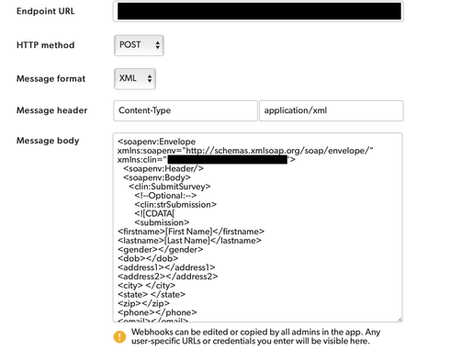
I'm trying to post a Webhook into a CTMS and it's out of scope for QuickBase to help with. The documentation doesn't provide any info on posting Webhooks externally. This is the instructions that our CTMS vendor provided: <soapenv:Envelope xmlns:soapenv="http://schemas.xmlsoap.org/soap/envelope/"; xmlns:clin="URL"><soapenv:Header/> <soapenv:Body> <clin:SubmitSurvey> <!--Optional:--> <clin:strSubmission> <![CDATA[ <submission> <firstname> </firstname> <lastname> </lastname> <gender></gender> <dob></dob> <address1></address1> <address2></address2> <city> </city> <state> </state> <zip></zip> <phone></phone> <email></email> <besttimetocall></besttimetocall> <howdidyouhearaboutus></howdidyouhearaboutus> <comments></comments> </submission> ]]> </clin:strSubmission> <clin:strSecret>PASSWORD</clin:strSecret> </clin:SubmitSurvey> </soapenv:Body> </soapenv:Envelope> The validator on our (CTMS Vendors) end does not like capitals, spaces or special characters. I plugged their info in like this and many other variations of this, but am failing: Can QuickBase send XML formatted submissions in a SOAP message externally?161Views2likes5CommentsIs there a limit to the number of pages you can use?
I have used HTML pages as instruction sheets to walk users through the steps of creating records. I am entertaining using them for detailed work instructions for jobs at the plant, but this would require hundreds of pages. Is there a limit to the number of pages you can use in Quick Base? I know there is a limit to the number of tables in an app, but can't find information on pages.164Views2likes7Comments
Find and append new unique values to secondary table
I have an app where I run a daily upload of data (much of it duplicate due to the nature of the source), but sometimes my daily upload includes a new record that needs to be added to a secondary table within the app. The key field in the secondary table matches one of the fields in my daily upload. I have set up a QB action that should identify new unique values in the field related to the secondary table's key and copy these records. But I am running into a problem. Sometimes my upload will include several rows with the same value in the field that I want to use to populate the secondary table's key field . When this happens, my action is registering an error. I only need the value in one of the duplicate lines to write to the secondary table, but I need to preserve all of the lines in the primary table. Any suggestions?283Views1like11CommentsCreate a button that gets the UserID for the user in a user field and then write that information to a field in the same record
Hello Quick Base Community. I am wanting to get the UserID for a user with the click of a button. Using the API_GetUserInfo, I can pull the UserID, copy it and then paste it somewhere, but what I would like to do is click a button that will get the UserID and then write it to a field in the record that I am on. Really the question is, is it possible to call an api and then perform an action using data that is returned from the initial api call? I assume that this wouldn't be a problem using scripting but I would like to know if it is possible natively within Quick Base. Thanks!323Views1like7Comments
Total Field or Column Header Colorization in a Summary Report
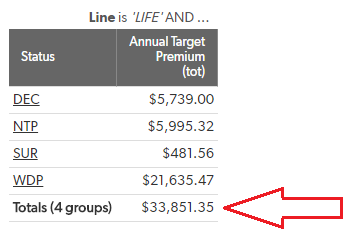
Hello, I have a summary report shown below, 1 of 9 that I'm building. Each of these summary reports takes a particular set of Statuses and totals them. Each total OR column headers will need to be colorized (red, yellow or green) and placed on our Homepage Dash. These status totals are not related to any dates or timelines. They are used for showing the total $ amount of insurance policies that were entered for the previous month, current month and next month by status. For example, the report above shows policies from the previous month. It would be amazing if I could make the Status and Annual TP column header red, given these totals represent policies that were Declined, Surrendered, Withdrawn etc. My next report would then be colorized yellow for policies that have a different set of statuses, then green column headers for policies for example that have been paid. Hope this makes sense! I'm open to any suggestions. Thanks for any help!813Views1like18Comments
Technical Documentation
What is the best way to generate technical documentation for my Quickbase app so that a future administrator will understand how it works? For context, I am self-taught in QB and not a programmer so I have no experience in this area. ------------------------------ Terri Bruce ------------------------------231Views0likes2CommentsFormula Builder Cursor Position Incorrect
When editing a formula in the new formula builder, for example in a rich text field, where you position the cursor and where the edit takes places is not correct. For example I can position my cursor after a field name such as [fieldname] and start typing, but the text I type appears about 4 - 5 characters to the right in the middle of another part of my formula. Is anyone else having this problem? It's the same in both Safari and Chrome294Views1like5Comments