Color Code Date Field based on Formula
Hi there, New to Quickbase, but have a big MS Excel background. What I used to find easy in Excel, I can't seem to get my head around in QB. If anyone can help enlighten my rookie brain, it would be greatly appreciated. I'm trying to colour-code a date type field based on multiple conditions: Say for example I have field called 'Survey Required By', which is the date for when we want a survey to be completed, and then another field called 'Survey Completed', and in this field we enter the date when the survey is completed. I want to highlight the field text or background in red if the 'Survey Required By' date is today or older, and the 'Survey Completed' field is blank. I've googled and tired many different formulas, but the best I've managed is to color code a whole row on a report, which I don't want to do. I just want the 1 field color changed. The formula I have so far is: if( isnull([Survey Completed]) and [survey required by]=today(), "red","" )Solved899Views0likes11Comments
IF AND Formula
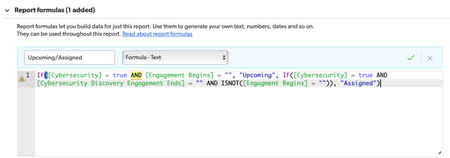
I am trying to write a report formula that is triggered off a checkbox and two different dates that I would typically write an IF AND formula. Anyone know how to make this work? It is giving me an 'expecting ,' error. The Cybersecurity field is a checkbox. The Engagement Begins is a date field. The Cybersecurity Discovery Engagement Ends is a date field. The logic should read if the Cybersecurity checkbox is checked AND the Engagement Begins field is blank, then the field should read "Upcoming", but if the Cybersecurity checkbox is checked AND the Engagement Begins field is not blank, and the Cybersecurity Discovery Engagement Ends field is blank, then the field should read "Assigned", otherwise show nothing.816Views1like2Comments
Button to Add Record via Pipeline, and refresh Record
Hi All, I am having troubles trying to via a button to add a new record then refresh the current record. As a button can't trigger a Pipeline, I've created a checkbox field to act as a trigger field. Currently the button uses an API_EditRecord to edit the checkbox and refresh the record. The API_EditRecord triggers my pipeline however the refresh happens before the Pipeline has a chance to complete. I saw this thread where we can create a HTML Code page to do a pause and refresh. https://community.quickbase.com/discussions/quickbase-discussions/save-new-record-pause-refresh/19873/replies/19876 I thought I might be able to tag that to the end of my current URL code to run afterwards, however it seems with the record refresh, it never gets to this part. My current code is as follows. URLRoot() & "db/" & Dbid() & "?act=API_EditRecord&rid=" & [Record ID#] & "&_fid_371=1" & "&apptoken=xxxxxxx" & "&rdr=" & URLEncode( URLRoot() & "db/" & Dbid() & "?a=doredirect&z=" & Rurl()) & URLRoot() & "db/" & Dbid() & "?a=dbpage&pageID="&715 &"&rid=" & [Record ID#] My question is: Is there a way to get the above code to run all parts or A way via the delay/refresh html code page to edit the checkbox which should trigger the Pipeline then continue with the delay/refresh html script? I used a Pipeline rather than an API_AddRecord as there are 30+ fields that need to be copied from one table record into another, plus update the record with the button with the related new record ID. Thanks.Solved413Views0likes2CommentsPreventing Budget Overrun
My objective is to prevent users from exceeding the available budget when logging time. Users can attach multiple task records to the DSR (Daily Status Report), and those tasks can belong to different budgets. I want to use a Formula query to obtain the value in the [Remainder (Available)] Field 64 of _dbid_budget, and compare the total of hours logged in [Units Delivered] Field 103 of _DBID_TASKS. Once all tasks are attached to a DSR, the Total Units Delivered Field 108 of _DBID_TIME_CARD (where the DSRs reside), I would want to compare available budget to hours consumed on tasks, and if there is an overage i will stop the flow of the report until it is resolved. I used a summary [Budget Line - Record ID# (Text)] field 267 on the DSR form configured for combined text, and was able to validate that I can see two correct record ID's when attaching 3 tasks and two of them using the same budget. The [Total Available Budget] field 268 formula on _DBID_TIME_CARD has no errors, but fails to render anything other than zero: SumValues( GetRecords( "{3.IN.('" & [Budget Line - Record ID# (Text)] & "')}", [_DBID_BUDGET] ), 64 ) Where 3 is the [record ID#] and 64 is [Remainder (Available)], both on the budget. Any input will be appreciated.Solved355Views0likes7Comments
Count instances of value in table prior to date
Hi everyone, I'm trying to find a way to create a field that counts the # of times an email address exists within a table based on a date field within that record. Example: Record is created with an email address and a date of interaction. Goal - return the # of times that email address already exists in other records on or before the date of that interaction. My formula query currently is: Size(GetRecords("{145.OBF.'" & [Date of Interaction] & "'}")) Which DOES work, but it's counting huge numbers, and I don't understand why. The results are in the thousands, for an email address that if I search for it, only exists 21 times. I *think* it's because my field 145 is also a formula query which reads - Trim(If([NEW Contact Email Address]="",[Contacts Table Field - Email Address],[NEW Contact Email Address])) I'm wondering if it's not counting the results in the field, but query; however, when I switched the field to the field 'NEW Contact Email Address] I returned tens of thousands of records rather than the very few times a staff member manually entered it as a 'NEW' contact rather than looking up the email from our contacts table. Ideas? and thank you!304Views0likes6CommentsGetRecords Formula Help
Looking for assistance to help figure out why my formula isn't working as expected. Setup: Rental Rates table: used to capture the Daily, Weekly, and Monthly rental amounts for Assets. There is a lookup field to select the related asset (FID 12). There is a number field to enter the Rental Year Coverage (FID 14). There is a currency field to capture the Rental Rate (FID 8) Rentals table: used to capture the individual rentals for specific assets. There is a lookup field to select the related asset (FID 6). There is a number field to enter the Rental Year (FID 20). In my Rentals table I have a formula-numeric field and need to find the Rental Rate (Rental Rate table FID 8) IF the related asset (Rental table FID 6) equals the related asset (Rental Rates table FID 12) AND the Rental Year (Rental table FID 20) equals Rental Year Coverage (Rental Rates table FID 14). I found various posts and put together the following formula: GetFieldValues(GetRecords("{12.EX.'"&[Related Asset]&" '}AND{14.EX.'"&[Rental Year]&"'}",[_DBID_RENTAL_RATES]), 8) The field won't save as it is saying that it is Expecting number but found textlist. I tried adding "ToNumber" prefix, but the error just changes to Expecting text/bool/number but found textlist. I have confirmed that each of the fields being compared are of the same type. What am I missing? ThanksSolved251Views1like3Comments
Format Numeric Value 2 Decimal Places
Hello, I have a Formula Text that calculates and displays data based on the numbers users enter in two other numeric fields. Example: When a user enters a number in my Numerator and Denominator fields, my formula field divides those numbers and then displays the answer in the Percentage field (as shown in the screenshot below). Is there a way to format the answer to two (2) decimal places, so it's shown as something like 7.33 and not 7.3333333 ? Please let me know. See the code I used for my formula field below: var Number Numerator = [Numerator] ; var Number Denominator = [Denominator] ; ToText(($Numerator / $Denominator) & " %")Solved249Views0likes4Commentschange navigation button so it opens the new location in edit mode
My app has a button that redirects to a documents table, but I need that to be opened in edit mode. If I use the button, it automatically switches back to view mode. If I choose edit mode from the documents table it refreshes me to the top of the form. There is a checkbox I want people to use next to the documents table, but the only way they can get it to work is if they tab over 10 tabs to the documents table - making the button that takes them there immediately useless if they need to use the checkbox. The button uses a formula to make it work: "https://thefamilyplace.quickbase.com/nav/app/buf7b3sig/table/buf7b5kxp/action/dr?rid="& URLEncode( [Record ID#])&"&rl=dvb&page=21" how do I adjust this so it opens in edit mode? Thank you for your help!Solved247Views1like6CommentsExpanded URL to Formula Query
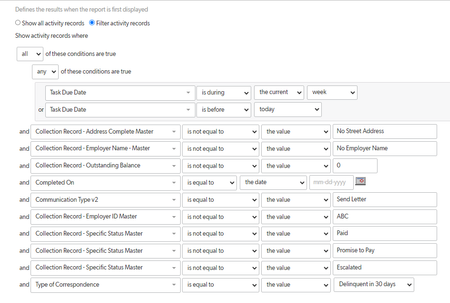
Hello, I am hoping someone much smarter than I can help solve this puzzle. I have a report on an activities table. I want to search the same parameters that the report has within a size(GetRecords()) formula query in order to showcase how many records the user can expect to generate. The first thing I did was to go to the report, unswitch the 'new style', choose 'more', and then select "show expanded url for this report". Which gives me this (made minor change to allow the formula query to save): Size(GetRecords((("{'33'.IR.'this+wk'}OR{'33'.BF.'today'})AND{'76'.XEX.'No+Street+Address'}AND{'61'.XEX.'No+Employer+Name'}AND{'68'.XEX.'0'}AND{'19'.EX.''}AND{'82'.EX.'Send+Letter'}AND{'60'.XEX.'ABC'}AND{'69'.XEX.'Paid'}AND{'69'.XEX.'Promise+to+Pay'}AND{'69'.XEX.'Escalated'}AND{'17'.EX.'Delinquent+in+30+days'}")), [_DBID_ACTIVITIES])) The above expanded url equals the below (report parameters) How can I modify this expanded url and turn it into a workable formula query? Any and all tips/ tricks are welcomed. Thank you!246Views0likes5Comments