Record limit when searching table
On any given table, when searching for records by separating values with " OR ", I'm hitting a limit of 50 results. I cannot find anything in personal settings or admin settings that addresses this limitation. I also don't see any discussions or references to this in documentation. My org does have a developer that seems to not have the limitation, but neither of us is able to identify any applicable role permissions or settings that could be causing the issue. Has anyone experienced this?160Views0likes3Comments
Calendar Report
Hello, I need help with quickbase calendar report. I currently have a field called start date which has list of companies. I have a another field called frequency which is multiple choice field consisting of daily weekly semi-monthly and monthly. I want to have calendar show the records which falls in the freqency range from start date. Can it be achieved in quickbase? ------------------------------ XYZ XYZ ------------------------------287Views0likes4Comments
RESTful API - groupBy
The request body of the Query for data endpoint accepts a groupBy property which is an array of object items . I understand the syntax and can follow along, but in my testing I haven't seen any measurable change in json returned in the response body no matter the pair of field/grouping I provide. The sortBy property seems to take the same parameters and returns data as expected. Has anybody had success using this property that they feel comfortable sharing? #APIsandcustomcode #reportsandcharts ------------------------------ Justin Torrence Quickbase Expert, Jaybird Technologies [email protected] https://www.jaybirdtechnologies.com/#community-post ------------------------------49Views0likes0CommentsReport Formula: Sum total
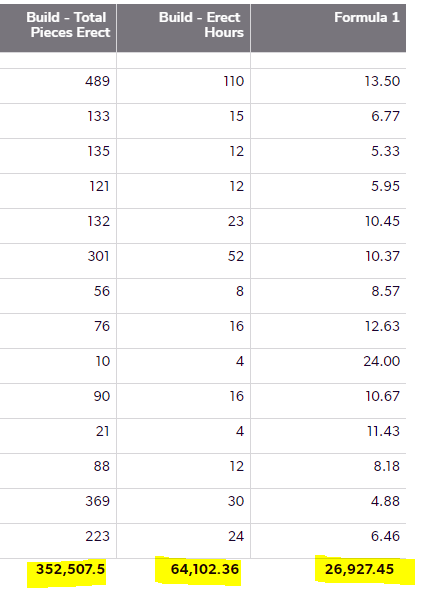
Hi, I have two columns Erect Hours and Total Pieces Erect. This is what I want to get at using report formula; (Sum of Total Erect Hours * 60) / Sum of Total Pieces Erect. (64102.36*60)/352507.5 = 10.91 I tried using this Sum([Build - Erect Hours])*60/Sum([Build - Total Pieces Erect]). However, it is not calculating the column total but it is calculating row total. Any help will be appreciated. ------------------------------ Bibhav Rimal ------------------------------353Views0likes5Comments
How to conditionally show a report on a form
I have a table that populates every day a person is scheduled from form entries. The goal is to show a report on the schedule entry form, so that when a person's name is selected from the dropdown it shows a report of their currently scheduled dates on the form. This is help prevent double booking. The embedded report filtered for: 1) Filtered by the person's name selected from a dropdown I know how to display data from the child table, but I'm stuck on the report. This entry form is in the same table as the scheduled dates Can this be done or will the form need to be saved before any information is populated? Thanks! ------------------------------ J. Striker ------------------------------124Views0likes4Comments
Report Across Tables By Date
I am trying to finalize my set up to look at my companies profit and loss in live time broken down by employee and monthly, quarterly and annual numbers. I would like to compare data across multiple tables and also be able to organize it by date from each table. I am trying to avoid using "A summary of a specific field" with "matching criteria" set to during "Current Month" etc The reason I am trying to avoid this is because I want to see the date written: November 2022- $$$, December 2022- $$$, January 2023 $$$ etc We want to look back historically for productivity and if we use the above, we would need to set that summary field for every scenario and still would not be able to look at it all together as it is a moving target. The hardest time I am having is filtering the information up to the parent table with a date attached to it. Here is my current set up. Table: Employee (Parent Table) Employee Salary Expenses Ancillary Expenses Related to Employee Employee Revenue Inside each of the child tables I have reports showing everything by employee per month, quarter, & year. I want to view the data the same way in the parent table so that I can look at profit and loss per employee. Example: Employee Table: November 2022: Total Profit December 2023: Total Profit January 2024: Total Profit ------ 2022: Total Profit 2023: Total Profit 2024: Total Profit I will also create a report that combines all employees on a monthly, quarterly, and annual basis to view the company as a whole. From here I want to send this information to a separate table that will subtract out company related expenses (different from employee related expenses). I feel like this may be able to be completed with a report link? Honestly I am stuck. I appreciate any help on this long winded explanation of what I am trying to do. ------------------------------ Joseph Mahon ------------------------------41Views0likes0CommentsFreeze the First Few Fields in Table View
Hello, I would like to freeze the first few fields (columns) in table view. We have tables with many fields and when we scroll we'd like the first four to scroll with us. How can I do this? ------------------------------ Meagan McOlin ------------------------------223Views0likes1CommentKanban Report Quick Update Fields
Hi all, Anyone know of a qay to edit kanban report fields on the fly? I use the kanban report for a priority tool for workload. I have a field, priority, that is set to color code the cards Red = High, yellow = medium, low=green. My users get frustrated having to hit the pencil to edit, change priority dropdown, save, wait for screen to reload etc. ------------------------------ Ivan Weiss ------------------------------41Views0likes2Comments