Home Page Search Bug
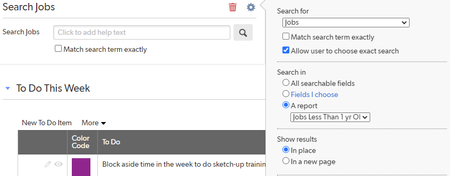
Hi everyone, I'm having a bizarre issue with the home page search function, and I'm not finding any other reference to anything similar on the community. Apologies if I missed another discussion already posted about this. I have a search bar on a home page that is supposed to search and display results based on a certain report. For my admin role, this works perfectly. But for every other user, it defaults to the reporting defaults for the table and searches every single record regardless of the filters applied to the report. Has anybody else experienced this? I did also have a user test it for me on their account to verify that it isn't some strange thing that happens when I "test as user." #Apphomepages #Search #Userandgroupmanagement ------------------------------ Elena Larrabee ------------------------------Solved229Views0likes4Comments
URL on home page to use field
I have a very random problem that I'm unsure if it is feasible. I have a formula URL in a table which adds a new record with a bunch of formulas for the date, the button works great in the table. My dilemma is trying to find a way to run this from the home page (Since that is where the data is visible). I can create the url with a single case scenario which will fill out all the information fully but I would like it to reference the field created in the table so that it can calculate the current date. ------------------------------ Jeremy Cohen ------------------------------76Views0likes1Comment
URL on Home Page to add a new record and then view it in edit mode
Hello, I am trying to use a home page button that will add a new record and then open it in edit mode. How can this be done? https://domainname.quickbase.com/db/brchmnxk7?a=API_AddRecord&rdr=https://domainname.quickbase.com.com/db/ brchmnxk7?a=er I realize this is an incorrect url but it does perform the action of adding the record - and then it takes me to the document tree: This XML file does not appear to have any style information associated with it. The document tree is shown below. <qdbapi> <action>API_AddRecord</action> <errcode>0</errcode> <errtext>No error</errtext> <rid>52</rid> <update_id>1620163249201</update_id> </qdbapi> Any suggestions? ------------------------------ nancy nancy ------------------------------Solved64Views0likes1CommentButton to get a report to pop up in a new window on a Home Page Dashboard
Any idea how to get a report to pop up in a new window (ideally a smaller window that can be expanded by the user) by clicking a button on the home page of an app? ------------------------------ George Bramhall ------------------------------71Views0likes1Comment
Way to launch to specific record from Home Page?
I have an employees table. Each employee is designated their QB username, as well as a myriad of other info. I want people to be able to click a home page button that takes them to their record. I can make a report that filters 'current user equals QB Username field', but that only takes them to a report with a single entry (theirs). This is good, but I would rather get them right to their record. I've thought of one way where I just embed the report itself on the homepage, which works but I am trying to figure out if there is a creative/sneaky way to do it and utilize the native buttons available on home pages. ------------------------------ Mike Tamoush ------------------------------30Views0likes6Comments
New Dashboard
I know it is in beta but does anyone know if buttons can be copied or whole dashboards? I HOPE so!!! Kyle McAfee Estimating & Database Design SHH Logistics LLC 15171 Cronewood Lane Memphis, IN 47143 Phone: 812.989.4171 / 973.229.9099 [email protected] www.SuporHeavyHaul.com WBE Certified Business109Views0likes5CommentsReport not viewable for certain roles on dashboard
I am not sure what happened but I see a report/widget not accessible for a couple of roles. The report is set for everyone to view yet on dashboard, it's not. How do I fix this? ------------------------------ CMS ITOperations ------------------------------53Views0likes2Comments
New Dashboard versus old Home Page - and Mobile App Usage
I have found a little 'perk' that may be inadvertently adding a new feature I've wanted for a long time. I've been looking for a way for quite some time, to have different dashboards or home pages for mobile versus computer. Since it seems the new beta dashboards are not opening on the mobile app, I've just gotten the ability to do what I need. It appears that the mobile app uses whatever home page was assigned to a role prior to assigning a new dashboard as the home page for that role. So I can set a home page for a role, to an existing home page that I've edited for mobile use. Then, if I create a new dashboard as the home page for the role, it becomes the home page on computer, but the mobile uses the previous home page. This is awesome! But, does anyone know if this is intentional, or if it will continue to behave this way if/when new dashboards become mobile friendly? I would love to build old home pages for mobile and new dashboards for computer, and assign the roles accordingly. But I don't want to lose what I've done once the new dashboard becomes mobile friendly, if it ever will. Just thought someone here might have some insight on this. THANKS ------------------------------ Joe Hargrave ------------------------------87Views0likes2Comments