Pinned Discussions


Forum Widgets
Recent Discussions
Events Website Link is gone?
I came here to sign up for some of the monthly events and discovered the link to the Website is no longer available from here. I am looking at the Events drop down in the header bar, all I see are Empower and Qrew Events. Luckily Ben left a breadcrumb in the calendar comments which I have pasted below. Am I missing something? https://www.quickbase.com/events0likes1Comment
Trying to use a URL field in Rich Text formula field to display and image
What is wrong with this formula where the field in brackets is a URL field. "<a href='" & "'><img src=\"[Photo Exterior Front from website]\"></a>" As is, I am not getting an image but when I click on the url in the url field I do get an image.0likes5Comments
Copy App Question
Hello, I have a fairly simple question. I'm currently learning how to use Solutions API / ALM. My plan is to create a copy of one of my applications and then use that copy to test creating and deploying solutions in it. As shown in the screenshot I've attached, before I create the copy application, I'm prompted to select options for my Cross-App Relationships. I just want to confirm that the option "Remove Cross-App Relationship" is the option that will not interfere with the original app(s). My goal is to create a copy of an app that is pretty much disconnected to other app(s), so I can rest assured nothing will be affected once I start testing things in the copied app. Please confirm. Thanks in advance!0likes0Comments
Hello Qrew! Lets catch up...
Hello everyone, One of my commitments this year has been to build a stronger connection with amazing Qrew members, and I’ve been looking forward to writing this post today. First of all, I want to thank everyone who was able to attend Empower 26 in May for spending their time with us. It was a pleasure to see you all and to speak with so many of you. Thank you also to those of you who joined us online – I hope we can see one another in person soon! It was another reminder of just how creative, inventive, and smart Qrew members are. During my speech at Empower (which you can watch here), I talked a lot about keeping promises. I think we’ve done a good job in the last year or so following through on commitments we made and focusing more on our customers. But there’s still plenty of work to do, and I can’t wait to take it on. As part of my commitment to improving the customer experience, I’m excited to say that we are making some changes to the community platform in the coming months. We dug into the feedback we’ve been receiving about the community platform, and the changes to come will make it more intuitive, responsive, and easier to use, search, and connect with one another. We are also introducing changes to product feedback, which went into place last week. The new tool also allows you to explore and support the ideas that matter most to you that are already under consideration from our Product team and provides visibility into what your teammates have submitted. It’s a shift we’re making to ensure that we’re hearing you more clearly and that we’re responding thoughtfully – all with the aim of continuing to build Quickbase alongside you. You can read more about these changes on Devi’s blog here. You’ll also start to hear more from me here in the community. I’m committed to communicating more about what we’re doing and why – and how Quickbase is evolving to meet your needs and keep pace with change. Just as importantly: I am listening. I hope to hear more from you about your experience and about your needs. Thank you as always for helping to shape what comes next, and for your continued commitment to making Quickbase even better. Your imagination, innovation, and ingenuity is the foundation for our success. Keep telling us what’s working, what’s still to work on, and what you would like to see next! – Kelly1like4Comments
Dynamically hide information on Document Templates
Hello all, does anyone if it's possible/how to dynamically hide/show reports and other information in document templates? I have a case where certain reports are needed for one common type of report, while other types of reports I need to generate use different reports. At the moment any time I want to include/exclude data for a report I would have to make an entirely new document template, and then manage that going forward. All help is appreciated, thanks!0likes0CommentsLooking for Connection and Collaboration Tool Users for September Qrew Meetup!
Hello Qrew! Anyone using Quickbase to work with people outside your org? Come talk about it at the September 22 nd Qrew meetup! Here’s the list of features that help with connection and collaboration: Emailing non-users – send updates to any email, no login needed Emailing a record – share one record's exact view with someone in a click Public app sharing – open an app to anonymous users, read-only, write-only, or both Secure links – expiring links that let someone view or edit one record without logging in Document generation – auto-build PDFs or Word docs from your data Role-based access – control exactly what outside users can see or touch If you’re using these features, we'd like to hear from you. Please reach out and we can feature you at our next Qrew Meetup. Thank you!1like2Comments
Available for Remote Quickbase Contract / Project Work
Hi everyone, I’m available for remote Quickbase contract, part-time, or project-based work. I have hands-on experience building and improving Quickbase applications, including workflows, dashboards, reports, forms, automations, and process improvements. I can also support data cleanup, migrations, troubleshooting, and application enhancements. I’m especially interested in helping organizations that need short-term Quickbase support, backlog assistance, or help improving an existing application. I’d be happy to share a sample of my Quickbase work and discuss any upcoming projects. You can reach me at [email protected]. Regards, Charlene0likes0Comments
Form Rule - How to Apply to Modal
I have a form with a basic rule that says "if this field has a value, then set this other field's value to another value". This is based on a relationship, but it works just fine when using the regular form. The issue is that when I click the "New Record" link at the top of an embedded Report which opens a modal instead of a new window the form rules don't apply the same way they do when using the full form. Here's the specific example. I have a parent "Job" record. In this record is a field called "Contract Type". When I create a new Project from that record using the embedded report, it automatically links the Job it was created from. I want the "Project - Contract Type" field to match what's in the Job record. But it needs to be possible to have a completely different "Contract Type" in the Project than what is in the Job. I just want it to default to that value. I'm using a basic form rule that says "if Job - Contract Type" is not empty, then fill that value into the "Project - Contract Type" field. On a normal form having the checkbox for "Run change actions when a condition changes from false to true" works just fine because I'm manually selecting a Job. If I uncheck that box, then I'm unable to change the "Project - Contract Type" once it's been set by the related Job. The form rule keeps changing it back. The modal form automatically links to the Job, so the condition doesn't change and trigger the rule. This could work just fine if we had the ability to use a formula in the Default value for the Field, but we can't. It only accepts plain alphanumeric text. Has anyone worked around this issue using the new forms and reports to have form rules run on that modal "New Record" option without having to uncheck the "condition change" option within the rule?0likes2Comments
JSON Array Iteration
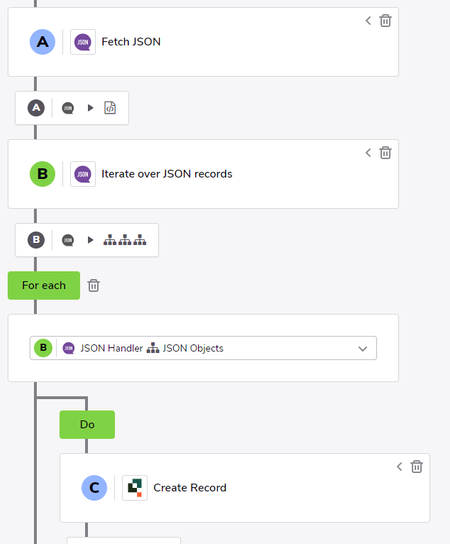
I have a pipeline set up to Fetch JSON from a third party application and iterate over JSON records. It returns the results without an issue, however the main data I want to extract from the results is an array that is nested within that results object. My main goal is to iterate through that nested array and create a record for each item in that array. Is that possible? I have tried a few different things without any luck. I don't have a ton of experience with for loops using Webhooks, but that seemed to be the most likely way to do this so I have tried using that without any luck. I can post an example code if necessary. Any help would be greatly appreciated!Solved0likes9CommentsPipeline Iterate over JSON nested data
I was pulling in JSON data from Ground Control and was having some trouble pulling in some nested data while creating a record. Here is how I solved it. I hope I can save some people time. Used the method posted here to get this started: JSON Handler details Data initially pulled was not an issue at the top level. Nested inside my data is "customFieldValues". Sample: "customFieldValues": [ { "name": "SomeFieldA", "value": "Abcdefg" }, { "name": "SomeFieldB", "value": "1234567" }, { "name": "SomeFieldC", "value": "CwhatIDidThere?" } ] To pull in this value I needed to use a raw_record Jinja expression and state the location in the array. {{b.raw_record['customFieldValues'][0]['value']}} 0 is used since this is the first location in the Array. (This assumes that b. is the reference used for the other fields such as {{b.status}} ) This is placed in the field reference in Create Record step for SomeFieldA. ------------------------------ James Carlos ------------------------------0likes5Comments