Pinned Discussions


Forum Widgets
Recent Discussions
Report Caching efficiencies
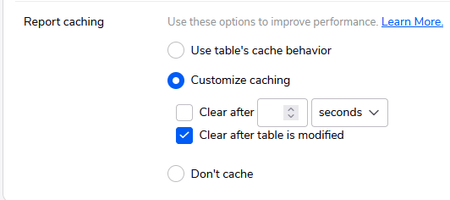
Last night at the PDX Qrew meetup, it was recommended that we use report caching. Today I am using report caching. After reading the documentation, that doesn't really describe what is happening or where the report data is saved or how it knows the table is updated or anything really other than you can turn it on... I am lead to this question. What is the most efficient setting when enabling Report Caching? To me below makes the most sense but I don't really know what will happen or how it will change the Apps behavior. Anyone want to speculate?0likes0CommentsEvents Website Link is gone?
I came here to sign up for some of the monthly events and discovered the link to the Website is no longer available from here. I am looking at the Events drop down in the header bar, all I see are Empower and Qrew Events. Luckily Ben left a breadcrumb in the calendar comments which I have pasted below. Am I missing something? https://www.quickbase.com/eventsSolved0likes2Comments
Snapshot a Report in Time
Hello All, I have a table A as the parent table and then I have the table b as the data which is a sync table that gets updated every month. I am trying to figure out how to snapshot a summary report and keep the data from changing. I am doing an analysis of some data and I want to keep that data the same when I come back to it a months from now. Table b is the summary report that I am trying to snapshot at the time I create the record in table A. Looking for any good ideas on how to do that? Thanks Jen0likes1Comment
Pipelines - Connected Table Refresh
Is it possible to run a table Refresh/Sync, for a Google Drive Connected Table, within a pipeline? I want to refresh a table at a specific scheduled time and then run a Table to Table import job. The refresh scheduling on the connected table is not specific enough since it is anytime within a one hour period. Thank you in advance for any help that you can provide. ------------------------------ Christine Carpentier ------------------------------0likes13Comments
Sorting high to low within a Pipeline search
I am trying to create a dynamic report that will stay updated with our top 25 clients based on their ACV. I have a checkbox field on each account labeled 'Top 25'. My goal is to have this automatically updated based on each account’s ACV. Ideally this proccess would: Look at all eligible Accounts Rank them by ACV from highest to lowest Identify only the top 25 Check the Top 25 checkbox for those Accounts Uncheck Accounts that fall out of the Top 25 Recalculate this automatically on a schedule The main issue I'm having is the Search Records step lets me set a record limit of 25 without giving me an option to sort the results by ACV. Because of that, I’m concerned that limiting the search to 25 records would not necessarily return the 25 highest ACV accounts. Any help will be appreciated. Thanks!Solved0likes1Comment
Convert currencies to USD using today's exchange rate
Is it possible in QuickBase to convert different currencies to USD using today's exchange rate? I have a field where users enter costs in different currencies, but want these costs to be converted to USD so i can compare costs. I know i can do that by create another numeric field and set us a formula with another text field contains all the currencies and then identify all the foreign currencies values against USD, but this needs to be updated regularly as the exchange rates change. Any function in QB to resolve this and convert currencies to USD based on today's rate.3likes3Comments